
Powerful Personal AI Agents for 2026: OpenClaw vs Perplexity Computer vs Google Antigravity vs Claude Desktop
Personal AI agents have quietly crossed a threshold. They are no longer chat tools you open when you need a quick answer — they are autonomous systems that run tasks while you sleep, control your desktop, write and deploy code, and coordinate teams of specialized sub-agents on your behalf. The question in 2026 is no longer whether to use one. It is which one fits your workflow, your risk tolerance, and how you actually work.
Four tools have emerged as the most discussed choices: OpenClaw, an open-source, self-hosted agent framework; Perplexity Computer, a cloud-native “digital worker” that orchestrates around 20 AI models; Google Antigravity, an agent-first IDE built for software development; and Claude Desktop, Anthropic’s polished, all-purpose desktop assistant. Each takes a fundamentally different bet on what a personal AI agent should be. This article cuts through the marketing and explains the real-world differences so you can make a clear, informed choice.
What Is a Personal AI Agent in 2026?
A regular chatbot is reactive. You type a prompt, it responds, and it forgets everything the moment you close the tab. A personal AI agent is proactive, persistent, and capable of taking action.
The core difference is autonomy with tool use. Modern agents can break a high-level goal — “prepare a competitive analysis of our three main rivals by Friday” — into sub-tasks, choose the right tools for each step (web search, spreadsheet generation, email drafting), execute those steps sequentially or in parallel, handle errors, and deliver a final output, all without you babysitting the process. This is what practitioners mean by agentic reasoning and multi-step workflows.
Behind the scenes, most agents use one or more foundational language models as their “brain” and connect them to tools — the “hands” of the system. Tools can include web browsers, file systems, terminal/shell access, calendar and email APIs, external SaaS connectors, and even the ability to spawn additional sub-agents for specific jobs. The degree of access varies widely between products, and that variation shapes everything about how each tool fits into a real workflow.
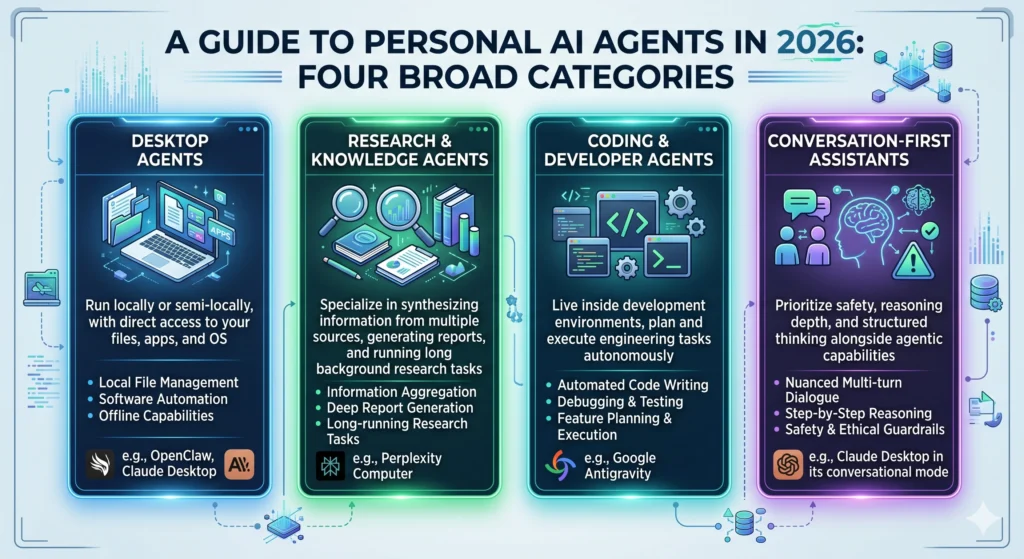
In practice, personal AI agents in 2026 fall into four broad categories:
- Desktop agents — Run locally or semi-locally, with direct access to your files, apps, and OS (e.g., OpenClaw, Claude Desktop)
- Research and knowledge agents — Specialize in synthesizing information from multiple sources, generating reports, and running long background research tasks (e.g., Perplexity Computer)
- Coding and developer agents — Live inside development environments, plan and execute engineering tasks autonomously (e.g., Google Antigravity)
- Conversation-first assistants — Prioritize safety, reasoning depth, and structured thinking alongside agentic capabilities (e.g., Claude Desktop in its conversational mode)
Product Snapshots
OpenClaw
OpenClaw is a self-hosted, open-source autonomous AI agent framework licensed under MIT. Created by developer Peter Steinberger, it has become one of the most widely adopted platforms for developers, privacy-conscious power users, and automation enthusiasts who want to run a personal agent on their own hardware.
What it is and where it runs: OpenClaw runs on a private server — your local machine, a VPS, a home server, or any Linux/macOS/Windows system — as a continuously running process. It is not a cloud service. You interact with it through messaging apps you already use: WhatsApp, Telegram, Signal, Slack, Discord, and a web interface, among more than 20 supported platforms.
Core strengths:
- Model agnosticism — Works with Claude Opus 4.6, GPT-5, Gemini, DeepSeek, and fully local models via Ollama or vLLM. You choose the brain; OpenClaw provides the nervous system.
- True autonomy via Heartbeat — A configurable scheduler wakes the agent every 15–30 minutes to check email, scan dashboards, run standing instructions, and complete scheduled tasks without any user trigger.
- Modular Skills — A plug-in system (ClawHub) lets you extend the agent with capabilities: shell command execution, file management, Playwright-based browser control, email, IoT device control, API interactions, and more.
- Multi-agent coordination — A single installation supports multiple agents. Agents can spawn sub-agents for specific tasks, delegating work to fresh sessions that report back on completion.
- Persistent memory — OpenClaw retains context across sessions through workspace files (SOUL.md for personality, USER.md for user profile, MEMORY.md for ongoing context).
Limitations and caveats: OpenClaw requires meaningful technical setup. Installation involves Docker or a native runtime, environment configuration, API key management, and firewall rules. Security is entirely your responsibility: exposed WebSocket ports have been linked to remote code execution vulnerabilities (CVE-2026-25253). Because the agent runs with shell access and stored credentials, a compromised instance gives an attacker the same permissions you granted the AI. Self-hosting gives you data sovereignty, but it does not automatically make you GDPR-compliant — you must build the compliance framework around the infrastructure.
Perplexity Computer
Perplexity Computer launched officially on February 27, 2026, positioned as a “general-purpose digital worker”. It is the most capable cloud-native agent in this comparison and represents Perplexity’s bet on multi-model orchestration at scale.
What it is and where it runs: Computer runs entirely in the cloud on Perplexity’s infrastructure. Every task runs in an isolated compute environment with a real filesystem, a real browser, and real tool integrations. A newer variant, Personal Computer, extends this to a dedicated Mac mini running 24/7, allowing the agent to access local files and native apps and be controlled remotely from an iPhone.
Core strengths:
- Multi-model orchestration — Rather than relying on a single model, Computer coordinates approximately 20 specialized models: Claude Opus 4.6 for core reasoning, Gemini for deep research and sub-agent creation, Nano Banana for image generation, Veo 3.1 for video, Grok for lightweight speed tasks, and ChatGPT 5.2 for long-context recall and broad search.
- Asynchronous, long-running tasks — Tasks can run for hours or even months in the background. You can run dozens of Computers in parallel. When Computer hits a problem, it creates sub-agents to solve it autonomously.
- Broad capability surface — In a single workflow, Computer can research, write, generate images, produce video, write and deploy code, and interact with external services.
- Personal Computer’s local access — On a Mac mini, the agent can access local files, open native apps, and work across your full Mac environment. Actions are visible and auditable; a kill switch is always present; files are created in a secure sandbox.
Limitations and caveats: Perplexity Computer is exclusively available to Max subscribers at $200/month ($2,000/year). There is no standalone option. All core processing happens on Perplexity’s servers — your prompts, files, and task context leave your machine. The Personal Computer variant improves local access, but the reasoning and orchestration still rely on Perplexity’s cloud. For users with strict data privacy requirements, this architecture is a firm constraint.
Google Antigravity
Google Antigravity is an agent-first IDE, announced alongside Gemini 3 in November 2025 and released into public preview. It represents a fundamentally different bet than its competitors: rather than being a general-purpose assistant, Antigravity is engineered specifically for software development workflows.
What it is and where it runs: Antigravity is a fork of Visual Studio Code powered by the Gemini 3 model family. It runs as a desktop IDE on macOS, Windows, and Linux, with agentic capabilities built directly into the editor core — not bolted on as a plugin. Four integrated components define its architecture: an AI-powered IDE, asynchronous local agents, an Agent Manager view for orchestrating multiple agents simultaneously, and a Browser Sub-Agent that can launch and visually verify web applications using Gemini 3’s multimodal vision.
Core strengths:
- Agent-first philosophy — Antigravity treats AI as an autonomous actor capable of planning, executing, validating, and iterating on engineering tasks, not just a code-completion autocomplete. The Manager Surface allows developers to dispatch five different agents to work on five different bugs simultaneously.
- Artifact-based verification — Every agentic session produces an artifact: a record of plans, screenshots, test results, and videos that provide evidence of what the agent did and why. This is genuinely novel for developer tooling.
- Browser Sub-Agent — The agent can launch and control a Chromium browser instance, take screenshots to verify UI rendering, fill out forms, click through app flows, and run end-to-end tests autonomously.
- Benchmark performance — Antigravity Pro scores 76.2% on SWE-bench Verified and 54.2% on Terminal-Bench 2.0, placing it among the strongest coding agents available.
- Multi-model flexibility — The IDE supports Gemini 3, Claude Sonnet 4.6, Claude Opus 4.6, and GPT-OSS 120B, allowing developers to assign different models to different agents within the same mission.
- Pricing — A free tier provides access to all models with rate limits. AI Pro costs $20/month and AI Ultra costs $249.99/month.
Limitations and caveats: Antigravity is VS Code-only. Teams using JetBrains, Visual Studio, or other IDEs need to switch entirely to access its agentic features. As a roughly six-month-old product (as of May 2026), it lacks enterprise-readiness documentation: no SOC 2, ISO 27001, or FedRAMP certifications are publicly documented. The free tier has been repeatedly throttled since December 2025, with quota cut four times — making it unreliable for deadline-driven daily use. Credit-to-token conversion rates on paid plans remain undisclosed. Antigravity’s strength is squarely in web, Python, and Google Cloud stacks; developers outside those ecosystems will find less native support.
Claude Desktop
Claude Desktop is Anthropic’s native desktop application, available on macOS and Windows. It is not a standalone product category — it is the access layer for Claude’s full suite of agentic capabilities, organized into a three-tab interface: Chat, Cowork, and Code.
What it is and where it runs: Claude Desktop runs locally as a native application, giving it direct access to your file system without the copy-paste friction of a browser tab. The underlying Claude models (Sonnet 4.6 for Pro users, Opus 4.6 for Max users) process requests on Anthropic’s cloud infrastructure. The desktop app is the front-end that unlocks local file access, persistent project memory, MCP integrations, and computer use.
Core strengths:
- MCP ecosystem — The Model Context Protocol connects Claude to 6,000+ external apps: GitHub, Slack, Jira, Google Drive, Stripe, and thousands more — all accessible within a single conversation. This turns Claude from a standalone assistant into an integration hub for your entire tool stack.
- Computer use — Claude can control your desktop via virtual mouse clicks, keyboard input, and screenshot reading. It scores 72.5% on OSWorld, up from under 15% when the feature launched in late 2024. Screen control is reserved for tasks that no dedicated tool can reach, such as native apps without APIs or hardware control panels.
- Cowork mode — Background agents run asynchronously while you do other work. Agents can be dispatched to work in parallel, with a visual diff system that shows exactly what changed.
- Scheduled tasks — Claude Code can run recurring jobs on Anthropic-managed cloud infrastructure on a schedule you define — even when your laptop is off.
- Claude Code agentic coding — Scores 80.8% on SWE-bench; supports GitHub PR creation, Jira ticket management, and database schema-aware queries via MCP.
- Extended thinking and Agent Teams — Opus 4.6 can decompose complex tasks into sub-tasks, spawn parallel sub-agents, and coordinate results — useful for large codebases, long research tasks, or multi-document analysis.
- Skills for Office formats — Pre-built Skills for Excel, PowerPoint, Word, and PDF allow Claude to produce formatted deliverables directly from conversation.
Pricing: Pro ($20/month) includes Claude Code and standard usage. Max 5x ($100/month) provides 5x usage for daily heavy users. Max 20x ($200/month) unlocks full-time agentic workflows with Opus 4.6.
Limitations and caveats: Claude Desktop’s agentic ceiling is Anthropic’s model suite — there is no native option to swap in Gemini or GPT as the core reasoning engine (though MCP connectors can bridge some workflows). Computer use remains a beta feature and can be slower than purpose-built desktop automation tools. The free tier does not include Claude Code. Hitting usage limits mid-project on the Pro plan is a known friction point, and many daily agentic users find the $100–$200/month Max tiers a necessary upgrade.
How We’ll Compare These Agents
The criteria below reflect what actually matters when choosing a personal AI agent for daily knowledge work, development, or automation — not just benchmark scores:
- Setup and ease of use — How quickly can a non-technical or semi-technical user get productive?
- Autonomy and task execution — How independently and reliably does the agent complete multi-step work?
- Research and information quality — How good is the agent at synthesizing information from multiple sources?
- Coding and development — How capable is the agent at planning, writing, testing, and deploying code?
- Privacy and data control — Where does your data go? Who controls it?
- Integrations and ecosystem — What tools can the agent connect to and act upon?
- Pricing and access model — What does it cost to get meaningful value?
- Best-fit use cases — Which types of work does each tool handle best?
Side-by-Side Comparison
| Tool | Primary Purpose | Where It Runs | Autonomy | Best For | Key Weaknesses | Ideal User |
|---|---|---|---|---|---|---|
| OpenClaw | General-purpose automation agent | Self-hosted (your hardware) | High — continuous, heartbeat-driven, truly 24/7 | Custom automation pipelines, privacy-sensitive workflows, multi-platform messaging bots | Significant technical setup; security is self-managed; local model quality vs. cloud gap | Developers, indie hackers, privacy-conscious power users |
| Perplexity Computer | Cloud “digital worker” for complex, long-horizon tasks | Cloud (+ optional Mac mini) | Very high — multi-model orchestration, weeks-long tasks, parallel runs | Deep research, competitive analysis, report generation, mixed media output (text, image, video, code) | $200/month minimum; cloud-only core; data leaves device; no offline or BYOM option | Knowledge workers, analysts, researchers, startup founders |
| Google Antigravity | Agent-first software development IDE | Desktop IDE (macOS, Windows, Linux) | High within dev workflows — async agents, parallel bug fixes, visual verification | Full-stack web/Python development, app prototyping, end-to-end automated testing | VS Code-only; early-stage product gaps (no enterprise certs, unreliable free tier); limited language/stack breadth | Software developers, technical co-founders, DevOps engineers |
| Claude Desktop | All-purpose intelligent desktop assistant with agentic capabilities | Desktop app + Anthropic cloud | Moderate-to-high — Cowork, computer use, scheduled tasks, Agent Teams | Writing, analysis, coding (Claude Code), structured thinking, document creation, integrated tool workflows | Locked to Anthropic models; Pro usage limits frustrate heavy daily use; computer use still in beta | Writers, analysts, developers, operations managers, generalist knowledge workers |
Deep-Dive by Use Case
For Deep Research and Synthesis
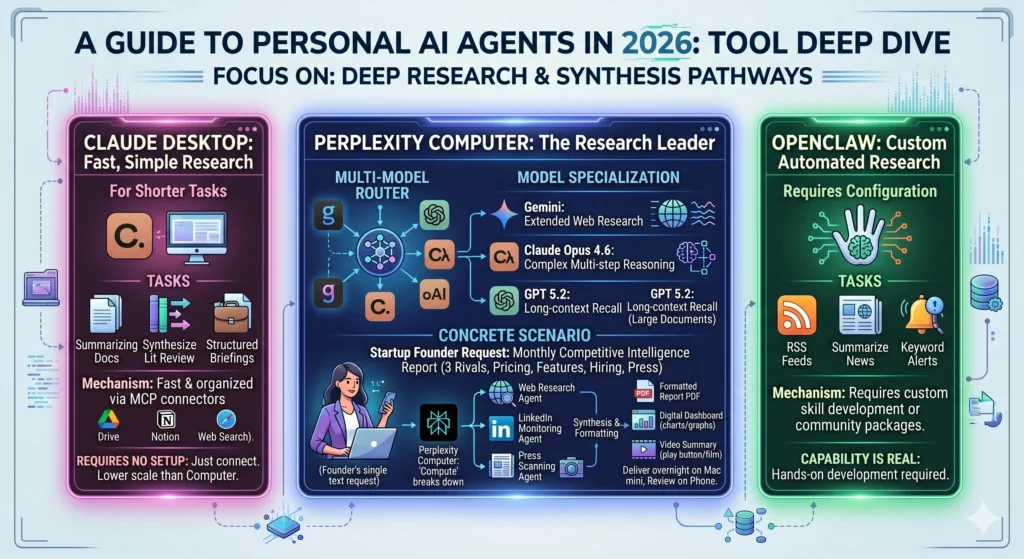
Perplexity Computer is the strongest tool in this category, and by a meaningful margin. Its architecture is purpose-built for research: rather than routing every request through a single model, it assigns the right model to each sub-task. Gemini handles extended web research; Claude Opus 4.6 manages complex multi-step reasoning; GPT 5.2 handles long-context recall when documents are large. The result is a system that can run a competitive analysis, synthesize findings from dozens of sources, generate a formatted dashboard, and produce a video summary — all in a single workflow you describe in plain language.
Concrete scenario — startup founder: A solo founder wants a monthly competitive intelligence report covering three rivals: pricing changes, new product features, executive hiring signals, and press coverage. With Perplexity Computer, she describes the outcome once. Computer breaks it into sub-tasks — web research, LinkedIn monitoring, press scanning — assigns sub-agents, and delivers a formatted report. She reviews it on her phone while her Mac mini handled the overnight run.
Where Claude Desktop fits: For shorter research tasks — summarizing a collection of documents, synthesizing a literature review, or building a structured briefing from uploaded files — Claude Desktop with MCP connectors to Google Drive, Notion, or web search is fast, easy, and well-organized. It lacks Computer’s scale and multi-model depth but requires no setup beyond connecting a few integrations.
Where OpenClaw fits: OpenClaw can be configured for automated research — pulling RSS feeds, summarizing news, alerting on keywords — but this requires custom skill development or community skill packages. The capability is real; the path to it involves more hands-on configuration.
For Coding, Software Development, and Technical Prototyping
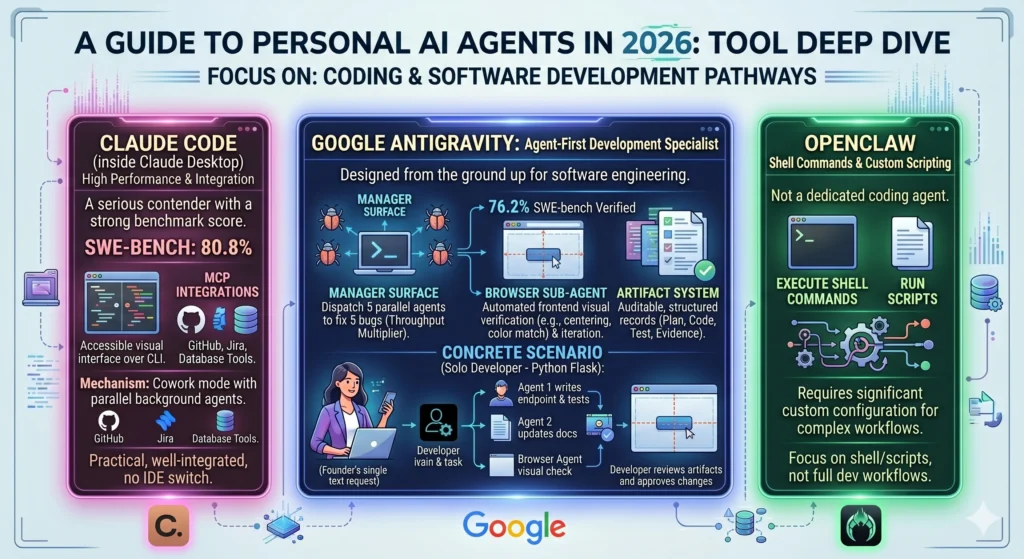
Google Antigravity is the clear specialist here. Its agent-first architecture was designed from the ground up for software engineering, and its benchmark performance reflects that: 76.2% on SWE-bench Verified. The Manager Surface allows a developer to dispatch five parallel agents to fix five different bugs simultaneously — a genuine multiplier on throughput. The Browser Sub-Agent goes a step further: after writing frontend code, the agent can launch the application in a headless browser, take a screenshot to verify that a button is centered or a color matches a design spec, and iterate on the discrepancy — all without the developer touching the UI.
The Artifact System is particularly valuable for teams or solo developers who want accountability over agentic work. Every completed mission produces a structured record: the plan, the code changes, the test results, and visual evidence of completion. This makes Antigravity more auditable than most AI coding tools.
Concrete scenario — solo developer: A developer building a Python Flask API needs to add a new endpoint, write tests, update the documentation, and check that the new route renders correctly in the web interface. In Antigravity, she describes the task to the Manager Surface. One agent writes the endpoint and tests; a second agent updates the docs; the Browser Sub-Agent verifies the rendered route. She reviews the artifacts, approves the changes, and merges.
Where Claude Desktop fits: Claude Code is a serious contender for coding work, scoring 80.8% on SWE-bench and integrating deeply with GitHub, Jira, and database tools via MCP. Its Cowork mode runs parallel background agents, and the visual diff system in the desktop app makes it accessible to developers who dislike CLI tools. For teams already living in Anthropic’s ecosystem, Claude Code inside Claude Desktop is a practical, well-integrated alternative to Antigravity — without requiring an IDE switch.
Where OpenClaw fits: OpenClaw is not a coding agent in the Antigravity or Claude Code sense. It can execute shell commands and run scripts, but complex software development workflows require significant custom configuration rather than a built-in experience.
For Open, Customizable Automation and Control
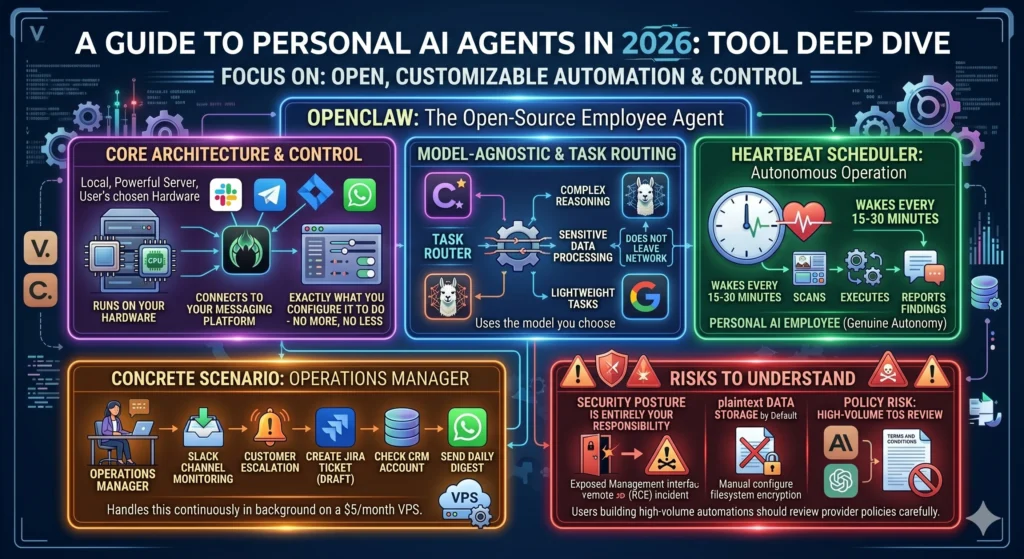
OpenClaw’s defining advantage is its architecture: it runs on your hardware, uses the model you choose, connects to the messaging platform you already use, and does exactly what you configure it to do — no more, no less.
The model-agnostic design matters in practice. An organization that needs Claude Opus for complex reasoning, a local Llama model for sensitive data processing (so nothing leaves the network), and Gemini for fast lightweight tasks can configure all three within a single OpenClaw instance, routing different task types to different models automatically.
The Heartbeat scheduler makes OpenClaw genuinely autonomous rather than reactive. It wakes every 15–30 minutes to scan your inbox, check dashboards, execute standing instructions, and report findings to your messaging app of choice — without you initiating anything. This is the pattern that earns OpenClaw the “personal AI employee” framing that has driven its explosive adoption among developers.
Concrete scenario — operations manager: A small-team operations manager wants an agent that monitors a shared Slack channel for customer escalations, creates a draft Jira ticket for each one, checks the relevant customer account in the CRM, and sends a daily digest to the team WhatsApp group. OpenClaw, configured with Slack, Jira, and WhatsApp skills, handles this continuously in the background on a $5/month VPS.
Risks to understand: OpenClaw’s security posture is entirely your responsibility. Exposed management interfaces have led to remote code execution incidents. OpenClaw stores data in plaintext by default; filesystem encryption must be configured manually. Policy risk also applies: some LLM providers (including Anthropic and OpenAI) have terms of service that restrict automated agent usage at scale — users building high-volume automations should review provider policies carefully.
For Writing, Analysis, and Guided Thinking
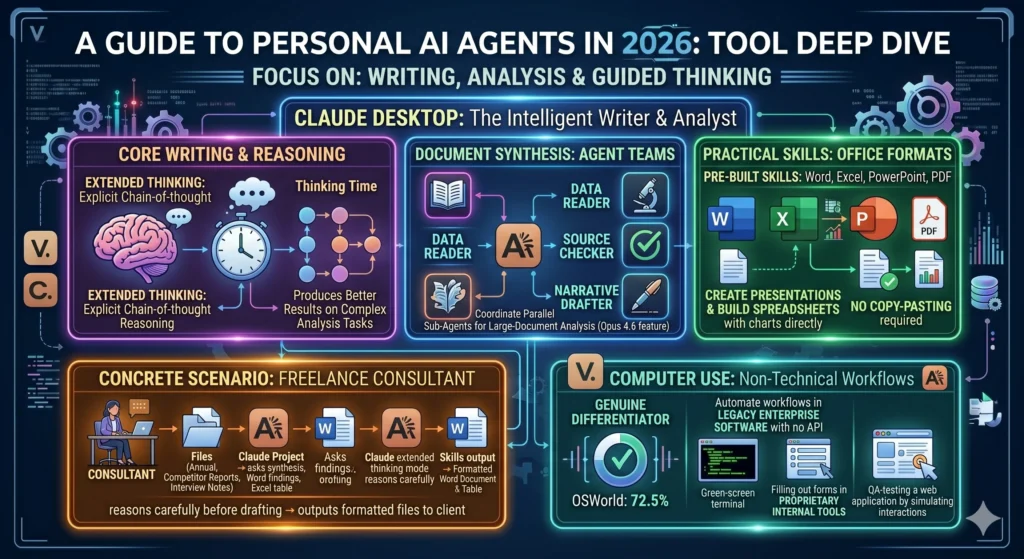
Claude Desktop is the most thoughtful companion in this group for knowledge work that centers on language, reasoning, and structured output. Extended thinking — explicit chain-of-thought reasoning before responding — produces noticeably better results on complex analysis tasks compared to standard inference. Opus 4.6’s Agent Teams can coordinate parallel sub-agents for large-document analysis: one reads the data, another checks sources, a third drafts the narrative.
The Skills for Office formats make Claude Desktop distinctly practical for writers and analysts who live in document-centric workflows. Pre-built Skills for Excel, PowerPoint, Word, and PDF let Claude create a presentation, build a spreadsheet with charts, or produce a formatted report directly from a conversation — without any manual copy-pasting.
Concrete scenario — freelance consultant: A management consultant is preparing a strategy deck for a client. She uploads the client’s annual report, three competitor reports, and her interview notes to a Claude Project. She asks Claude to synthesize the competitive dynamics, draft the key findings section as a formatted Word document, and populate a comparison table in Excel. Claude’s extended thinking mode reasons through the data carefully before drafting; the Skills output formatted files she can hand directly to the client.
Computer use for non-technical workflows: Claude’s desktop control — 72.5% on OSWorld — opens a category of use cases that other tools in this list don’t cover well: automating workflows in legacy enterprise software with no API, filling out forms in proprietary internal tools, or QA-testing a web application by simulating real user interactions. For knowledge workers who regularly interact with software that has no integration layer, this is a genuine differentiator.
Trade-offs, Risks, and Practical Caveats
Cloud vs. Local / Self-Hosted
Every tool in this comparison involves a trade-off between capability and control. Perplexity Computer offers the highest raw capability — 20 coordinated models, weeks-long task runs, media generation — but all reasoning happens on Perplexity’s servers. OpenClaw offers the most complete data sovereignty, but at the cost of technical setup burden and self-managed security.
Claude Desktop and Google Antigravity sit in the middle: they run locally as applications, but their model inference happens in Anthropic’s and Google’s cloud respectively. Neither is a fully private solution for regulated data workflows. The hybrid approach — using local models via Ollama for sensitive data and cloud models for general tasks — is available in OpenClaw but requires deliberate configuration.
Vendor Lock-In and Platform Dependency
All four tools carry some form of vendor dependency. Claude Desktop’s agentic capabilities are tied to Anthropic’s model upgrades and pricing decisions. Perplexity Computer’s orchestration relies on Perplexity’s continued operation and model partnerships. Google Antigravity’s ecosystem relies on the VS Code fork’s compatibility with the broader extension marketplace (it uses Open VSX, not the Microsoft Visual Studio Code Marketplace).
OpenClaw’s model-agnostic design is the most resilient to single-vendor dependency, but it introduces a different dependency: your own infrastructure and configuration. If a key dependency (a Skill, a plugin) introduces a vulnerability or stops being maintained, that becomes your problem to solve.
Policy Risk for Cross-Platform Agent Configurations
A specific risk worth naming clearly: some AI providers’ terms of service restrict how their models can be used inside third-party agent frameworks at scale. Users who configure OpenClaw or similar frameworks to make high-volume automated API calls should review the ToS of each model provider they connect. Perplexity Computer’s isolated compute environment sidesteps some of these concerns by handling orchestration internally, but enterprise users should verify that task data flowing through the system is handled in compliance with their data agreements.
Maturity and Reliability
Google Antigravity is the newest of the four tools in serious production use. Its free tier has been throttled repeatedly since launch; enterprise certifications are absent. Users building deadline-critical workflows on Antigravity should budget for the paid tiers and plan for the product to evolve rapidly — which means both improvements and occasional breaking changes. Perplexity Computer launched in late February 2026 and its Personal Computer Mac variant in April 2026; the product is capable but still maturing. OpenClaw and Claude Desktop both have longer track records in production use.
Simple Recommendation Framework
There is no universally “best” personal AI agent in 2026. The right choice depends on what you do, how technical you are, how much you value privacy, and how much you’re willing to pay. The framework below is designed to make the decision fast.
Choose Perplexity Computer if you primarily need research, knowledge synthesis, and long-running tasks that combine text, images, code, and data — and you are comfortable with a $200/month cloud subscription. It is the most capable general-purpose agent for complex, multi-output knowledge work.
Choose Google Antigravity if you are primarily building software and want an agent that lives inside your development workflow, can autonomously plan and execute engineering tasks, and provides verifiable artifacts as proof of work. The free and $20/month tiers make it accessible for individual developers; enterprise teams should wait for security certifications to catch up.
Choose OpenClaw if you prioritize openness, extensibility, model-agnostic flexibility, and data sovereignty — and you are comfortable with Docker, environment configuration, and ongoing security management. It is the most customizable agent in this comparison and the only one with genuine self-hosted privacy.
Choose Claude Desktop if you want a powerful, practical assistant for writing, analysis, coding, and everyday knowledge work on your computer — without significant setup complexity. Its MCP ecosystem, computer use, and Office Skills make it the most accessible high-capability agent for non-technical and semi-technical users. The $20/month Pro tier is a reasonable entry point; serious daily agentic users will likely need the $100–$200/month Max tiers.
If you are building complex automation for a team or organization, none of these tools is an island. Many practitioners use two: Perplexity Computer for research and synthesis, Claude Desktop or Antigravity for development, and OpenClaw for glue-layer automation between systems. The tools are complementary rather than mutually exclusive — and the best configuration is the one that eliminates the most friction in how you actually work.