
Best AI Schedule Maker Tools Compared (Free & Premium) — 2026 Guide
You’ve probably had this experience: it’s Monday morning, you open your calendar, and it’s already broken. Three overlapping meetings, a project deadline buried somewhere in your task app, a gym habit you keep skipping, and zero focus time blocked out. By noon you’ve spent more energy planning your day than actually working through it.
That’s exactly the problem AI schedule maker tools are built to solve. Instead of you manually dragging tasks around a calendar every morning, these tools use AI to automatically assign your work into available time slots, protect your deep focus time, reschedule when things shift, and learn your working patterns over time.
But here’s the thing — not all of them work the same way. Some take full control of your calendar. Others quietly suggest where to place things. A few are free; most charge a monthly fee. And one popular tool (Clockwise) shut down entirely in March 2026. If you’ve been reading other roundup articles that still recommend it, that’s a red flag for how outdated they are.
This guide is based on hands-on research into every major AI schedule maker available today. By the end, you’ll know exactly which tool fits your work style, budget, and team setup — and which ones aren’t worth your time.
What Is an AI Schedule Maker?
An AI schedule maker (also called an AI scheduling assistant or AI calendar assistant) is a tool that connects to your calendar and task list, then uses artificial intelligence to automatically plan, organize, and protect your time.
The key difference from a regular calendar app is automation with context. A normal calendar just displays what you put in it. An AI schedule maker reads your tasks, meetings, deadlines, and working habits, then decides when each task should happen, how long it’ll take, and what to reschedule if something changes.
Think of it like having a smart executive assistant who knows your priorities, blocks your focus time before meetings can eat it, and rebuilds your daily plan whenever a conflict appears — without you lifting a finger.
How AI Scheduling Actually Works
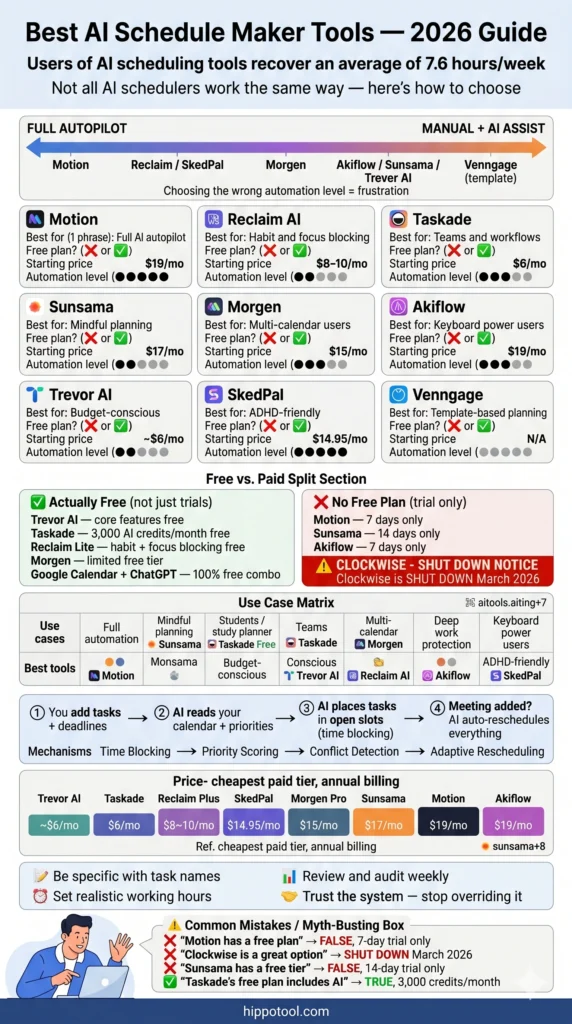
Most AI scheduling assistants operate on a few core mechanisms:
- Time blocking — Placing tasks in specific calendar slots rather than leaving them on a floating to-do list
- Priority scoring — AI decides which tasks get the best time slots based on deadlines, importance, and energy levels
- Conflict detection — Automatically identifying overlapping commitments and offering resolutions
- Adaptive rescheduling — When a meeting is added or a task runs long, the AI rebuilds the plan around the change
- Habit protection — Setting recurring blocks for exercise, learning, focus time, or any routine you want to protect
The level of automation varies dramatically between tools — and that difference is the most important thing to understand before choosing one.
The Automation Spectrum: Where Each Tool Sits
Before diving into individual tools, it helps to understand that AI schedule makers exist on a spectrum from fully hands-off to fully hands-on:
| Automation Level | What It Means | Best Tools |
|---|---|---|
| Full Autopilot | AI decides everything; your day is planned automatically | Motion |
| Smart Defender | AI protects blocks and habits; you stay in control | Reclaim AI, SkedPal |
| AI Suggests, You Approve | AI proposes a plan; you confirm changes | Morgen |
| AI Assists Manual Planning | You plan your day; AI helps estimate and organize | Sunsama, Akiflow, Trevor AI |
| Template Generator | AI creates a visual schedule from a prompt; not live | Venngage AI |
Understanding where you fall on this spectrum is more important than any individual feature comparison. A freelance writer who likes morning planning rituals and a startup founder drowning in Slack notifications need completely different tools.
Quick Comparison: Best AI Schedule Maker Tools at a Glance
| Tool | Best For | Free Plan | Starting Paid Price | AI Automation Level |
|---|---|---|---|---|
| Motion | Full AI autopilot | ❌ (7-day trial) | $19/mo (annual) | Highest |
| Reclaim AI | Focus time & habits | ✅ Lite plan | $8–10/seat/mo | High |
| Taskade | Teams & AI agents | ✅ Free Forever | $6/mo (annual) | Medium-High |
| Sunsama | Mindful daily planning | ❌ (14-day trial) | $17/mo (annual) | Low-Medium |
| Morgen | Multi-calendar users | ✅ Limited | $15/mo (annual) | Medium |
| Akiflow | Keyboard power users | ❌ (7-day trial) | $19/mo (annual) | Medium |
| Trevor AI | Budget-conscious users | ✅ Core free | ~$6/mo | Medium |
| SkedPal | Energy-aware deep work | ✅ Limited | $14.95/mo | High |
| Venngage AI | Visual schedule templates | ✅ Basic free | Paid tier | Template only |
The 9 Best AI Schedule Maker Tools (Honest Reviews)
1. Motion — Best for Full AI Automation
Motion is the most aggressively automated AI schedule maker on the market. You add your tasks, set deadlines and priorities, and Motion builds your entire day for you. It continuously reprioritizes your plan as meetings appear, tasks shift, and deadlines change. You don’t build your schedule — you just approve the one the AI creates.
This makes Motion uniquely powerful for professionals who have 15+ tasks in flight at any given time, frequent calendar changes, and a workload that’s too complex to manually manage. It’s one of the few AI productivity tools that genuinely replaces both your task manager and your calendar in a single system.
Key features:
- Automatic daily planning from your full task list
- Real-time AI rescheduling when priorities or meetings change
- Meeting scheduling links that respect your task blocks
- Project boards, timelines, and team task assignment
- AI Chat, AI Docs, and AI Sheets (newer features)
- Team distribution — AI assigns tasks across members based on availability
Pricing:
- Individual (monthly): $34/month
- Individual (annual): $19/month
- Teams Pro AI: ~$12.73/seat/month (annual)
- Teams Business AI: ~$19.43/seat/month (annual)
- No free plan. 7-day trial only — it auto-charges if you don’t cancel.
Who it’s genuinely for: Founders, project managers, and knowledge workers with chaotic, deadline-driven workloads who want AI to fully own their calendar. Also frequently recommended for people with ADHD who benefit from reduced scheduling decisions.
Who should skip it: If your schedule is mostly predictable, or you prefer knowing why things are placed where they are, Motion can feel like handing your calendar to a black box. The mobile app has persistent usability issues, and the UI has a noticeable learning curve. Some users report the product has visible weaknesses that haven’t been resolved despite years of feedback.
The honest verdict: When Motion works, it genuinely saves hours. When it doesn’t — which happens — it can create a chaotic, unworkable daily plan. At $19–34/month, the price-to-consistency ratio is the main criticism. Best for users who fully commit to the system rather than dipping in and out.
2. Reclaim AI — Best for Protecting Focus Time and Habits
Reclaim takes a different approach than Motion. Instead of running your entire calendar, it acts as a smart layer on top of your existing Google Calendar or Outlook — automatically defending your focus time, scheduling habits, and placing tasks in available slots without taking over. Think of it as an AI scheduling assistant rather than an AI calendar replacement.
Over 20,000 companies use Reclaim, and the tool claims users recover an average of 7.6 hours per week through AI-optimized scheduling. Its habit scheduling library (130+ templates) is arguably the best in this category — from daily workouts to deep work blocks to lunch breaks.
Key features:
- Smart task scheduling synced from Asana, Todoist, Jira, ClickUp, and Linear
- 130+ habit templates with automatic time blocking
- Intelligent meeting scheduling with conflict detection and buffer time
- No-meeting day protection
- Scheduling links that respect your protected blocks
- Slack status sync
- Team analytics: time spent on tasks, meetings, and wellness
- Smart 1:1 scheduling for recurring team check-ins
Pricing:
- Lite (Free): Basic habit and task scheduling, limited integrations
- Plus: $8–10/seat/month (annual) — full task integrations, more habits
- Business: $12/seat/month (annual) — team analytics, admin controls
- Enterprise: Custom
Who it’s genuinely for: Remote professionals, freelancers, knowledge workers, and teams at larger organizations who need to protect deep work from meeting overload. Especially strong if you already use project management tools like Asana or Jira — the integrations are deep and reliable.
Who should skip it: Reclaim is not a project manager. You won’t find Gantt charts, subtask nesting, or project documentation here. It works best for internal, meeting-heavy teams rather than client-facing work with external coordination.
The honest verdict: The most versatile tool in this category. Its free tier makes it a realistic option for students and budget-conscious users, and the paid plans scale well for teams. G2 rates it 4.8/5. If you’re torn between tools, Reclaim is the safest default starting point.
3. Taskade — Best AI Schedule Maker for Teams and Students
Taskade occupies a unique position in this category. It’s not just an AI scheduling assistant — it’s a full AI workspace backed by Y Combinator, where scheduling sits inside project management, collaboration, and AI agents. The AI schedule generator works for free with no signup required, making it genuinely accessible for students and solo builders.
What makes Taskade stand out is the depth of its AI: custom agents can suggest schedules, reorganize tasks based on priorities, run multi-step workflows across integrations, and even deploy as shareable productivity apps through the Genesis App Builder. No other tool in this list comes close to that functionality at the free tier.
Key features:
- AI schedule generator — generate a daily or weekly schedule from a plain-text prompt
- 7 project views: List, Board, Calendar, Table, Mind Map, Gantt, Org Chart
- AI agents with 100+ integrations (Google Calendar, Outlook, Slack, Notion, iCloud)
- Real-time collaboration with chat, video, and live editing
- Workflow automation with triggers, reminders, and status updates
- Genesis AI App Builder — turns prompts into shareable live apps
- AI weekly planner from a single prompt
Pricing:
- Free Forever: 3,000 AI credits/month, all 7 views, unlimited members
- Starter: $6/month (annual)
- Pro: $16/month (annual) — 10 seats, unlimited apps
- Business: $40/month (annual)
- Enterprise: $400/month (annual)
Who it’s genuinely for: Remote teams, creative agencies, content creators, entrepreneurs, and students who need scheduling inside a larger workflow rather than as a standalone calendar. It’s the top pick for anyone who wants to build, plan, and execute in one place — and the free plan makes it the best AI schedule maker for students who need structure without a subscription.
Who should skip it: If you need a pure calendar-first experience with tight Google Calendar sync and nothing else, Taskade will feel heavyweight. The AI scheduling features are also less refined than Reclaim or Motion’s dedicated calendar automation.
The honest verdict: Best free value in this entire category. For teams and self-learners, the combination of scheduling, AI agents, and collaboration at no cost is unmatched. If you’re building content sites, running a remote team, or studying for exams and need help structuring your time, start here.
4. Sunsama — Best for Mindful, Intentional Daily Planning
Sunsama is built around one core philosophy: planning should be deliberate, not automated. Every morning, you go through a guided ritual — pulling tasks from your connected apps (Jira, Asana, GitHub, Slack, Todoist, email), estimating how long each will take, and building a realistic daily plan with calendar time-boxing. Every evening, there’s a shutdown ritual to reflect and close the day.
This is fundamentally different from tools like Motion. The goal is not to let AI run your day — it’s to use AI assistance to help you run your day with more intention and less chaos.
Key features:
- Guided morning planning ritual pulling from 10+ connected tools
- Time estimation and capacity tracking
- Drag-to-calendar time-boxing
- Integrated time tracking (actual vs. planned)
- Focus mode with distraction blocking
- Weekly review and reflection workflow
- Distraction-free UI designed for calm
Pricing:
- Monthly: $22/month
- Annual: $204/year (~$17/month)
- No free plan. 14-day trial only.
Who it’s genuinely for: Professionals who value the act of planning, need to pull tasks from many different tools, and want a clear picture of their capacity each day. Especially popular with managers, senior engineers, freelancers, and anyone burned out from reactive work culture. G2 rates it 4.5/5.
Who should skip it: Anyone who skips morning routines, prefers automation, or is budget-sensitive. Sunsama requires daily engagement to get value — if you miss a few days, you lose momentum. At $22/month without a free tier, it’s a harder sell for individuals who just want calendar blocking.
The honest verdict: The best tool in this list for reclaiming intentionality in your workday. Compared directly to Motion, one source put it well: “Use Motion if you want AI to make decisions for you. Use Sunsama if you want to make better decisions yourself.”
5. Morgen — Best for Multi-Calendar and Multi-Client Users
Morgen is an AI daily planner built for people managing complexity: multiple calendar accounts, multiple clients, multiple time zones. It supports Google Calendar, Outlook, Apple Calendar, iCloud, Fastmail, CalDAV — basically every major calendar provider in a single unified view. No other tool in this category matches that cross-platform depth.
What separates Morgen from Motion or Reclaim is its AI Planner’s approval model. Instead of making changes automatically, it proposes a plan and waits for you to confirm. This gives you AI intelligence without ceding control — a middle path that freelancers and consultants tend to prefer.
Key features:
- Unified view across all major calendar providers
- AI Planner with energy-aware scheduling and human approval
- Time blocking with drag-and-drop
- Scheduling links and booking pages
- Task management integrated with calendar
- Available on Windows, Mac, Linux, iOS, and Android
- Team scheduling workflows
Pricing:
- Free: Limited features
- Pro (monthly): $30/month
- Pro (annual): $15/month ($180/year)
- Team (annual): $10/seat/month ($120/year)
Who it’s genuinely for: Freelancers juggling multiple clients, consultants with separate business and personal calendars, solopreneurs on Windows or Linux (where many competitors are Mac-only), and former Clockwise users who need a new home since Clockwise shut down in March 2026.
Who should skip it: Users who want the simplest possible setup or full AI automation. Morgen’s power comes from its depth, which adds some complexity to the initial setup.
The honest verdict: The most underrated tool in this category. Rated 4.8/5 on Product Hunt. If you’re managing three or more calendar accounts, Morgen is the clearest upgrade over any default calendar app.
6. Akiflow — Best for Technical and Keyboard-Driven Users
Akiflow is designed for people whose biggest productivity problem isn’t scheduling — it’s task fragmentation. If your to-dos live in Asana, Jira, Linear, Notion, Slack, and email simultaneously, Akiflow pulls them all into a single unified inbox, then lets you time-block them into your calendar using keyboard shortcuts and a command-bar interface.
It sits between Motion and Sunsama: more automated than Sunsama, more human-controlled than Motion, and more keyboard-native than both.
Key features:
- Universal task inbox from 15+ apps (Asana, Jira, Linear, Notion, Slack, email, and more)
- Command-bar interface with full keyboard shortcut support
- Time blocking with Google Calendar and Outlook sync
- AI task duration estimates and scheduling suggestions
- Daily planning ritual with visual time-boxing
- Task batching and focus time protection
Pricing:
- Monthly: $34/month
- Annual: $19/month
- No free plan. 7-day trial only.
Who it’s genuinely for: Developers, operations professionals, product managers, and technical users whose task list spans many tools. If you’ve ever counted five different apps before knowing what to work on next, Akiflow was built specifically for you.
Who should skip it: Mobile-first users (Akiflow is primarily desktop), people who want AI to fully automate scheduling, or anyone on a tight budget.
The honest verdict: In a three-way comparison with Motion and Sunsama, Akiflow has been described as providing “the best balance between planning, integrations, and day-to-day usability.” It’s the professional’s choice when you need control and consolidation.
7. Trevor AI — Best Free AI Schedule Maker for Individuals
Trevor AI is the answer to a question many users have: “Is there an AI schedule maker that’s actually free and actually works?” The answer is yes — Trevor AI offers genuine time blocking, real calendar integration, and AI scheduling suggestions at no cost, with a $6/month Pro upgrade available for more features.
It converts your to-do list into a time-blocked calendar view, connects with Todoist, Google Calendar, Google Tasks, and Outlook, and uses AI to suggest durations and best time slots for each task. Users report a 2x improvement in task completion rates compared to plain to-do lists.
Key features:
- AI time blocking from your task list
- Drag-and-drop daily planning interface
- Real-time sync with Todoist, Google Calendar, Google Tasks, Outlook
- AI-suggested task durations and placement
- Overdue task reminders
- Focus session support
Pricing:
- Free: Core features, including basic AI — genuinely useful, not just a teaser
- Pro: ~$6/month — advanced AI features and priority support
Who it’s genuinely for: Freelancers, students, solo professionals, and anyone who wants structured scheduling tied to a real calendar without paying. It’s consistently cited in student productivity guides as the best free AI tool for converting a study plan into a time-blocked schedule.
Who should skip it: Power users who need project management, team features, or aggressive AI automation. Trevor AI is lean by design — its strength is simplicity.
The honest verdict: The most honest free offer in this category. It won’t replace Motion or Reclaim for professionals with complex schedules, but for someone starting out with AI productivity tools, it’s the best place to begin.
8. SkedPal — Best for Energy-Aware Scheduling and Deep Work
SkedPal uses a system called “Time Maps” — user-defined templates that tell the AI when different types of work should happen. You might say: mornings are for deep work, afternoons are for admin, evenings are personal. SkedPal then places all your tasks into those windows, respecting the energy levels you’ve defined. When something changes, it recalculates and rebuilds your schedule automatically.
This makes it uniquely suited for knowledge workers who want intelligent scheduling that aligns with their energy rhythms, not just their availability.
Key features:
- Time Map templates for energy-aware scheduling
- AI task placement into best available energy windows
- Adaptive rescheduling when tasks change
- Priority and urgency-based scheduling
- Recurring task and routine scheduling
- One-tap “bump” feature for quick rescheduling (popular with ADHD users)
Pricing:
- Limited free plan
- Paid: $14.95/month
Who it’s genuinely for: Consultants, managers, and deep work practitioners who want scheduling to reflect not just when they’re free but when they do their best work. Also frequently recommended as an ADHD-friendly scheduling tool due to the bump feature reducing decision overhead.
Who should skip it: Users who want a simple drag-and-drop calendar or need strong team collaboration features.
The honest verdict: A quiet overperformer. Less well-known than Motion or Reclaim, but its Time Map system solves a problem those tools don’t fully address: scheduling around human energy, not just availability.
9. Venngage AI Schedule Generator — For Visual Schedule Templates
Venngage is not an AI scheduling assistant in the same category as the tools above. It’s a visual design platform that includes a free AI-powered schedule generator — you describe what you need, and it creates a styled, printable schedule layout.
There’s no calendar sync, no task integration, no adaptive rescheduling. It generates a static visual template.
That said, it has a clear and legitimate use case: students creating visual study schedules, teachers building classroom timetables, content creators designing weekly planning templates, or anyone who needs a polished, shareable schedule layout for a presentation or social post.
Pricing: Free for basic output; paid tiers for branding, downloads, and team sharing.
The honest verdict: Don’t include this if you’re looking for a live AI calendar tool. Do include it if you need a visual weekly planner template you can customize and print.
Best Free AI Schedule Makers (Genuinely Useful, Not Just Trials)
A lot of “free plans” in this space are actually disguised trials that push you toward a paid upgrade within days. Here are the tools with free options that are actually worth using long-term:
1. Trevor AI (Free) — Best overall free option. Core AI time blocking, Todoist and Google Calendar integration, drag-and-drop planning. Genuinely functional for daily individual use.
2. Taskade (Free Forever) — Best free option for teams and students. 3,000 AI credits/month, all 7 project views (including Calendar and Gantt), unlimited members, and calendar sync with Google, Outlook, and iCloud. The AI schedule generator also works with no account required.
3. Reclaim AI Lite (Free) — Best free option for focus time protection. Basic habit blocking and task scheduling on Google Calendar. Limited compared to paid, but meaningful for light users.
4. Morgen (Free limited) — Best free option for multi-calendar users. Unified calendar view across Google, Outlook, and Apple Calendar at no cost. AI planning features are limited, but the core calendar experience is solid.
5. Venngage AI (Free basic) — Best free option for visual/template schedules. No live planning, but excellent for creating visual weekly schedules and study planners to print or share.
6. Google Calendar + ChatGPT (Free) — Best free system for students. No dedicated app needed. Paste your tasks and deadlines into ChatGPT, generate a weekly plan, and add events manually to Google Calendar. Simple, flexible, and free indefinitely.
Best AI Study Planner Tools for Students
Students represent one of the clearest use cases for AI scheduling — unpredictable exam schedules, multiple deadlines across subjects, and the need to balance study sessions with personal time. Here are the best AI tools for students who need structured study planning:
Taskade (Free) stands out as the best AI study planner for students. The free forever plan includes a daily and weekly schedule generator powered by AI. You describe your study goals in plain English — “I have three exams in 10 days and need to cover 12 chapters” — and it generates a structured schedule. It also handles assignments, revision tracking, and group study collaboration in the same workspace.
Trevor AI (Free) is the next best option for students. Connect your class schedule in Google Calendar, add your study tasks in Todoist, and Trevor blocks study sessions automatically. Its simple interface has a low learning curve — you can be up and running in 20 minutes.
Reclaim AI (Free Lite) is useful if you already use Google Calendar and want to block study habits automatically (e.g., 1 hour of revision every weekday at 6pm without manually adding it each week).
Google Calendar + ChatGPT (Free) remains the most flexible and accessible option for students who don’t want to learn a new tool. Use ChatGPT to generate a structured exam study schedule from your syllabus, then copy events into Google Calendar.
How AI Schedule Makers Function as AI Task Managers
One common question: Is an AI schedule maker the same as an AI task manager?
Not exactly — but the best tools combine both. Here’s the difference:
- An AI task manager focuses on organizing, prioritizing, and tracking your tasks — what needs to get done and in what order.
- An AI schedule maker focuses on when those tasks happen — placing them into your actual calendar time.
Tools like Motion and Reclaim AI bridge both functions: they pull tasks from dedicated project management tools (Asana, Jira, Todoist) and then schedule them directly onto your calendar. This hybrid function is what makes them genuinely useful as all-in-one AI productivity tools — you’re not maintaining a separate to-do list and a separate calendar; the AI connects them automatically.
Tools like Akiflow and Trevor AI sit at the intersection too — they act as a universal task inbox first, then help you time-block tasks into your calendar.
Which AI Schedule Maker Should You Choose?
Here’s the honest decision guide based on what you actually need:
Choose Motion if: You have a complex, constantly-shifting schedule and want AI to fully manage your calendar without daily manual input. You’re willing to pay $19–34/month and fully commit to the system.
Choose Reclaim AI if: You want to protect focus time and habits without losing control of your calendar. You work in a team environment with internal meetings and use Asana, Jira, or Todoist. The free Lite plan is enough to start.
Choose Taskade if: You’re a team, student, or creator who needs scheduling inside a broader workspace. The free plan is the most generous in this category — start here before paying for anything else.
Choose Sunsama if: You want a calm, intentional daily planning ritual and regularly pull tasks from Jira, Asana, GitHub, and email. You’re comfortable paying $17/month for a tool you’ll use every single day.
Choose Morgen if: You manage multiple calendar accounts (Google + Outlook + iCloud), work with clients across time zones, or you’re a Windows/Linux user that most other tools overlook.
Choose Akiflow if: Your task list is fragmented across five or more apps and you want a keyboard-driven, developer-friendly system to consolidate and time-block everything.
Choose Trevor AI if: You want a real, functional AI schedule maker for free. Start here if you’re new to AI scheduling tools.
Choose SkedPal if: You want to schedule around your energy levels, not just your availability. Time Maps are a genuinely unique feature worth exploring.
5 Practical Tips to Get More from Any AI Schedule Maker
Regardless of which tool you choose, these habits will significantly improve your results:
1. Be specific with tasks. “Work on project” is too vague for AI to schedule well. “Write 800-word draft of landing page section” gives the AI enough to estimate time and place it accurately.
2. Set realistic working hours. Most tools default to 9–5. If you do your best work at 7am or prefer late evenings, configure your working window to match — the AI will schedule inside it.
3. Protect at least one deep work block daily. Whether through Reclaim’s habit system, SkedPal’s Time Maps, or Motion’s priority settings, treat deep focus time as a non-negotiable calendar item.
4. Review and audit weekly. AI scheduling improves as it learns your patterns. Spend 10 minutes each Friday reviewing what got completed, what got pushed, and why — then adjust your setup accordingly.
5. Don’t fight the system. These tools work best when you trust them. If you’re constantly overriding the AI’s scheduling decisions, you’re essentially doing the work yourself. Either refine your settings until you agree with the output, or switch to a more manual tool like Sunsama or Trevor AI.
Frequently Asked Questions About AI Schedule Makers
What’s the difference between an AI schedule maker and a regular calendar app?
A regular calendar app displays events you add manually. An AI schedule maker connects to your tasks and goals, then automatically places work into available time slots, resolves conflicts, and adapts when things change. The intelligence is in the automation — you set your priorities, and the AI builds the actual plan.
Are AI scheduling assistants safe to connect to your calendar?
The major tools (Motion, Reclaim, Taskade, Sunsama, Morgen) all use standard OAuth authentication for calendar access, meaning they never see your calendar password — they receive a limited permission token you can revoke at any time. Check each tool’s privacy policy if you’re handling sensitive client data; enterprise plans typically offer stronger data controls.
Can an AI schedule maker work for students?
Yes — and it’s one of the strongest use cases. Tools like Taskade (free), Trevor AI (free), and Reclaim AI’s Lite plan all work well for students managing study sessions, assignment deadlines, and exam prep. The AI study planner use case is particularly well-served by Taskade’s free AI schedule generator.
Is an AI scheduling assistant the same as an AI task manager?
Not exactly, but the best tools combine both. AI task managers organize what needs to be done. AI scheduling assistants decide when it gets done on your calendar. Tools like Motion, Reclaim, and Akiflow function as both — pulling tasks from your project tools and placing them into calendar time automatically.
What happened to Clockwise?
Clockwise, a popular AI calendar tool focused on team focus time optimization for Google Calendar, officially shut down on March 27, 2026. The team announced it was transitioning away. Former Clockwise users are best served by Morgen (best multi-calendar equivalent), Reclaim AI (best for focus time defense), or Motion (best for full automation).
Do I still need to plan my day if I use an AI schedule maker?
It depends on the tool. With Motion, the AI builds your day automatically and you review rather than plan. With Sunsama or Trevor AI, you’re still involved in the planning process — AI assists rather than replaces you. The most effective approach for most people is somewhere in the middle: let AI handle the scheduling mechanics while you maintain control over priorities and boundaries.