
Qu'est-ce que Grok Bot ? Guide complet de ses fonctionnalités et de ses cas d'utilisation
La plupart des assistants IA attendent une question, génèrent une réponse et s'arrêtent. Grok Bot fonctionne différemment. Il vous permet de créer des assistants IA persistants capables d'utiliser un serveur cloud, de collaborer sur différents sites web et applications professionnelles, de gérer des fichiers, d'exécuter des commandes et de poursuivre une tâche même après la fermeture de l'application.
Grok Bot est bien plus qu'un simple chatbot. Au lieu de se contenter de rédiger un e-mail ou de résumer un document, vous pouvez lui attribuer un rôle permanent, comme chercheur SEO, assistant commercial, enquêteur de bugs ou coordinateur des opérations. Il peut mémoriser les instructions associées à ce rôle, suivre des procédures réutilisables et exécuter des tâches planifiées.
Le mot important, cependant, est assistant. Grok Bot peut effectuer de véritables actions, ce qui le rend utile, mais ces actions peuvent aussi avoir de réelles conséquences. Il fonctionne de manière optimale lorsque des limites claires, des sources fiables et des points de contrôle d'approbation sont définis, plutôt que d'être considéré comme un remplaçant non supervisé d'un employé.
Ce guide explique ce qu'est Grok Bot, comment il fonctionne, ses principales fonctionnalités, les cas d'utilisation les plus pratiques de Grok Bot et les limitations que vous devez comprendre avant de le connecter à vos comptes.
Qu'est-ce que Grok Bot ?
Grok Bot est une plateforme d'agents IA développée au sein de l'écosystème Grok. Elle permet aux utilisateurs de créer des bots nommés, dotés de tâches, d'instructions et d'un contexte d'utilisation spécifiques. Chaque bot peut fonctionner dans un environnement de cloud computing persistant, et non plus limité à une seule fenêtre de chat.
Un bot peut naviguer sur des sites web, utiliser des applications connectées, gérer des fichiers, exécuter des commandes terminal, créer des documents et collaborer avec d'autres bots. Il peut également continuer à fonctionner même lorsque votre ordinateur ou votre téléphone est éteint, car la tâche s'exécute dans le cloud.
Par exemple, vous pourriez créer :
- Un Robot de recherche SEO qui surveille les concurrents et prépare les opportunités de contenu
- A Bot de recherche de ventes qui recueille des informations sur les clients potentiels
- A Bot de support qui organise les tickets et rédige les réponses
- A Bot de reproduction de bugs que les tests ont signalé des problèmes sur un site web de préproduction
- Un Bot d'opérations qui prépare un rapport de performance hebdomadaire
- Un Bot de dépenses qui retrouve les reçus et organise les enregistrements de transactions
Chaque bot possède son propre rôle et son historique de conversations, mais les bots appartenant à un même utilisateur partagent le même serveur cloud. Cet environnement partagé facilite la collaboration, mais implique également qu'un bot ne doit pas être considéré comme une barrière inviolable contre un autre bot appartenant au même compte.
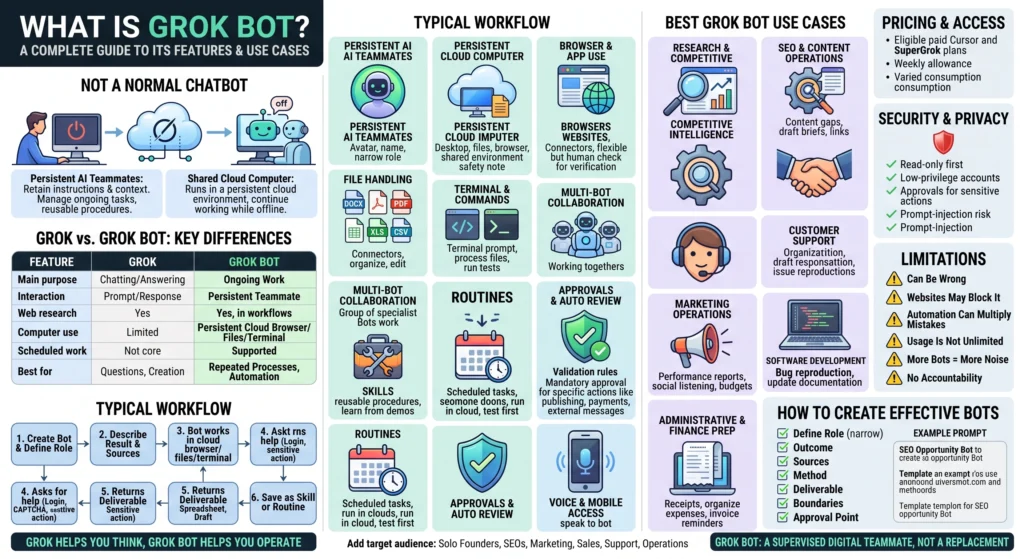
Grok contre Grok Bot
Les noms sont similaires, mais Grok et Grok Bot ont des objectifs différents.
| Fonctionnalité | Grok | Grok Bot |
|---|---|---|
| Objectif principal | Discuter, répondre aux questions et créer du contenu | Achèvement d'un travail en cours ou en plusieurs étapes |
| Style d'interaction | Vous envoyez une invite et recevez une réponse | Vous assignez une tâche à un coéquipier IA persistant |
| Recherche sur le Web | Oui | Oui, dans le cadre de flux de travail plus longs |
| Création d'images et de vidéos | Disponible via Grok Imagine | Peut être intégré aux flux de travail délégués lorsque cela est pris en charge. |
| Fichiers et documents | Peut analyser et générer du contenu | Peut organiser, modifier et déplacer des fichiers au sein de son environnement de travail |
| Utilisation de l'ordinateur | Limité par l'expérience du consommateur | Utilise un ordinateur cloud persistant avec navigateur, fichiers et terminal |
| Travaux programmés | Pas l'expérience principale | Soutenu par des routines |
| Agents multiples | Habituellement, une conversation avec un assistant | Les discussions de groupe peuvent inclure plusieurs bots spécialisés. |
| Idéal pour | Questions, rédaction, recherche, aide au codage et génération créative | Processus répétitifs, tâches en arrière-plan et automatisation inter-applications |
Voici une façon simple de comprendre la différence : Grok vous aide à penser et à créer, tandis que Grok Bot est conçu pour vous aider à opérer.
Les deux produits présentent encore des similitudes. Tous deux permettent la recherche, la rédaction de contenu, l'analyse des problèmes et l'assistance au développement. Grok Bot se révèle plus utile lorsqu'une tâche requiert plusieurs étapes, différents outils, une exécution récurrente ou un livrable créé en dehors de la conversation.
Comment fonctionne Grok Bot ?
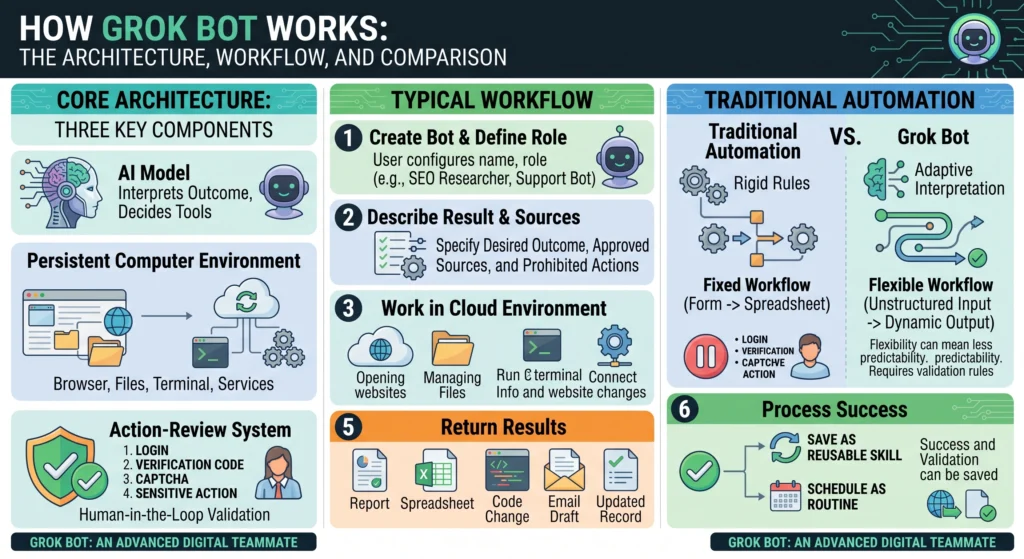
Grok Bot associe un modèle d'IA à un environnement informatique persistant et à un système d'analyse des actions. Lorsqu'on lui confie une tâche, il interprète le résultat, détermine les outils nécessaires et exécute le travail étape par étape.
Un flux de travail typique ressemble à ceci :
- Vous créez un bot et définissez son rôle.
- Vous décrivez le résultat souhaité, les sources à utiliser et les actions à ne pas entreprendre sans autorisation.
- Le bot fonctionne via son navigateur cloud, ses fichiers, son terminal ou ses services connectés.
- Il vous demande votre aide lorsqu'il rencontre une connexion, un code de vérification, un CAPTCHA ou une action sensible.
- Il renvoie un résultat tel qu'un rapport, une feuille de calcul, une modification de code, un brouillon d'e-mail ou un enregistrement mis à jour.
- Un processus réussi peut être enregistré comme une compétence réutilisable ou programmé comme une routine.
Cela diffère de l'automatisation traditionnelle. Une automatisation classique suit des règles rigides, comme “ lorsqu'un formulaire est soumis, copier ces champs dans une feuille de calcul ”. Grok Bot, quant à lui, peut interpréter des informations moins structurées et adapter son approche lorsqu'un site web, un fichier ou une requête ne se présente pas exactement de la même manière à chaque fois.
Cette flexibilité est précieuse, mais elle peut aussi rendre les comportements moins prévisibles. C'est pourquoi les tâches répétitives doivent comporter des règles de validation et des exigences d'approbation claires.
Principales fonctionnalités du bot Grok
Coéquipiers IA persistants
Un bot Grok est conçu pour rester disponible et non pour disparaître après une seule conversation. Vous lui attribuez un nom, une fonction et des instructions qui définissent son fonctionnement.
Cette persistance est utile car elle évite de devoir réexpliquer le même processus à chaque fois. Un bot de contenu peut conserver vos règles éditoriales, un bot d'ingénierie peut se souvenir de l'organisation de votre projet et un bot d'exploitation peut respecter le format de rapport attendu par votre équipe.
Les bots les plus efficaces ont généralement des responsabilités bien définies. “ Aider mon entreprise ” est trop vague. “ Préparer un rapport hebdomadaire des liens d'affiliation brisés et des informations produits modifiées ” donne au bot un objectif concret et vérifiable.
Ordinateur en nuage persistant
Grok Bot s'exécute sur un serveur cloud doté d'un navigateur, d'un système de fichiers et d'un terminal. Les fichiers et les sessions de navigation restent accessibles entre les tâches, et le travail peut se poursuivre même lorsque votre appareil personnel est hors ligne.
Cela permet à l'agent d'accéder à de nombreuses interfaces similaires à celles utilisées par un utilisateur. Il peut ouvrir un site web, naviguer sur un tableau de bord, télécharger un fichier, l'analyser et préparer un résultat dans une autre application.
L'ordinateur cloud est persistant pour l'utilisateur et n'est pas totalement isolé pour chaque bot. Les bots d'un même compte peuvent partager des fichiers et des sessions de navigation ouvertes. Il est donc important d'éviter de donner à un bot l'accès à des informations sensibles auxquelles vous ne souhaiteriez pas qu'un autre bot du même compte ait accès.
Utilisation du navigateur et des applications
Grok Bot peut fonctionner via des sites web et des applications compatibles. Les connecteurs structurés sont généralement préférables car ils offrent un accès aux données plus clair et plus fiable. En cas d'indisponibilité d'un connecteur, le bot peut utiliser l'interface du navigateur.
Le travail via navigateur est flexible mais non garanti. Les sites web peuvent modifier leur mise en page, bloquer le trafic cloud automatisé, faire expirer les sessions ou afficher des demandes de sécurité. Un bot peut vous demander de prendre brièvement le contrôle pour vous connecter, effectuer une authentification à deux facteurs ou résoudre un CAPTCHA.
Les transactions financières, les mots de passe, les clés d'accès et les procédures de récupération de compte doivent rester sous contrôle humain direct.
Gestion des fichiers
Grok Bot peut fonctionner avec les types de fichiers commerciaux et techniques courants, notamment les documents, les feuilles de calcul, les présentations, les PDF, les images, l'audio, la vidéo, les fichiers CSV, JSON, HTML, le code source et les carnets de notes.
Cela rend les flux de travail basés sur les fichiers pratiques. Un bot peut collecter des rapports, nettoyer une feuille de calcul, comparer des documents, organiser les ressources téléchargées ou transformer des notes non structurées en un livrable soigné.
Des fichiers peuvent persister sur le serveur cloud partagé même après la suppression d'un bot. Si un fichier contient des informations sensibles, la suppression du bot seul peut ne pas supprimer ce fichier ni la session de navigation active. Un nettoyage séparé est donc nécessaire.
Exécution de commandes et de terminaux
Les robots techniques peuvent exécuter des commandes dans un terminal. Cela s'avère utile pour inspecter des dépôts, traiter des fichiers, exécuter des tests, transformer des données ou vérifier un environnement de développement.
L'exécution de commandes locales peut également être disponible lorsqu'une tâche nécessite d'interagir avec des fichiers ou des outils présents sur votre ordinateur. L'accès local augmentant les risques, il est recommandé de le désactiver, sauf si un flux de travail légitime l'exige. L'approbation par commande constitue la valeur par défaut la plus sûre.
Collaboration multi-bots
Grok Bot prend en charge les conversations de groupe impliquant plusieurs bots spécialisés. Un groupe peut comprendre de deux à six bots, ce qui leur permet de se répartir un projet et de se relayer dans les tâches.
Par exemple, un flux de travail de recherche pourrait utiliser :
- Un robot de recherche pour trouver des informations crédibles
- Un robot analyste pour comparer les preuves et identifier les lacunes.
- Un robot rédacteur pour préparer l'article
- Un robot correcteur pour vérifier la clarté, les affirmations et la mise en forme
Cette structure peut réduire la saisie manuelle entre les outils, mais un plus grand nombre d'agents n'améliore pas automatiquement la qualité du travail. Un trop grand nombre de bots peuvent répéter les mêmes recherches, formuler des hypothèses contradictoires ou consommer davantage de ressources sans améliorer le résultat final.
Commencez par un seul bot. N'en ajoutez un autre que lorsqu'il existe un transfert de responsabilité clair qui améliore la qualité ou la vitesse.
Compétences
Une compétence est une procédure réutilisable qui enseigne aux bots comment accomplir un type de tâche particulier. Elle peut définir les entrées requises, les étapes, les règles de décision, les contrôles de validation, le format de sortie et les limites d'approbation.
Par exemple, une compétence de mise à jour de contenu pourrait demander à un bot de :
- Ouvrir l'article existant.
- Identifier les statistiques, les prix et les caractéristiques des produits qui pourraient être obsolètes.
- Vérifiez chaque modification à l'aide de sources approuvées.
- Consignez les anciennes et les nouvelles informations dans un tableau récapitulatif.
- préparer une version mise à jour sans la publier.
- attendre l'approbation éditoriale.
Grok Bot peut également apprendre à partir d'une démonstration enregistrée de l'activité visible du navigateur. L'enregistrement peut durer jusqu'à dix minutes. La compétence générée doit néanmoins être considérée comme une ébauche, car une démonstration peut ne pas expliquer les cas inhabituels, les échecs de connexion ou les actions dangereuses.
Travail de routine et planifié
Les routines permettent à un bot d'exécuter une tâche planifiée ou, lorsque cela est possible, suite à un événement. L'exécution ayant lieu dans le cloud, votre ordinateur portable n'a pas besoin de rester allumé.
Chaque robot peut gérer jusqu'à 50 routines. Le système conserve les 20 derniers enregistrements d'exécution pour chaque routine, offrant ainsi un historique limité permettant de vérifier ce qui s'est passé.
Un test de routine n'est pas une simulation anodine. Il peut naviguer sur des sites web, modifier des fichiers et utiliser des outils connectés. Il est impératif de toujours effectuer des tests avec des données à faible risque avant de laisser un test de routine s'exécuter sans surveillance.
Les bonnes pratiques doivent définir :
- L'horaire et le fuseau horaire
- La source de la vérité
- Le résultat requis
- La destination de cette sortie
- Que faire lorsqu'aucune nouvelle donnée n'est disponible ?
- Comment gérer une défaillance partielle
- Comment éviter les actions en double
- Quelles actions nécessitent une approbation ?
Approbations et examen automatique
Grok Bot inclut une couche d'examen indépendante qui évalue des actions telles que les commandes du terminal, l'activité du navigateur, les appels de connecteur, les modifications d'automatisation et la délégation à d'autres agents.
Selon l'action et vos paramètres, le système peut l'autoriser, la refuser ou la mettre en attente d'approbation. Lorsque vous y êtes invité, vous pouvez généralement autoriser une action ponctuellement, accorder une autorisation plus large ou la refuser.
L’autorisation permanente doit être utilisée avec précaution. “ Autoriser systématiquement l’accès à ce rapport d’analyse en lecture seule ” est une option plus ciblée et plus sûre que “ Autoriser systématiquement les actions sur mon compte d’analyse ”.”
L'approbation humaine devrait normalement être requise avant qu'un bot :
- Envoie des courriels ou des messages externes
- Publie du contenu
- Achète tout
- Modifications des budgets publicitaires
- Supprime des fichiers ou des enregistrements
- Déploie le code en production
- Modifie les autorisations de l'utilisateur
- Accepte les conditions légales
- Transferts d'argent
- Contacte les candidats ou les clients
L'analyse automatique réduit les risques, mais elle ne peut pas examiner toutes les conséquences possibles d'une action. Elle doit être combinée à des autorisations de compte limitées, des instructions claires et des vérifications humaines régulières.
Accès vocal et mobile
Grok Bot est disponible sur les principales plateformes de bureau et mobiles, notamment Windows, macOS, Linux, iPhone, iPad et Android. Les mêmes bots, conversations et routines sont accessibles depuis différents appareils.
Cette fonctionnalité est utile lorsqu'une tâche débute sur un ordinateur mais nécessite ultérieurement une validation par téléphone. Les utilisateurs peuvent également dicter des instructions, envoyer des messages vocaux et utiliser l'interaction vocale en direct lorsque cette option est disponible.
Meilleurs cas d'utilisation de Grok Bot
Les meilleurs cas d'utilisation de Grok Bot partagent trois caractéristiques : ils impliquent plusieurs étapes, s'appuient sur plusieurs outils et produisent un résultat vérifiable par une personne.
Recherche et veille concurrentielle
Un robot de recherche peut surveiller les sites web d'une entreprise, les annonces de produits, les pages de prix, les discussions publiques et les notes internes. Il peut ensuite générer un rapport structuré qui distingue les faits avérés des interprétations.
Voici quelques exemples concrets :
- Suivi des changements de prix et de fonctionnalités des concurrents
- Suivi des nouveaux outils d'IA dans une catégorie particulière
- Préparation d'un bulletin d'information hebdomadaire sur l'industrie
- Comparaison des logiciels avec une liste de contrôle des exigences
- Collecte de données pour un rapport d'étude de marché
- Suivi des journaux de modifications et des annonces de nouvelles versions des produits
Les robots de recherche devraient conserver les références bibliographiques dans leurs résultats de travail, même si l'article final publié ne comporte pas de citations. Cela permet à un éditeur de vérifier les informations avant publication.
Opérations SEO et de contenu
Grok Bot peut faciliter le référencement naturel sans transformer votre site web en une usine à contenu de piètre qualité. Son principal atout ne réside pas dans la génération automatique de centaines d'articles, mais dans la prise en charge des tâches répétitives de recherche et de contrôle qualité liées à la création de contenu réellement utile.
Les tâches SEO utiles comprennent :
- Surveillance des résultats de recherche pour un sujet cible
- Trouver les questions et les problèmes récurrents abordés par les utilisateurs
- Comparaison de la couverture des concurrents
- Identifier les lacunes en matière de contenu
- Création de briefs de contenu préliminaires
- Vérifier les anciens articles pour repérer les prix ou les fonctionnalités obsolètes.
- Trouver des liens internes ou d'affiliation brisés
- Suggestion de liens internes pertinents
- Vérification des titres, des métadonnées et de la mise en forme
- Préparation des brouillons compatibles WordPress pour relecture humaine
Un bon robot d'indexation doit privilégier les informations propriétaires, distinguer les faits des suggestions et éviter d'inventer des données sur les mots-clés. Il ne doit jamais affirmer qu'un mot-clé a un volume de recherche ou une difficulté particulière sans avoir accès à une source de données SEO fiable.
Maintenance du contenu des affiliés
Les articles d'affiliation deviennent rapidement obsolètes lorsque les prix des produits changent, que ceux-ci disparaissent des stocks ou que leurs spécifications sont mises à jour. Un robot Grok peut analyser les pages marchandes et signaler les modifications à un rédacteur.
Il peut également identifier les liens brisés, les informations manquantes, les allégations non étayées concernant les produits et les comparaisons qui nécessitent de nouvelles preuves. Toutefois, il ne doit pas remplacer discrètement les recommandations ni publier de nouvelles allégations commerciales sans vérification.
Pour un site web d'outils et d'IA, une routine utile pourrait consister à vérifier chaque semaine les guides d'achat les plus pertinents et à générer une feuille de calcul contenant la page, l'affirmation modifiée, les preuves, la modification recommandée et le niveau d'urgence.
Prospection commerciale
Un robot de recherche commerciale peut collecter des informations publiques sur une entreprise, les comparer au profil d'un client idéal et préparer une ébauche de message personnalisée.
Cela peut aider à :
- Recherche de comptes
- Qualification principale
- Préparation des enregistrements CRM
- Notes de réunion
- brouillons de suivi
- Résumés des opportunités
- Identification des signaux d'achat
Les messages automatisés peuvent facilement être considérés comme du spam. Soumettez l'envoi de vos messages à une approbation et exigez que chaque brouillon contienne une raison valable de contacter le destinataire.
Service client
Grok Bot peut classer les demandes d'assistance, trouver la documentation pertinente, recueillir le contexte du compte et préparer une réponse pour examen. Il peut également identifier les problèmes courants qui devraient être intégrés au contenu du centre d'aide.
Pour les produits techniques, un bot peut tenter de reproduire un problème signalé dans un environnement de test sécurisé et renvoyer des captures d'écran, les étapes suivies et ses observations. Il ne doit pas apporter de modifications irréversibles à un compte client ni promettre de remboursements, d'avoirs ou de résultats contractuels sans autorisation.
Opérations marketing
Les équipes marketing peuvent utiliser les bots pour collecter des données de campagne, préparer des synthèses de performance, rédiger du contenu et surveiller les conversations publiques.
Exemples :
- Rapports hebdomadaires de campagne
- Préparation du calendrier de contenu
- Écoute sociale
- Surveillance des campagnes des concurrents
- Brouillons de pages de destination et d'e-mails
- briefs créatifs
- idées de variantes publicitaires
- Recommandations budgétaires
Un bot peut recommander de transférer un budget d'une campagne à une autre, mais la modification effective devrait attendre l'intervention d'une personne qui comprend le contexte commercial global.
Développement logiciel
Grok Bot peut faciliter les tâches d'ingénierie qui vont bien au-delà de la simple écriture de code dans une fenêtre de chat. Il peut interagir avec les dépôts de données, les tickets, les environnements de préproduction, la documentation et la communication d'équipe.
Les tâches utiles comprennent :
- Reproduction des bogues
- Exploration d'une base de code inconnue
- Exécution des tests
- Enquête sur les échecs de compilation
- Préparation des plans de mise en œuvre
- Mise à jour de la documentation
- Création des notes de version
- Examen des journaux
- Listes de contrôle pour le déploiement des bâtiments
- Signaler les risques non résolus
Grok Build est le produit d'agent de codage le plus spécialisé, tandis que Grok Bot est utile lorsque le travail d'ingénierie doit être coordonné avec les navigateurs, les messages, les outils de suivi des problèmes et les systèmes d'entreprise.
Le déploiement en production, les secrets, les systèmes de facturation, les migrations de bases de données et les modifications de sécurité doivent toujours nécessiter une approbation explicite.
Projets de sites web et de SaaS
Un développeur indépendant peut créer un petit groupe de bots autour d'un site web ou d'un projet SaaS :
- A Robot de recherche valide le public cible, le problème et les concurrents.
- A Robot produit élabore les exigences, les cas limites et les critères d'acceptation.
- A Bot de développement contribue au travail de dépôt.
- A Bot QA tests de mise en place et enregistrement des défaillances reproductibles.
- Un Robot SEO élabore des propositions d'architecture de contenu et d'optimisation.
- A Lancer le bot assemble la documentation, effectue les vérifications analytiques et les tâches de mise en production.
Cette structure peut réduire les changements de contexte, mais le développeur reste responsable de l'architecture, de la sécurité, de l'accès à la production et de la qualité finale.
Préparation administrative et financière
Grok Bot peut collecter les reçus, organiser les notes de frais, classer les transactions et générer des récapitulatifs. Il peut également retrouver les documents manquants ou rédiger des rappels de factures.
Il s'agit de tâches préparatoires, et non d'un substitut à l'expertise comptable. Un robot ne devrait pas effectuer de déclarations fiscales, de transferts de fonds, d'approbation de dépenses ni fournir de conseils financiers officiels sans vérification par un expert.
Opérations de recrutement
Les équipes de recrutement peuvent utiliser des bots pour rechercher des candidats, organiser les informations sur les candidats potentiels, préparer les supports d'entretien et rédiger des messages personnalisés.
L'intervention humaine est essentielle car les décisions d'embauche ont un impact sur la vie des personnes et peuvent être soumises à une réglementation. Un système automatisé ne devrait pas classer ni rejeter les candidats en se basant sur des critères sensibles, des hypothèses implicites ou des scores non justifiés.
Productivité personnelle
Les particuliers peuvent utiliser Grok Bot pour des tâches récurrentes mais faciles à gérer, telles que :
- Préparation d'un briefing matinal
- Résumé des messages sélectionnés de la boîte de réception
- Notes de réunion d'organisation
- Créer une liste de lecture hebdomadaire
- Comparaison des achats
- Options de planification de voyage
- Suivi des projets personnels
- Organiser les fichiers
Les processus personnels les plus sûrs commencent par la collecte d'informations et la préparation des brouillons. Évitez de donner à un bot un accès non supervisé à vos comptes bancaires, vos documents d'identité, vos comptes de santé ou vos gestionnaires de mots de passe.
Tarifs et accès à Grok Bot
L'accès à Grok Bot est inclus dans les abonnements Cursor payants éligibles. Il est également possible d'y accéder en liant un abonnement SuperGrok individuel éligible, notamment les abonnements SuperGrok, SuperGrok Plus et SuperGrok Heavy compatibles.
L'utilisation du bot est mesurée séparément de l'utilisation classique de Grok ou de Cursor et est réinitialisée chaque semaine. Il n'existe pas de “ nombre de tâches ” universellement fiable, car une simple vérification du navigateur et une longue recherche multi-agents consomment des ressources de calcul très différentes.
Les prix des abonnements, les services inclus et les promotions peuvent varier selon le pays, la plateforme et le mode de facturation. Consultez la page de paiement actuelle avant de vous abonner plutôt que de vous fier à un ancien prix mentionné dans un avis.
C'est important, car Grok Bot n'est peut-être pas la solution la plus économique pour de simples tâches d'écriture ou des recherches occasionnelles. Son intérêt se révèle pleinement lorsqu'il faut gérer des rôles persistants, exécuter des tâches en arrière-plan, programmer des routines ou travailler sur plusieurs applications.
Sécurité et confidentialité de Grok Bot
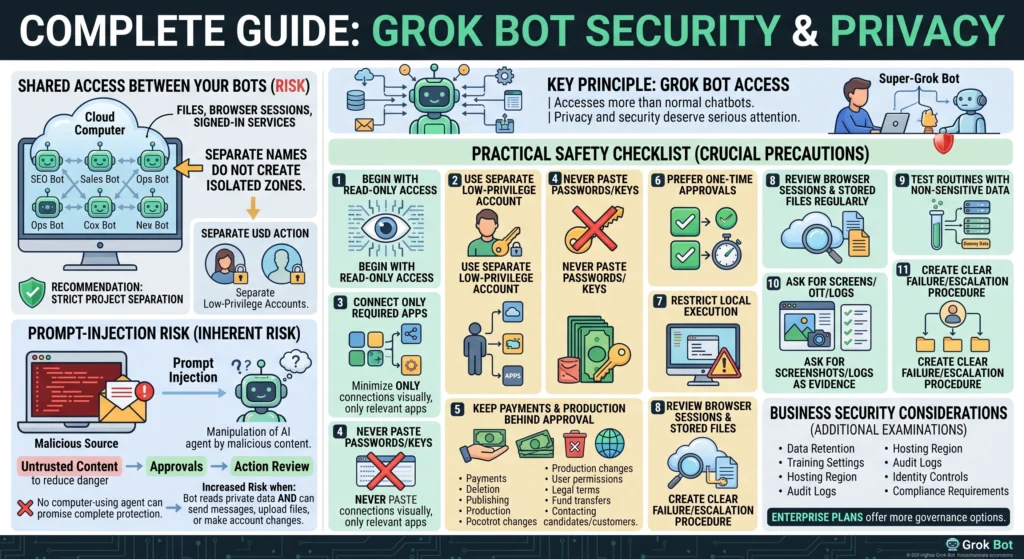
Grok Bot a accès à bien plus de ressources qu'un chatbot classique, la confidentialité et la sécurité méritent donc une attention particulière.
Accès partagé entre vos bots
Les bots appartenant à un même utilisateur partagent le même serveur cloud. Ils peuvent donc accéder aux mêmes fichiers, sessions de navigation et services connectés. Des noms de bots différents ne garantissent pas l'isolation des zones de sécurité.
Si différents projets nécessitent une séparation stricte, utilisez des comptes ou des environnements distincts à faibles privilèges plutôt que de supposer que les profils de bots le permettront.
Risque lié à l'injection rapide
Une page web, un courriel ou un document malveillant peut contenir des instructions cachées ou visibles destinées à manipuler un agent d'IA. C'est ce qu'on appelle l'injection d'instructions.
Grok Bot utilise la gestion des contenus non fiables, les approbations et la vérification des actions pour réduire les risques, mais aucun agent utilisant un ordinateur ne peut garantir une protection absolue. Le risque augmente lorsqu'un bot peut lire des données privées et également envoyer des messages, télécharger des fichiers ou modifier des comptes.
Liste de contrôle pratique de sécurité
Veuillez prendre les précautions suivantes avant de connecter Grok Bot à des systèmes importants :
- Commencez par un accès en lecture seule
- Utilisez un compte distinct à faibles privilèges lorsque cela est possible.
- Connectez uniquement les applications nécessaires à la tâche.
- Ne collez jamais vos mots de passe, clés privées ou codes de récupération dans une conversation.
- Soumettez les paiements, les suppressions, les publications et les modifications de production à l'approbation.
- Privilégier une approbation ponctuelle à une autorisation permanente
- Limiter l'exécution locale sauf si elle est réellement nécessaire
- Examinez régulièrement les sessions de navigation et les fichiers stockés.
- Routines de test avec des données non sensibles
- Demandez des captures d'écran, des journaux, des liens ou des comparaisons comme preuves.
- Élaborer une procédure claire de gestion des défaillances et d'escalade
Avant tout déploiement, les entreprises doivent examiner la conservation des données, les paramètres de formation, la région d'hébergement, les journaux d'audit, les contrôles d'identité et les exigences de conformité. Les forfaits Entreprise offrent davantage d'options de gouvernance que les configurations individuelles ou en libre-service pour les équipes.
Limitations de Grok Bot
Grok Bot est puissant, mais plusieurs limitations affectent sa fiabilité en situation réelle.
Cela peut être faux
Un bot peut mal interpréter les instructions, utiliser une source obsolète ou formuler une conclusion erronée, même si elle est péremptoire. L'accès direct au web ou à X contribue à la fraîcheur des données, mais ne garantit pas leur exactitude.
Les travaux importants doivent être étayés par des preuves et une validation. Si une allégation a des répercussions sur la santé, les finances, les droits légaux, l'emploi, la sécurité ou la réputation, une personne qualifiée doit la vérifier.
Les sites web peuvent le bloquer.
Certains sites web bloquent le trafic provenant d'environnements cloud ou d'outils d'automatisation. D'autres modifient fréquemment leur conception, ce qui peut interrompre un processus enregistré. Les sessions de connexion peuvent expirer et les contrôles de sécurité peuvent nécessiter une intervention humaine.
L'automatisation peut multiplier les erreurs
Une mauvaise réponse dans une conversation instantanée n'affecte qu'une seule réponse. Une routine planifiée mal conçue peut répéter la même erreur jour après jour. Commencez par des flux de travail en mode brouillon uniquement, surveillez les premières exécutions et ajoutez progressivement les droits d'écriture.
Plus de bots peuvent signifier plus de bruit
Un groupe composé de plusieurs agents peut répartir efficacement le travail, mais il peut aussi engendrer des recherches redondantes, des fichiers incohérents et un gaspillage de ressources. Il est donc préférable de constituer une équipe réduite capable de mener à bien la tâche.
L'utilisation n'est pas illimitée
Les recherches approfondies, l'activité de navigation, le codage et la collaboration multi-agents peuvent consommer les données plus rapidement que les simples conversations. Les flux de travail complexes doivent être conçus pour s'arrêter une fois les preuves suffisantes recueillies, plutôt que de permettre une navigation indéfinie.
Cela ne remplace pas la responsabilité.
Un bot ne peut être tenu responsable d'un paiement erroné, d'un message malveillant, d'un déploiement défectueux ou d'une décision injuste. La personne ou l'organisation qui l'utilise demeure responsable des conséquences.
Comment créer un bot Grok efficace
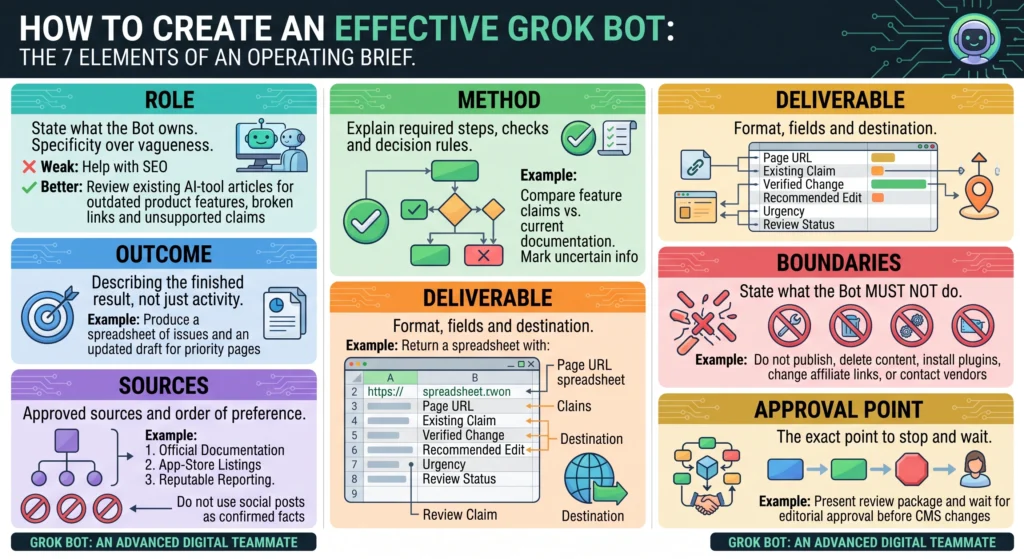
Un bot bien conçu a besoin de plus qu'un simple intitulé de poste. Donnez-lui un cahier des charges clair et précis.
Incluez les éléments suivants :
Rôle
Indiquez ce que le bot possède. Limitez la responsabilité à un cadre suffisamment précis pour permettre une évaluation.
Faible: Aide au référencement (SEO).
Mieux: Examinez les articles existants sur les outils d'IA afin de repérer les fonctionnalités obsolètes, les liens brisés et les affirmations non étayées.
Résultat
Décrivez le résultat final, et non seulement l'activité.
Exemple: Élaborez un tableau récapitulatif des problèmes et une version préliminaire mise à jour des cinq pages les plus prioritaires.
Sources
Identifier les sources approuvées et leur ordre de préférence.
Exemple: Consultez d'abord la documentation officielle du produit, puis les fiches produits sur les plateformes de téléchargement et les sources fiables. Ne considérez pas les publications sur les réseaux sociaux comme des faits avérés.
Méthode
Expliquez les étapes, les vérifications et les règles de décision requises.
Exemple: Comparez chaque caractéristique annoncée avec la documentation produit correspondante. Indiquez les informations incertaines au lieu de faire des suppositions.
Livrable
Spécifiez le format, les champs et la destination.
Exemple: Renvoyer une feuille de calcul contenant l'URL de la page, la réclamation existante, la modification vérifiée, la modification recommandée, l'urgence et l'état de la révision.
Frontières
Indiquez ce que le bot ne doit pas faire.
Exemple: Ne publiez pas, ne supprimez pas de contenu, n'installez pas de plugins, ne modifiez pas les liens d'affiliation et ne contactez pas les vendeurs.
Point d'approbation
Indiquez précisément au bot quand s'arrêter.
Exemple: Présentez le dossier de révision et attendez l'approbation éditoriale avant de préparer les modifications du CMS.
Exemple d'invite de commande Grok Bot
Utilisez ce modèle pour créer un bot pratique de référencement et de recherche de contenu :
Vous êtes le robot de recherche d'opportunités SEO pour un site web d'outils d'IA et de services en ligne.
Votre travail consiste à trouver des opportunités de contenu utiles en fonction des véritables problèmes des lecteurs, des changements actuels des produits et des lacunes dans la couverture existante du site web.
Utilisez les informations officielles sur le produit, les résultats de recherche actuels, les discussions publiques des utilisateurs et le catalogue de contenu fourni. Distinguez les faits avérés de votre interprétation. N'inventez jamais de volume de recherche, de difficulté des mots-clés, de prix, de points de référence ou de caractéristiques du produit.
Pour chaque opportunité, notez le lecteur cible, l'intention de recherche, le problème résolu, le contenu concurrent, l'angle d'approche novateur, la valeur ajoutée originale de l'article et les pages existantes pertinentes pour les liens internes.
Veuillez fournir un tableau contenant dix opportunités et une brève note recommandant les cinq plus prometteuses. Évaluez chaque idée selon sa pertinence, la qualité des preuves, son utilité pratique, sa faisabilité en termes de classement et son potentiel de monétisation.
Ne publiez aucun contenu, ne modifiez pas le site web, n'achetez aucun service, ne modifiez aucune donnée analytique et ne contactez personne. Arrêtez-vous après avoir présenté les recommandations et attendez l'approbation.
Cette invite fonctionne car elle définit le rôle, le critère de preuve, le livrable et les limites. Elle empêche également le robot de fabriquer des indicateurs SEO qu'il ne peut pas vérifier.
Qui devrait utiliser Grok Bot ?
Grok Bot est parfaitement adapté à :
- Les fondateurs indépendants qui répètent les mêmes tâches de recherche et opérationnelles
- Développeurs gérant des sites web ou des projets SaaS
- Les professionnels du référencement (SEO) qui gèrent de vastes bibliothèques de contenu
- Les équipes marketing préparent des rapports et des ébauches de campagnes
- Les équipes commerciales qui ont besoin d'études de comptes
- Équipes de soutien chargées des enquêtes répétitives
- Des équipes d'exploitation travaillent sur plusieurs applications web
- Les organismes qui ont besoin de processus reproductibles et vérifiables
Pour une personne qui souhaite seulement des réponses ponctuelles, une aide à la rédaction basique ou la génération d'images, cela peut s'avérer inutile. Le chat Grok standard est plus simple pour ces besoins.
Grok Bot est également un mauvais choix lorsqu'un processus implique un accès illimité à des systèmes hautement sensibles, ne peut tolérer des erreurs occasionnelles ou ne dispose d'aucun humain disponible pour examiner les actions importantes.
Grok Bot vaut-il la peine d'être utilisé ?
Grok Bot est une solution intéressante pour les tâches répétitives, complexes et réparties sur plusieurs outils. Son système informatique persistant, ses compétences réutilisables, ses routines planifiées et la collaboration entre plusieurs bots le rendent plus performant qu'un assistant conversationnel classique pour les opérations continues.
La valeur ajoutée ne réside pas dans la création d'une équipe d'agents autonomes aussi importante que possible. Elle réside plutôt dans l'exploitation d'un processus bien défini, l'octroi d'un accès limité à un bot et la mesure de son impact sur le gain de temps sans perte de qualité.
Un bon point de départ consiste à mettre en place un flux de travail en lecture seule qui génère un rapport ou un brouillon. Une fois que le bot exécute ce processus de manière fiable, vous pouvez le transformer en compétence, le programmer comme une routine et autoriser progressivement des actions soigneusement sélectionnées.
Utilisé de cette manière, Grok Bot peut devenir un véritable allié numérique. Sans aucune limite, il peut automatiser les erreurs aussi facilement que les tâches utiles.
Foire aux questions
Grok Bot est-il la même chose que Grok ?
Non. Grok est un assistant IA généraliste utilisé pour les conversations, la recherche, la rédaction, l'aide à la programmation et la création de contenu multimédia. Grok Bot est une plateforme d'agent persistant conçue pour effectuer des tâches complexes sur différents sites web, applications, fichiers et terminaux.
Le bot Grok peut-il fonctionner lorsque mon ordinateur est éteint ?
Oui. Ses tâches s'exécutent sur un serveur cloud, ce qui permet aux travaux planifiés ou en cours de se poursuivre même après la fermeture de l'application ou l'arrêt de votre appareil.
Grok Bot peut-il utiliser des sites web et des applications ?
Oui. Il peut utiliser les connexions d'applications compatibles et fonctionner via un navigateur. Certains sites web peuvent bloquer l'automatisation ou exiger une authentification et des vérifications de sécurité.
Plusieurs bots Grok peuvent-ils fonctionner ensemble ?
Oui. Les discussions de groupe peuvent contenir de deux à six bots. Ils peuvent se répartir le travail, échanger des informations et se passer les tâches.
Quelles sont les compétences de Grok Bot ?
Les compétences sont des procédures réutilisables qui décrivent comment une tâche doit être accomplie, y compris les étapes, les entrées, les vérifications, les sorties et les limites d'approbation.
Que sont les routines Grok Bot ?
Les routines sont des tâches planifiées ou déclenchées par des événements et assignées à un bot. Un bot peut gérer jusqu'à 50 routines, et les enregistrements des dernières exécutions sont conservés pour consultation.
Grok Bot peut-il publier du contenu automatiquement ?
Le système est peut-être techniquement capable de gérer une interface de publication connectée, mais la publication automatique comporte des risques. Il est plus sûr de le laisser préparer une ébauche et d'exiger une validation humaine avant publication.
Le bot Grok est-il sûr ?
Ce système comprend des mécanismes d'isolation, de vérification des actions et d'approbation, mais il n'est pas sans risque. Les utilisateurs d'ordinateurs peuvent commettre des erreurs, recevoir des instructions malveillantes et agir via vos comptes connectés. Limitez les autorisations et soumettez les actions importantes à une approbation.
Grok Bot remplace-t-il les employés ?
Elle peut réduire les tâches répétitives et aider à les accomplir plus rapidement, mais elle ne remplace pas le jugement humain, la responsabilité, l'expertise ni la capacité à établir des relations. Son utilité principale réside dans son rôle de collaborateur numérique supervisé.
Quel est le meilleur cas d'utilisation initial pour Grok Bot ?
Commencez par une tâche à faible risque, en lecture seule et régulière, comme la préparation d'une mise à jour sur la concurrence, la vérification de la validité des informations ou la création d'un rapport d'activité hebdomadaire. Mesurez le résultat avant d'autoriser le bot à apporter des modifications.