
Genspark AI: The Complete Guide to Its Smart Workspace Features
Introduction: What Is Genspark AI?
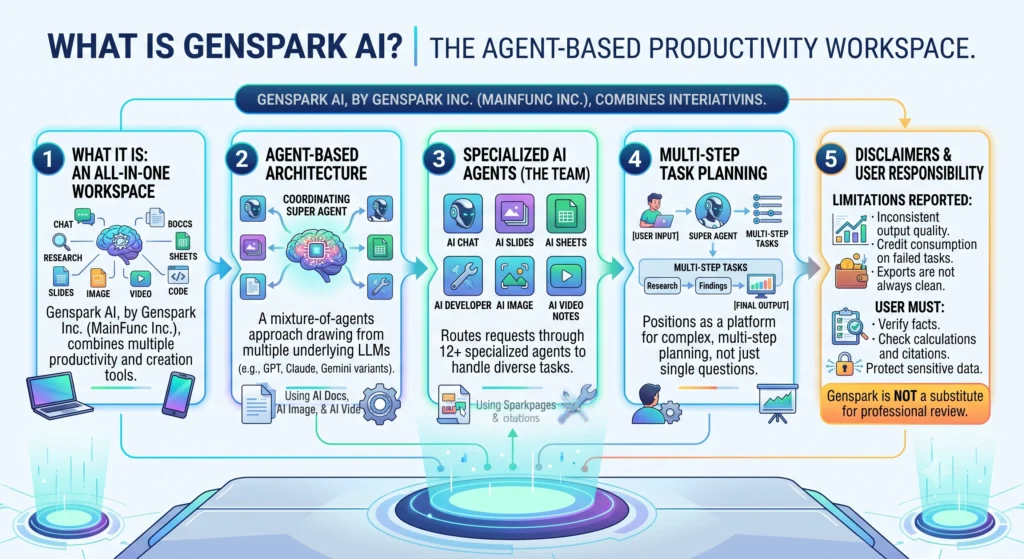
Genspark AI is an AI workspace built by Genspark Inc. (operating under parent company MainFunc Inc.) that combines chat, research, document creation, spreadsheets, presentations, image and video generation, and lightweight coding tools into one platform. Rather than being a single chatbot, Genspark routes requests through more than a dozen specialized “agents” — AI Chat, AI Slides, AI Sheets, AI Docs, AI Developer, AI Image, AI Video, AI Meeting Notes, and a coordinating “Super Agent” that decides which tools to use for a given task.
The core difference from a standard chatbot like a single-model assistant is architectural: Genspark uses a “mixture-of-agents” approach, drawing on multiple underlying large language models (such as GPT, Claude, and Gemini variants) and combining or cross-checking their outputs rather than relying on one model for every answer. It positions itself as an agent-based productivity platform that can plan multi-step tasks — for example, researching a topic, then turning findings into a slide deck — instead of only answering a single question.
That said, independent testing shows real limits. Reviewers report inconsistent output quality, credit consumption even on failed tasks, and exports that don’t always translate cleanly into PowerPoint or other formats. Genspark can speed up drafting and research, but users remain responsible for verifying facts, checking calculations and citations, protecting sensitive data, and making final decisions — it is not a substitute for professional review.
How Genspark AI Works
The basic workflow is similar across Genspark‘s tools:
- Sign up or access the workspace — create a free account via the Genspark website or mobile/desktop app; no credit card is required for the free tier.
- Describe the intended outcome with a clear prompt — state what you want (a report, deck, spreadsheet, image, etc.) in plain language.
- Add context, files, instructions, audience, and constraints — upload documents, specify tone, target audience, format, and any sources to prioritize.
- Generate the deliverable — the Super Agent (or a specific agent like AI Slides or AI Sheets) researches, drafts, and assembles the output, often citing sources along the way.
- Review, edit, verify, and export — check facts, edit content or design, and export to formats like PowerPoint, PDF, or web pages.
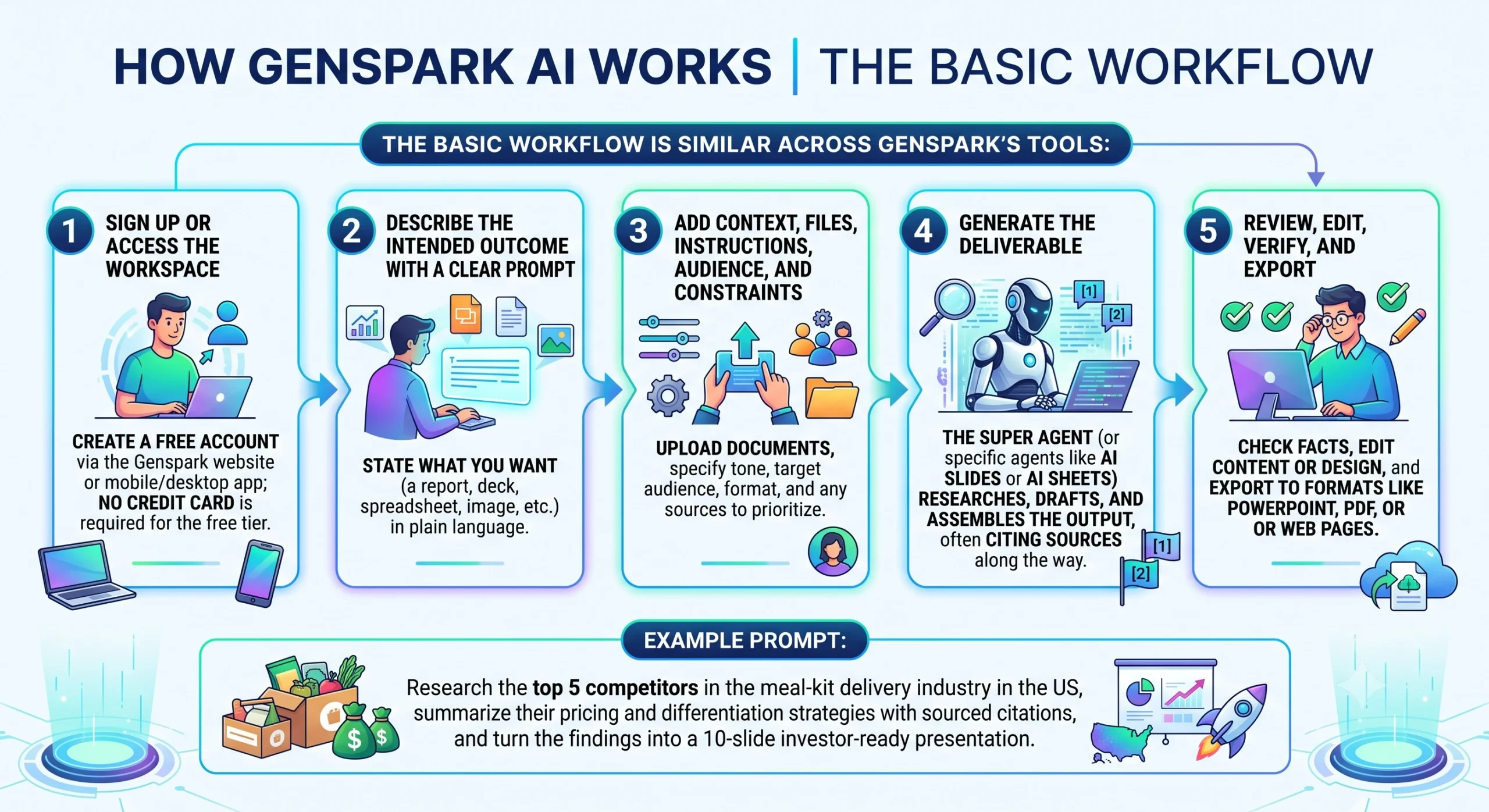
Example prompt: “Research the top 5 competitors in the meal-kit delivery industry in the US, summarize their pricing and differentiation strategies with sourced citations, and turn the findings into a 10-slide investor-ready presentation.”
How to Get Better Results From Genspark AI
- Be specific about the audience, tone, and output format upfront rather than iterating repeatedly.
- Start with AI Chat for brainstorming (it doesn’t use credits on paid plans) before committing credits to a full deliverable.
- Break large requests into smaller, well-scoped tasks — vague, open-ended prompts to the Super Agent tend to consume more credits and produce less reliable results.
- Always ask for sources and use the built-in fact-check feature before trusting a claim in a research report or slide.
Genspark AI Features
Genspark’s feature set has expanded quickly, and not everything is available on every plan. The table below reflects features confirmed via Genspark’s own app listings, blog, and independent testing as of mid-2026.
| Feature | What It Does | Best For |
|---|---|---|
| Super Agent | Coordinates other agents, plans multi-step tasks, can browse the web, and can autonomously find/download files or build simple websites and lead-gen tools | Users unsure which tool to use or needing multi-step automation |
| AI Chat (Mixture of Agents) | Chat across multiple models (GPT, Claude, Gemini, Grok) with a “reflection” step that blends answers; unlimited on paid plans per current promotions | Brainstorming and complex prompts where answer quality matters |
| AI Slides | Generates presentation drafts from prompts, with templates, drag-and-drop edits, fact-checking, and export to PowerPoint/PDF/web | Turning research into client-ready decks |
| AI Sheets | Builds spreadsheet templates from natural-language prompts, pulls live web data into tables, and can auto-generate Python-based charts in a notebook environment | Quick data collection and visual analysis |
| AI Docs (Sparkpages) | Drafts structured documents and interactive research pages with citations and tables | Research briefs, reports, and long-form writing |
| AI Developer | Drafts website, app, or game projects and can connect to GitHub for code edits and pull requests | Basic prototyping and simple app/site builds |
| AI Meeting Notes | Transcribes meetings and generates shareable notes; can auto-join calendar meetings via Google/Outlook integration | Teams that want automated meeting summaries |
| AI Image / AI Video | Generates images and short videos using multiple underlying models (e.g., Nano Banana, Flux, DALL-E, Luma, PixVerse) | Marketing assets and quick creative content |
| “Call for Me” voice agent | Places phone calls on the user’s behalf (e.g., business inquiries) and returns a transcript/summary | Outsourcing simple phone-based tasks |
| Personal assistant & integrations | Connects to Gmail, Google Drive, Calendar, and Microsoft tools to summarize email, draft replies, and prep for meetings | Knowledge workers wanting an assistant plugged into daily tools |
| Genspark AI Browser | Desktop browser with built-in AI for summarizing pages, automating research, and ad-blocking | Users who want AI embedded directly in browsing |
| GenOffice (open source) | A free, ad-free, AI-native office suite (Docs, Sheets, Slides, PDF) released separately under Apache-2.0 license | Users wanting a no-cost, offline-friendly office alternative |
A Google Workspace add-on is also available, letting users open a Genspark sidebar directly inside Google Docs, Sheets, and Slides to edit, analyze, or generate content without leaving the file. Independent reviewers note that while research and document features (Sparkpages) are the strongest part of the platform, slide and spreadsheet visuals remain less polished than dedicated design tools like Beautiful.ai, Gamma, or Canva.
How to Use Genspark AI
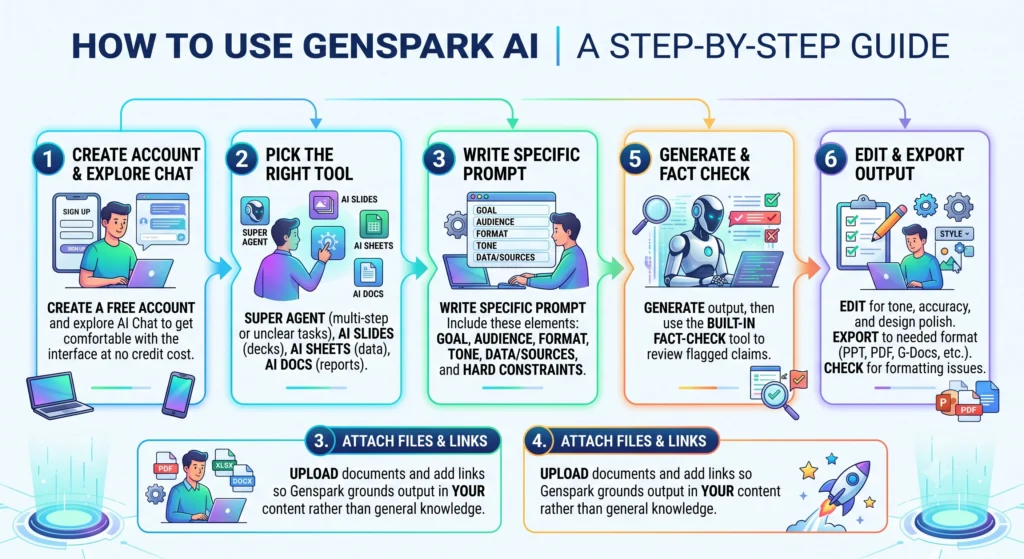
- Create a free account and explore AI Chat first to get comfortable with the interface at no credit cost.
- Pick the right tool for the job — Super Agent for multi-step or unclear tasks, AI Slides for decks, AI Sheets for data work, AI Docs for reports.
- Write your prompt with these elements: goal, audience, output format, tone, data/sources to use, and any hard constraints (length, deadline, style).
- Attach relevant files or links so Genspark can ground its output in your actual content rather than general knowledge.
- Generate the output, then use the built-in fact-check tool to review flagged claims before trusting or sharing them.
- Edit for tone, accuracy, and design polish, then export to the format you need (PowerPoint, PDF, Google Docs, etc.), checking for formatting issues that reviewers say can occur on export.
Example prompts:
- Research: “Compile a sourced research brief on the current state of AI regulation in the EU and US, including at least 8 credible sources, and flag areas where sources disagree.”
- Content/marketing: “Write a 600-word blog post for small-business owners about email marketing automation, in a friendly and practical tone, with an SEO-focused title and three subheadings.”
- Data analysis/business planning: “Analyze this spreadsheet of quarterly sales by region, identify the two fastest-growing regions, and build three charts summarizing the trend for a leadership presentation.”
Before publishing or sharing any Genspark output, verify citations against original sources, re-check any calculations or data pulled into sheets, inspect generated visuals for accuracy, confirm you have permission to use any connected account data, and review the final file for formatting or factual errors — reviewers consistently flag inconsistent outputs and export glitches as recurring issues.
Best Genspark AI Use Cases
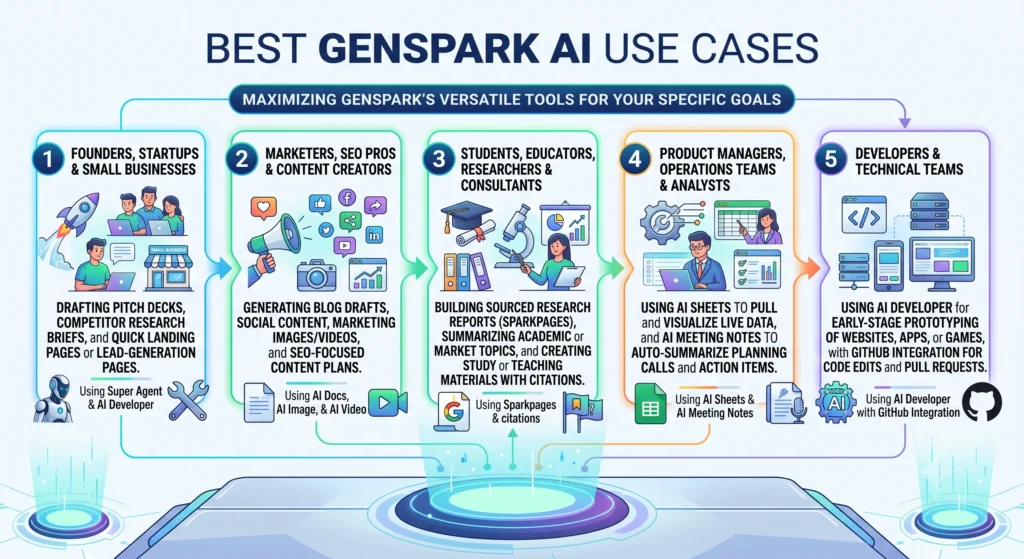
Founders, startups, and small businesses: drafting pitch decks, competitor research briefs, and quick landing pages or lead-generation pages using AI Developer and Super Agent.
Marketers, SEO professionals, and content creators: generating blog drafts, social content, marketing images/videos, and SEO-focused content plans using AI Docs, AI Image, and AI Video.
Students, educators, researchers, and consultants: building sourced research reports (Sparkpages), summarizing academic or market topics, and creating study or teaching materials with citations
Product managers, operations teams, and analysts: using AI Sheets to pull and visualize live data, and AI Meeting Notes to auto-summarize planning calls and action items.
Developers and technical teams: using AI Developer for early-stage prototyping of websites, apps, or games, with GitHub integration for code edits and pull requests.
Genspark AI Pros and Cons
| Pros | Cons |
|---|---|
| Consolidates chat, research, docs, slides, sheets, and creative generation in one workspace, reducing tool-switching | Output quality is inconsistent; slides and sheets are strong first drafts but need manual polish |
| Multi-model “fact-checking” approach aims to reduce hallucinated claims in research outputs | AI-generated content can still contain errors; all facts, sources, and calculations require human verification |
| Free tier available with daily credits for testing before paying | Reported unclear credit usage and credits deducted even on failed tasks |
| Google Workspace integration lets users work inside Docs/Sheets/Slides they already use | Export from Genspark to PowerPoint/PDF can introduce formatting issues (font/layout shifts) |
| Broad creative toolset (image, video, voice-calling agent) beyond typical chatbot scope | Design quality for slides/visuals trails specialized tools like Beautiful.ai, Gamma, or Canva |
| Independent security research raised concerns about the desktop browser’s phishing protection and default data-training settings | |
| Customer reviews cite support delays and billing/cancellation issues as a recurring weakness |
For highly advanced design, professional video editing, deep statistical analysis, or production-grade software development, dedicated specialized tools generally outperform Genspark’s built-in equivalents.
Who Benefits Most From Genspark AI?
Genspark tends to deliver the strongest value for people who need to move quickly between research, writing, and light design tasks without switching between many separate subscriptions — freelancers, small marketing teams, consultants producing client research and decks, and students or hobbyists testing AI-assisted workflows on the free plan.
Who May Benefit Less
- People who only need a simple question-and-answer chatbot may find Genspark’s broader toolset unnecessary and its credit system confusing.
- Professionals who already rely on specialized software (e.g., Adobe for design, dedicated BI tools for analytics, or established coding IDEs) may find Genspark’s built-in equivalents less capable for advanced work.
- Anyone handling sensitive personal, healthcare, legal, or client data should be cautious: independent security research flagged weak phishing protection in Genspark’s browser and default settings that use search data for AI model training unless a user opts out.
A practical way to decide: try one low-stakes task (a blog draft or an internal research summary) on the free plan, and compare the time saved and output quality against your current process before committing to a paid tier.
Pricing, Privacy, and Safety Considerations
Genspark uses a freemium, credit-based pricing model. Reported tiers (confirmed by multiple independent sources, though exact figures may shift over time and should be checked on Genspark’s official pricing page) are:
| Plan | Price | Credits | Storage | Notes |
|---|
| Plan | Price | Credits | Storage | Notes |
|---|---|---|---|---|
| Free | $0 | ~100–200 credits/day | 1 GB | Limited agent and model |
| Plus | $24.99/month | ~10,000 credits/month | 50 GB | Priority agent access; promotional unlimited AI Chat/Image periods have been offered |
| Pro | $249.99/month (some sources cite lower annual/alternate pricing) | ~125,000 credits/month | 1 TB | Full access to all agents and premium |
| Enterprise | Custom, starting figures vary by source | N/A | N/A | Adds team analytics, security features (e.g., SAML) |
Because third-party sources report some variation in Pro/Enterprise pricing, readers should confirm current rates directly on Genspark’s official pricing page before subscribing.
On privacy: Genspark’s policy (managed under parent company MainFunc Inc.) states it does not collect sensitive categories of personal data (such as race, religion, or health data) by default. However, it does collect account information, usage data, and user-generated content, and by default uses search data to improve its AI models unless the user opts out in account settings. A feature called “Call for Me,” which places phone calls on a user’s behalf, introduces additional consent and disclosure considerations for anyone on the other end of the call. Independent security testing has also raised concerns about phishing protection in Genspark’s desktop browser product.
Given these findings, users should review Genspark’s current Terms of Service and Privacy Policy directly and avoid uploading confidential personal, company, healthcare, legal, or client data unless they have confirmed appropriate permissions, opt-out settings, and compliance safeguards are in place.
Conclusion
Genspark AI is most useful as a productivity and first-draft tool — a way to speed up research, writing, and basic content creation across formats — rather than a replacement for professional judgment, specialized software, or careful fact review. Its multi-agent approach and broad toolset can genuinely reduce time spent switching between apps, but independent reviews consistently show that output polish, credit transparency, and support reliability lag behind the platform’s marketing. A sensible next step is to try one low-risk task on the free plan — such as drafting a research brief or a blog post — and compare the result and time cost against your current workflow before deciding whether to upgrade.