
Unleash Google Antigravity: The Ultimate Agentic IDE for Devs
If you’ve been treating your AI coding assistant like a smarter autocomplete, Google Antigravity is about to make that feel embarrassingly quaint. Launched in November 2025, Antigravity doesn’t just suggest the next line—it dispatches agents, manages terminals, clicks through UIs in a real browser, and hands you back a human-readable report while you’re still finishing your coffee.
This isn’t incremental. It’s a paradigm shift.
The Core Shift: From Search to Action
Tools like Cursor, GitHub Copilot, and their relatives are fundamentally reactive. You type, they complete. You ask, they suggest. The mental model is still “developer does the work, AI assists.”
Antigravity inverts this.
You become the orchestrator—the manager setting intent, reviewing plans, and approving execution. The agents do the building. This isn’t a subtle distinction. It fundamentally changes how you structure your day, your projects, and your cognitive load as a solo developer.
The question is no longer “What should I type next?” It’s “What should I delegate, and to whom?”
Core Architecture: What’s Actually Running Under the Hood
The Dual-View Interface
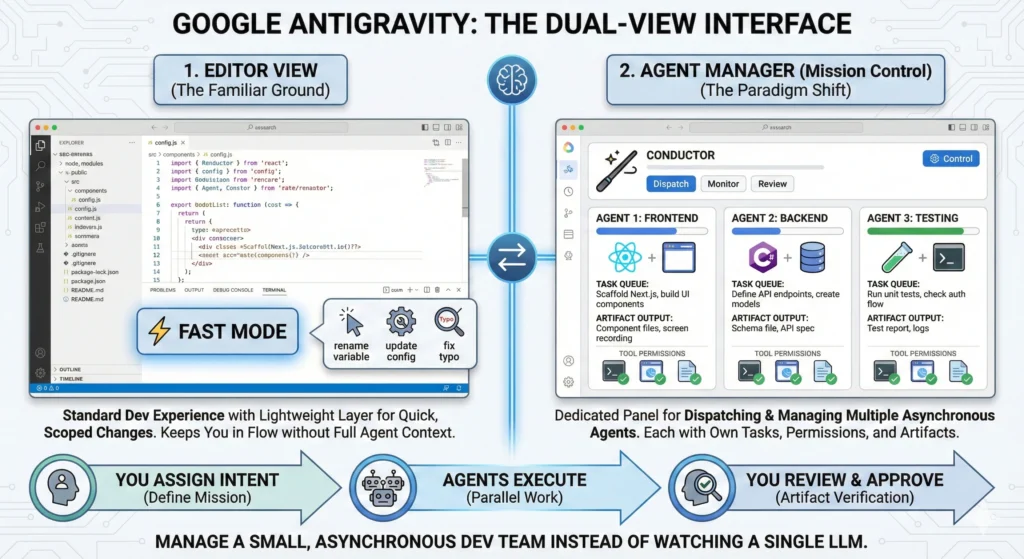
Antigravity ships with two distinct operating modes baked into the interface:
1. Editor View Your standard VS Code-adjacent experience. Syntax highlighting, file tree, extensions—familiar ground. The key addition here is Fast Mode, a lightweight, low-latency edit layer for quick, scoped changes. Think: rename a variable across a module, update a config, fix a typo in a schema. Fast Mode keeps you in flow without spinning up a full agent context.
2. Agent Manager (Mission Control) This is where Antigravity separates itself. Mission Control is a dedicated panel for dispatching, monitoring, and reviewing multiple agents running in parallel. Each agent has its own task queue, tool permissions, and artifact output. You’re not watching a single LLM complete a prompt—you’re managing a small, asynchronous dev team.
You assign intent. Agents execute. You review and approve.
Cross-Tool Autonomy: The Three Pillars
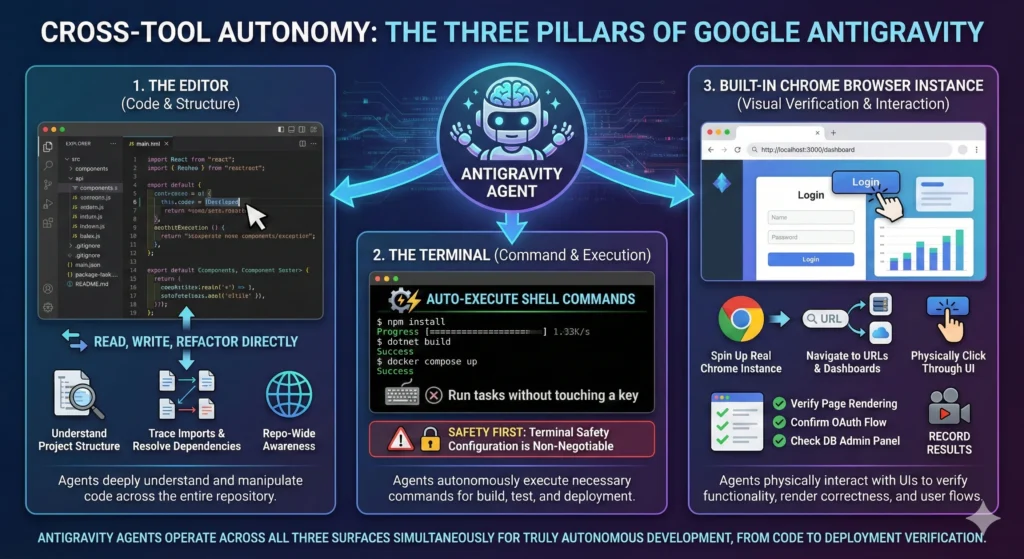
Every Antigravity agent has access to three operating surfaces:
The Editor Agents read, write, and refactor code directly. They understand project structure, can trace imports, and resolve dependencies—not just within a file, but across the entire repo.
The Terminal Agents auto-execute shell commands. npm install, dotnet build, docker compose up—agents run these without you touching a key. This is powerful and, as we’ll discuss later, exactly why terminal safety configuration is non-negotiable.
A Built-In Chrome Browser Instance This is the feature that genuinely surprises most developers. Agents spin up a real, embedded Chrome instance, navigate to URLs (your localhost dev server, a third-party dashboard, a cloud console), physically click through the UI, and record results. The agent can verify that your deployed Next.js page renders correctly, confirm that an OAuth flow completes, or check that your database admin panel reflects a migration—autonomously.
Artifacts: No More Log Soup
Traditional agent outputs are raw logs. Walls of text. Token spew.
Antigravity agents generate structured Artifacts instead—human-readable, reviewable documents tailored to the task type:
- Implementation Plans — Step-by-step breakdowns of what the agent intends to do before it does it
- Screen Recordings — Captured browser sessions from the Chrome instance showing exactly what the agent saw and did
- Database Schemas — Auto-generated ERDs and migration files ready for review and approval
- Test Reports — Structured summaries of what passed, failed, and why
You review an Artifact before execution continues. This is the checkpoint system that keeps you in control without requiring you to babysit every terminal line.
The Solo Developer Multiplier: A Real-World Micro-SaaS Workflow
Let’s make this concrete. You’re building a micro-SaaS — a subscription-based analytics tool for Shopify store owners. Here’s how Antigravity changes your build day.
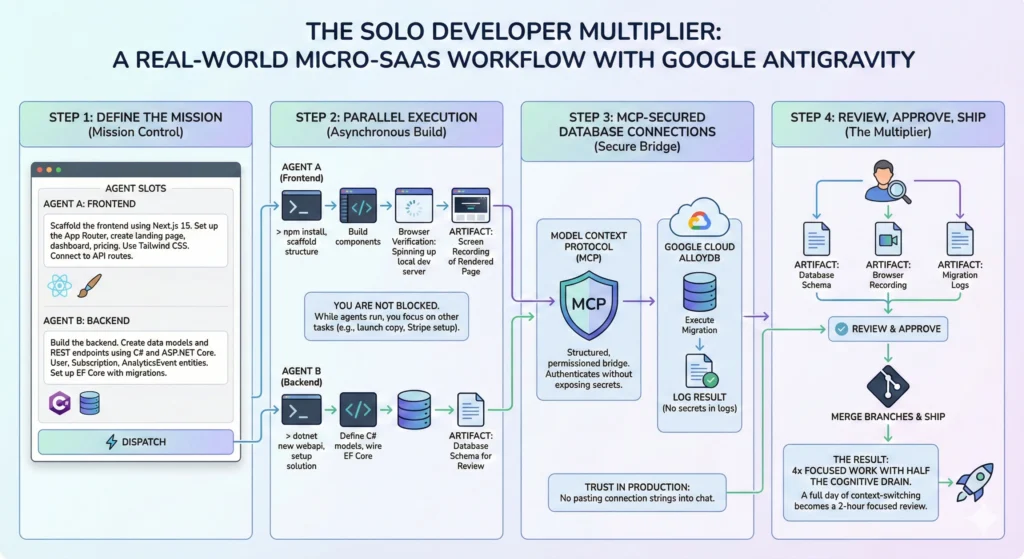
Step 1: Define the Mission
In Mission Control, you open two agent slots. You write intent briefs—plain English descriptions of what each agent is responsible for:
- Agent A: “Scaffold the frontend using Next.js 15. Set up the App Router, create a landing page, a dashboard route, and a pricing component. Use Tailwind CSS. Connect to our API routes.”
- Agent B: “Build the backend. Create data models and REST endpoints using C# and ASP.NET Core. We need User, Subscription, and AnalyticsEvent entities. Set up EF Core with migration support.”
Step 2: Parallel Execution
You hit dispatch. Both agents start simultaneously.
Agent A scaffolds the Next.js 15 project, installs dependencies via terminal, generates the file structure, builds components, and pushes a browser verification—spinning up a local dev server and screenshotting the rendered landing page as a screen recording Artifact.
Agent B sets up the ASP.NET Core solution, defines the C# entity models, wires up EF Core DbContext, and generates the initial migration. It hands you a Database Schema Artifact for review before touching anything live.
You’re not blocked on either. While agents run, you’re writing your launch copy, setting up Stripe, or sleeping.
Step 3: MCP-Secured Database Connections
Here’s where the architecture gets serious. When Agent B needs to run migrations against your cloud database—say, AlloyDB on Google Cloud—it doesn’t ask you to paste connection strings into a chat window.
Instead, Antigravity leverages Model Context Protocol (MCP), which creates a structured, permissioned bridge between agents and external services. The agent authenticates through MCP, executes the migration, and logs the result—all without your secrets ever appearing in a prompt, a log file, or a stored message thread.
For a solo developer handling production data, this is the difference between a tool you can actually trust in a real workflow and one you’d never run near production.
Step 4: Review, Approve, Ship
Each agent surfaces its Artifacts. You review the schema, check the browser recording, approve the migration, and merge the branches. What would have taken a full day of context-switching took you a focused two-hour review session.
That’s the multiplier. Not 2x output. More like 4x focused work with half the cognitive drain.
The Dark Side: Hardware Tax and Platform Risk
No honest review skips this section. Antigravity has real costs, and two of them are significant.
The Hardware Tax
Antigravity is an Electron application. It runs local Chrome instances. It streams Gemini model responses concurrently across multiple active agents. On a MacBook Pro M3 with 16GB RAM, running two agents simultaneously with browser verification active will visibly crater your battery life and push memory pressure into uncomfortable territory.
Expect:
- RAM usage north of 4–6GB for a standard two-agent session
- CPU spikes during model inference and browser automation sequences
- Noticeable battery drain — plan for being plugged in during heavy sessions
This isn’t a dealbreaker, but it is a hardware conversation. If you’re on a lower-spec machine, Antigravity’s parallel agent power will be gated by your RAM ceiling. The tool is built for power; your hardware needs to match.
The OpenClaw Ban Wave (February 2026)
This one matters for every developer evaluating Antigravity as a long-term platform investment.
In February 2026, Google executed a significant account ban wave targeting users who had connected their flat-rate Claude or Gemini accounts to OpenClaw—a popular open-source framework created by developer Peter Steinberger. OpenClaw had built up a substantial user base by helping developers plug external AI accounts into its agentic workflows, which in practice enabled very high-volume usage that went far beyond normal individual developer patterns.
Google deemed this a Terms of Service violation. Their stated reason centered on excessive and abusive backend usage at scale—traffic patterns inconsistent with individual developer usage and consistent with coordinated reselling or sharing of access—rather than the mere fact of routing authentication through OpenClaw.
The result: a mass ban wave. Some users lost access to their AI accounts; others reported broader Google account impact and project disruption, with no appeals process clearly communicated at launch.
The lesson isn’t that OpenClaw users were bad actors. Many were developers experimenting in good faith. The lesson is structural: building a critical workflow dependency on a platform that can unilaterally revoke access—with no migration path—is a business risk, not just a technical one.
When evaluating Antigravity for your micro-SaaS development stack, treat your Google account access as infrastructure. Back up your projects locally. Understand the ToS boundaries and usage limits before you build workarounds into your workflow. The OpenClaw situation is a case study in platform risk that applies to any developer deeply embedded in a single vendor’s ecosystem.
Actionable Takeaways: How to Use Antigravity Without Getting Burned
These aren’t opinions. They’re operational conclusions from understanding how the system actually works.
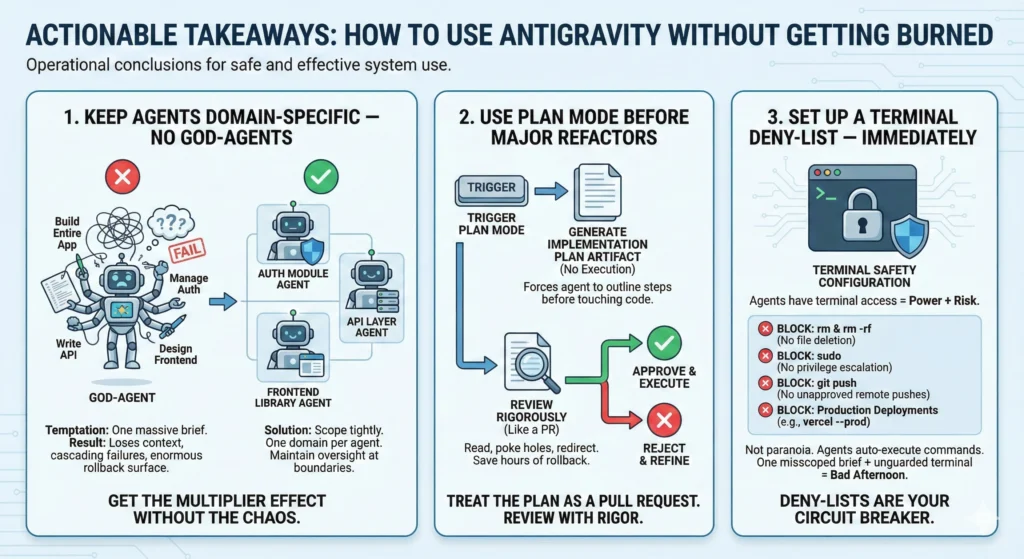
1. Keep Agents Domain-Specific — No God-Agents
The temptation is to write one massive agent brief: “Build me the entire app.” Resist this completely.
God-agents fail in predictable ways: they lose context across large codebases, make cascading architectural decisions without checkpoints, and produce Artifacts too large to meaningfully review. When they go wrong—and they will—the rollback surface is enormous.
Instead, scope agents tightly. One agent owns one domain: the auth module, the API layer, the frontend component library. You maintain oversight at every boundary. This is how you get the multiplier effect without the chaos.
2. Use Plan Mode Before Major Refactors
Before any agent touches a significant codebase change—a data model redesign, a routing overhaul, a dependency upgrade—trigger Plan Mode first.
Plan Mode forces the agent to generate a full Implementation Plan Artifact without executing anything. You read the plan, poke holes in it, and either approve or redirect. This single habit will save you from hours of rollback work on changes that looked right in a two-sentence brief but fell apart in architectural reality.
Treat the Implementation Plan as a pull request. Review it with the same rigor.
3. Set Up a Terminal Deny-List — Immediately
Agents have terminal access. That is power. Unguarded, it is also risk.
Before you run a single agent session, configure a strict terminal deny-list in your Antigravity settings. At minimum, block:
rmandrm -rf— no agent should be deleting filessudo— no agent should be escalating privilegesgit push— no agent should be pushing to remote without your explicit approval- Any production deployment command specific to your stack (
vercel --prod,dotnet publish, etc.)
This is not paranoia. Agents auto-execute terminal commands. One misscoped brief plus an unguarded terminal is a bad afternoon. Deny-lists are your circuit breaker.
Final Verdict
Google Antigravity is the first tool that genuinely earns the phrase “agentic IDE” without asterisks. The parallel agent architecture, the browser automation, the MCP-secured database connections, the Artifact review system—these aren’t features bolted onto a code editor. They’re a coherent system built around a different model of how software gets built.
For solo developers and indie hackers running lean, the productivity multiplier is real and significant. You can simultaneously develop a Next.js 15 frontend and an ASP.NET Core backend without being the bottleneck in both contexts at once. That’s a genuine unlock.
But go in clear-eyed. The hardware tax is real. The platform risk—illustrated sharply by the OpenClaw ban wave—is real. And the discipline required to use agentic tools safely (domain-specific agents, Plan Mode, deny-lists) is not optional; it’s the operational foundation that determines whether Antigravity makes you faster or creates expensive messes.
Used well, it’s the closest thing to a leverage multiplier a solo developer has had access to. Used carelessly, it’s a very fast way to create very complicated problems.
The tool is ready. The question is whether your workflow is.