
Master 1440p vs 4K Gaming in 2026
Introduction
In 2026, the resolution debate has shifted from “1080p vs 1440p” to a much tougher choice: stick with 1440p as the performance sweet spot, or jump to 4K for IMAX‑level immersion. RTX 50‑series GPUs with DLSS 4 and AMD’s new RDNA 4 cards with FSR 4 finally make both resolutions viable for many gamers, but not in the same way or at the same budget.
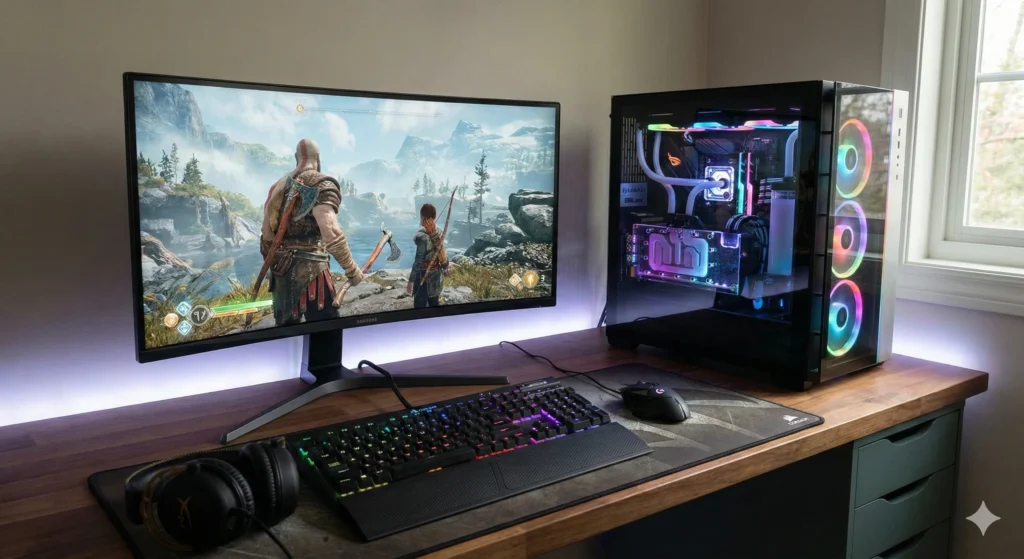
Modern flagships like the RTX 5090 can push well over 100 fps in demanding titles at native 4K, and even higher with DLSS 4’s Multi Frame Generation, while RDNA 4 cards use FSR 4 to keep 4K ray‑traced games playable. At the same time, 1440p monitors now reach 540 Hz with cutting‑edge OLED panels, making them ideal for esports and competitive shooters. Choosing between 1440p and 4K in 2026 is less about “which is better” and more about which aligns with your games, your GPU, and your budget.
Resolution Fundamentals
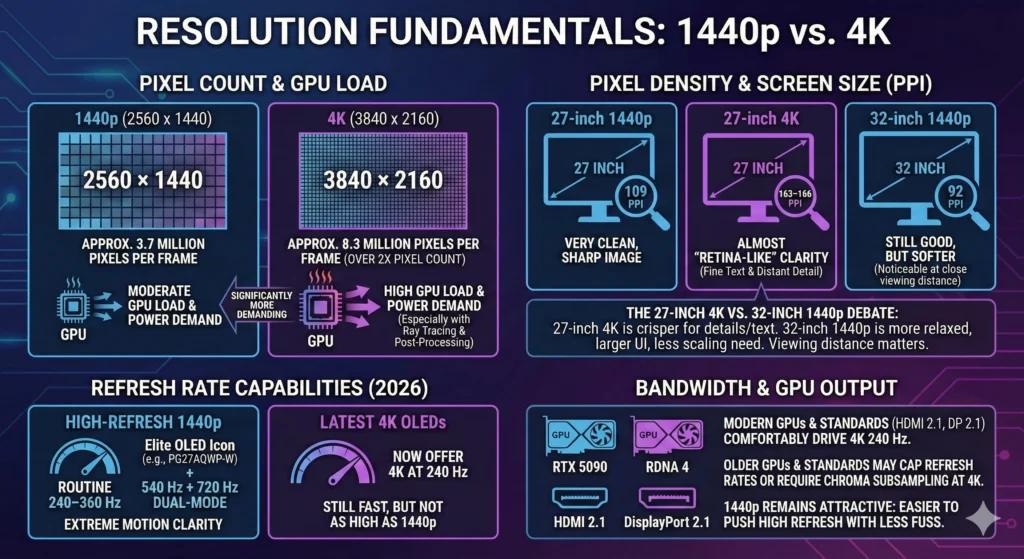
1440p (2560 × 1440) renders about 3.7 million pixels per frame, while 4K (3840 × 2160) renders roughly 8.3 million—more than double the pixel count and GPU load. That means 4K typically demands significantly more from both your graphics card and your power supply, especially when you add ray tracing or heavy post‑processing.
On common gaming sizes, pixel density changes how sharp the image feels. A 27‑inch 1440p monitor sits around 109 pixels per inch (PPI), which already looks very clean compared to 1080p, while a 27‑inch 4K panel jumps to about 163–166 PPI, making fine text and distant detail almost “retina‑like.” By contrast, a 32‑inch 1440p screen drops to roughly 92 PPI—still good for gaming, but noticeably softer than a 27‑inch 4K when you sit close.
This is where the “27 inch 4K vs 32 inch 1440p” debate really matters. On a desk at typical PC viewing distances, 27‑inch 4K looks crisper for text and high‑detail games, while 32‑inch 1440p feels more relaxed and forgiving, with larger UI elements and less need for scaling. If you mainly sit further back with a controller, the difference shrinks; if you’re nose‑to‑screen in competitive FPS, you’ll notice the clarity advantage of higher PPI more.
Refresh rate is the other pillar. In 2026, high‑refresh 1440p panels routinely reach 240–360 Hz, with elite OLED models like the Asus ROG Swift PG27AQWP‑W hitting 540 Hz plus a 720 Hz dual‑mode for extreme motion clarity. 4K used to be limited to 120–144 Hz, but the latest 27‑ and 32‑inch OLEDs now offer 4K at 240 Hz—still fast, but not as insanely high as 1440p.
Finally, bandwidth and GPU output matter. HDMI 2.1 and DisplayPort 2.1 can comfortably drive 4K 240 Hz on modern GPUs like the RTX 5090 and RDNA 4 cards, but older midrange GPUs and older display standards may cap you to lower refresh rates or require chroma subsampling at 4K. That’s another reason 1440p remains attractive: it’s easier to push high refresh with less fuss.
Performance Breakdown
Moving from 1440p to 4K increases pixel count by about 2.25×, so GPU load for 4K rendering rises sharply, especially in heavy engines and with ray tracing enabled. Even with the best cards, you’ll see a clear FPS gap between 1440p and 4K—though upscaling tech like DLSS 4 and FSR 4 narrows it dramatically.
TechSpot’s review of the RTX 5090 shows how this plays out in real games. In God of War Ragnarök, the card hits around 268 fps at 1440p on ultra settings, but drops to about 195 fps at native 4K—still extremely fast, but roughly a 27% reduction. In The Last of Us Part I, it delivers about 204 fps at 1440p and 125 fps at 4K, showing a similar pattern: the card is a beast, but 4K still costs frames. Across a broad test suite, reviewers typically see the RTX 5090 20–40% faster than the RTX 4090 at 4K, with smaller gains at 1440p where CPU limits kick in.
Example RTX 5090 Native FPS: 1440p vs 4K
On the AMD side, the older RX 7900 XTX already showed how 4K can be viable in rasterized games but punishing with ray tracing. TechSpot‑style testing sees it averaging 70–90 fps at native 4K in many raster workloads, but only about 30–35 fps at 4K with maxed ray tracing—essentially unplayable without upscaling. At 1440p with ray tracing plus FSR upscaling, the same card can reach roughly 135 fps in titles like Cyberpunk 2077, highlighting how much more forgiving 1440p is for RT.
RDNA 4 and RX 9000‑series cards are designed to fix some of that pain. AMD’s RDNA 4 announcement emphasized upgraded ray‑tracing accelerators, new AI accelerators, and FSR 4 upscaling tuned for 4K with maximum ray tracing, promising significantly better performance and image stability than FSR 3.1. Early previews of FSR 4 describe improved temporal stability, better detail preservation, and reduced ghosting, making 4K upscaling more competitive with Nvidia’s DLSS.
DLSS 4, exclusive to RTX 50‑series GPUs, doubles down on this with Multi Frame Generation. Nvidia claims DLSS 4 can generate up to three extra frames for each rendered frame, multiplying frame rates by up to 8× relative to brute‑force rendering and enabling 4K 240 fps with full ray tracing in select titles. Reviewers see massive gains in DLSS 4‑enabled games: in some RT‑heavy workloads, turning on DLSS 4 with frame generation more than doubles effective FPS compared to native, while also reducing GPU‑side power per displayed frame.
This matters directly for “1440p vs 4K ray tracing fps.” On an RTX 5090, 1440p with RT plus DLSS 4 can feel absurdly fast—often 150–200+ fps in many titles—while native 4K with RT may hover closer to 90–140 fps, depending on the game. With DLSS 4’s 4K gaming performance in quality or balanced mode, you’re usually looking at 4K internally upscaled from 1440p or even 1080p, yet still with image quality that rivals or beats native 1440p in motion.
From a “gpu requirements for 4k gaming 2026” standpoint, here’s the rough landscape:
- For true high‑end 4K (120–240 Hz) with ray tracing: RTX 5090/5080 or the top RDNA 4 RX 9000 cards with FSR 4 are the realistic options.
- For “good enough” 4K 60–100 fps without maxed RT: upper‑midrange cards like Nvidia’s previous‑gen high end (RTX 4090/4080 class) or RDNA 4 midrange (RX 9070 XT) can handle it, especially with upscaling.
- For 1440p high refresh (144–240+ Hz): a wide band of GPUs qualifies, from modern midrange like RX 7800 XT/RTX 4070 up to the latest RX 9070 and RTX 50‑series; this is where 1440p sweet spot gaming really shines.
Crucially, “fsr 4 vs dlss 4 1440p” is less about 1440p native and more about how these tools let you treat 4K displays like smarter versions of 1440p. DLSS 4 often leads in absolute performance and motion stability, especially with Multi Frame Generation, while FSR 4 focuses on broad compatibility and better‑than‑before temporal quality. If you lean on upscaling tech 4K native rendering becomes optional; “native 1440p vs upscaled 4K” on a good 4K OLED can look surprisingly close, especially at typical viewing distances.
Visual Quality & Use Cases
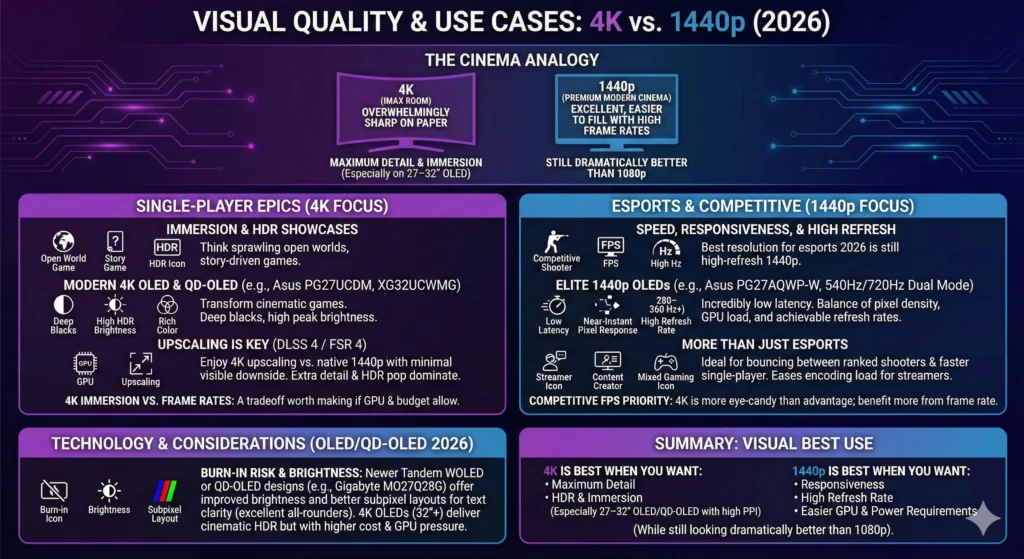
If 4K is the IMAX room, 1440p in 2026 is the premium modern cinema: not as overwhelmingly sharp on paper, but still excellent, and easier to fill with high frame rates. For single‑player epics—think sprawling open worlds, story‑driven games, and HDR showcases—4K immersion vs frame rates is usually a tradeoff worth making if your GPU and budget allow it.
Modern 4K OLED and QD‑OLED monitors, such as the Asus ROG Swift PG27UCDM (27‑inch 4K 240 Hz QD‑OLED) and Asus ROG Strix XG32UCWMG (32‑inch 4K 240 Hz WOLED), deliver deep blacks, high HDR peak brightness, and rich color that transform cinematic games. Combined with DLSS 4 or FSR 4, these displays let you enjoy 4K upscaling vs native 1440p with minimal visible downside: the extra detail and HDR pop dominate your perception, while smart reconstruction hides most of the internal resolution tricks.
For esports and competitive shooters, the calculus flips. The best resolution for esports 2026 is still high‑refresh 1440p: it strikes a balance of pixel density, GPU load, and achievable refresh rates that 4K simply can’t match yet. OLED and QD‑OLED panels like the Asus ROG Swift PG27AQWP‑W (27‑inch 1440p at 540 Hz with a 720 Hz dual mode) and other 1440p 280–360 Hz models offer incredibly low latency and near‑instant pixel response. If “competitive fps resolution choice” is your top priority, 4K is more eye‑candy than advantage; you benefit more from frame rate and responsiveness than from extra pixels.
Even outside pure esports, “high refresh 1440p esports” setups are ideal if you bounce between ranked shooters and faster single‑player games where smoothness matters more than pixel count. A 27‑inch 1440p OLED at 240–360 Hz already looks very sharp compared to 1080p, especially if you are upgrading from an older TN panel. For streamers and content creators, 1440p also eases encoding load and can reduce system stress compared to constant 4K capture.
1440p vs 4K OLED gaming 2026 also touches on burn‑in risk and brightness. Many of the best QD‑OLED 1440p monitors 2026, like Gigabyte’s MO27Q28G and similar panels, use newer tandem WOLED or QD‑OLED designs with improved brightness and better subpixel layouts for text clarity, making them excellent all‑rounders for gaming plus productivity. Meanwhile, 4K OLEDs at 32 inches and above—like the Asus XG32UCWMG, LG’s C‑series TVs used as monitors, or Dell’s 32‑inch QD‑OLEDs—deliver a more cinematic, couch‑friendly experience and stunning HDR for single‑player, but often at higher cost and with more GPU pressure.
So, visually:
- 4K is best when you want maximum detail, HDR, and immersion—especially on 27–32 inch OLED/QD‑OLED panels where PPI is high and HDR is strong.
- 1440p is best when you want responsiveness, high refresh, and easier GPU and power requirements, while still looking dramatically better than 1080p.
Hardware & Cost Analysis
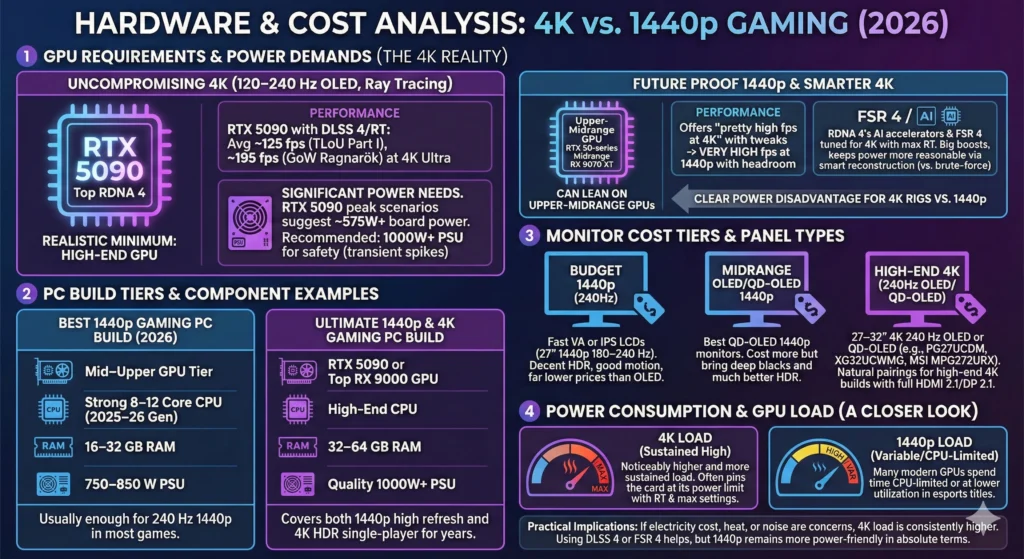
On the hardware side, the “gpu requirements for 4k gaming 2026” and “minimum gpu for 4k gaming 2026” questions boil down to how much you’re willing to compromise on settings and frame rate. For uncompromising 4K—aiming for 120–240 Hz on a 4K OLED with high settings and ray tracing—the realistic minimum is a high‑end GPU like the RTX 5090, RTX 5080, or top RDNA 4 RX 9000 cards leveraging DLSS 4 or FSR 4.
The RTX 5090 in particular is built for 4K: reviewers show it averaging around 125 fps at 4K in The Last of Us Part I and 195 fps in God of War Ragnarök at ultra settings, with even larger gaps versus previous generations when ray tracing and DLSS 4 are used. However, that performance comes with significant power needs. Some testing and guidance suggest a 575 W–class power budget just for the GPU in peak scenarios and recommend at least 1000 W PSUs for full high‑end builds to handle transient spikes safely, resulting in a clear “4K gaming power usage comparison” disadvantage versus 1440p‑oriented rigs.
Older but still potent cards like the RX 7900 XTX show ~355 W board power and solid 4K raster performance, but their 4K ray tracing FPS is usually in the 30–60 fps range without upscaling. That’s where FSR 4 and similar technologies aim to help: RDNA 4’s new AI accelerators and FSR 4 are explicitly tuned for 4K with maxed ray tracing, promising big boosts in effective performance while keeping “4k gaming power usage comparison” more reasonable by relying on smarter reconstruction instead of brute‑forcing every pixel.
By contrast, a “future proof 1440p rig” and “best 1440p gpus to buy in 2026” can lean on upper‑midrange GPUs instead of extreme flagships. Cards one or two tiers below the 5090—such as RTX 50‑series midrange options or RDNA 4’s RX 9070 XT—are already reported to offer “pretty high fps at 4k in pretty much all games” with some settings tweaks, which translates to very high fps at 1440p with headroom for higher refresh. That means:
- For “best 1440p gaming pc build 2026”, a mid–upper GPU tier, strong 8–12‑core CPU from the 2025–26 generation, 16–32 GB of RAM, and a 750–850 W PSU is usually enough for 240 Hz 1440p in most games.
- For “ultimate 1440p and 4k gaming pc builds”, pairing an RTX 5090 or top RX 9000 GPU with a high‑end CPU and 32–64 GB RAM plus a quality 1000 W+ PSU covers both 1440p high refresh and 4K HDR single‑player for years.
Monitor costs are moving targets, but there are clear tiers. “Budget 1440p 240hz monitor 2026” options typically center on fast VA or IPS LCDs—27‑inch 1440p 180–240 Hz panels with decent HDR and good motion clarity at far lower prices than OLED. Midrange OLED/QD‑OLED 1440p monitors, such as the best QD‑OLED 1440p monitors 2026 mentioned in TFTCentral’s and reviewer roundups, cost more but bring deep blacks and much better HDR.
At the high end, the “best monitors for 4k gaming 2026” are 27–32 inch 4K 240 Hz OLED or QD‑OLED displays like the Asus ROG Swift PG27UCDM and XG32UCWMG, or value options such as MSI’s MPG272URX and MAG321UP QD‑OLEDs. These are the natural pairings for a “high end 4k gaming build uk 2026” or similar premium PC builds elsewhere: RTX 5090‑class GPU, top‑tier CPU from current best‑gaming‑CPU lists, and a 4K OLED with full HDMI 2.1/DP 2.1 support.
Power consumption 4k vs 1440p is not just about rated TGP; it’s about how hard the GPU is driven. At 1440p high refresh, many modern GPUs spend time CPU‑limited or at lower utilization in esports titles, while 4K with RT and max settings often pins the card at its power limit. If electricity cost, heat, or noise are concerns, “gpu load 4k rendering” is noticeably higher and more sustained than at 1440p; using DLSS 4 or FSR 4 helps, but 1440p remains more power‑friendly in absolute terms.
Decision Framework
To make this practical, treat the “resolution debate 2026 pc” as a short quiz. Answer honestly, and map yourself to a resolution and build type.
- What do you play most?
- Competitive shooters / MOBAs / battle royales → Lean 1440p high refresh.
- Single‑player AAA / open world / RPGs → Lean 4K OLED or 1440p OLED, depending on budget.
- Mix of both → Likely 1440p OLED/QD‑OLED as a compromise.
- What’s your target FPS?
- 240–360+ fps → 1440p (or even 1080p) with a top‑tier 1440p OLED or high‑end LCD.
- 120–165 fps → Either 1440p or 4K is viable; GPU budget decides.
- 60–100 fps with max eye‑candy → 4K with DLSS 4 or FSR 4 is ideal.
- How strong is your GPU, and what can you realistically buy?
- RTX 5090 / top RX 9000 budget → 4K or 1440p, your choice.
- Upper midrange (RTX 4070/5070‑class, RX 7800 XT/9070 XT) → 1440p sweet spot gaming is the smart default.
- Older midrange → 1440p 144 Hz or even 1080p high refresh may be the right target.
- Do you care more about immersion or responsiveness?
- Immersion, HDR, cinema‑like image → 4K OLED/QD‑OLED with upscaling.
- Snappy input, low latency, and clear motion → 1440p high refresh.
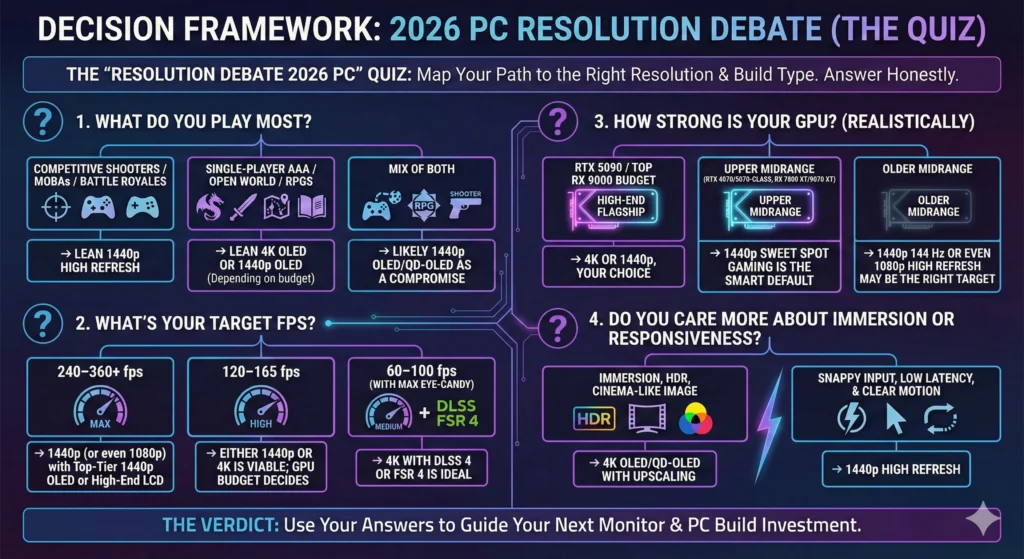
Resolution Choice Quick Guide
When thinking about “native 1440p vs upscaled 4k,” remember that modern upscaling is no longer a crude blur. DLSS 4’s transformer‑based model can generate 15 out of 16 pixels using learned context and temporal data, often improving stability and edge quality versus older DLSS versions. FSR 4 similarly emphasizes temporal stability and detail retention over FSR 3.1, especially at 4K with RT, and can be dropped into existing FSR 3.1 games on RX 9000 GPUs. On a good 4K OLED, a 4K image upscaled from 1440p can look as good or better in motion than native 1440p on a 1440p screen, especially in slower, cinematic titles.
On the other hand, if you aim for “best qd-oled 1440p monitors 2026” and “1440p gaming monitor recommendations 2026,” you get access to extreme refresh rates and excellent image quality without needing a 4K‑class GPU or PSU. Panels like the PG27AQWP‑W or modern 1440p QD‑OLEDs deliver incredible blacks and colors at 1440p with far lower GPU load, power consumption, and total build cost than a full 4K flagship rig.
Conclusion
If you’re upgrading from 1080p in 2026 and building a balanced rig, 1440p remains the smartest default: it’s forgiving on GPUs, ideal for high refresh, and now has OLED and QD‑OLED options that look phenomenal without demanding RTX 5090‑ or RX 9000‑class hardware. For most gamers, a future proof 1440p rig built around an upper‑midrange GPU, solid CPU, and a 27‑inch 1440p 240–360 Hz monitor will feel like a generational leap in both clarity and smoothness.
Choose 4K if you already have or plan to buy a high‑end GPU and care deeply about HDR single‑player experiences, especially on cutting‑edge 27–32 inch 4K OLED/QD‑OLED monitors where DLSS 4 or FSR 4 can unlock stunning visuals without sacrificing playability. In that space, “best monitors for 4k gaming 2026” and “ultimate 1440p and 4k gaming pc builds” make sense: you’re effectively paying for an IMAX‑at‑home experience, and the hardware now exists to deliver it.
Whichever path you pick, the final step is hands‑on: once your monitor and GPU are in place, spend time testing. Try native 1440p vs upscaled 4K, experiment with DLSS 4 or FSR 4 quality modes, and tweak refresh and frame caps while watching GPU usage, temps, and power. That personal setup testing—on your own eyes, desk, and games—is what will truly lock in whether 1440p or 4K is the right resolution for you in 2026.