
Perplexity Computer: The Powerful AI Digital Worker
Introduction
For most of the last five years, AI has lived behind a chat window. You type a question, it types an answer, and you go off to execute the work yourself. That model is useful, but it has a ceiling: the moment a task requires more than one step, more than one tool, or more than five minutes of sustained effort, you are still doing the coordination yourself.
Perplexity Computer, launched on February 25, 2026, is designed to change that equation. Instead of giving you an answer you then act on, it takes the objective you describe and runs the entire project — researching, reasoning, coding, building, and delivering a finished output — while you are doing something else.
This article explains what Perplexity Computer actually is, how it works at a technical level you can understand without an engineering degree, where it fits in the broader Perplexity ecosystem alongside the Comet browser and Deep Research, and where it is genuinely useful — and where it is not.
What Is Perplexity Computer?
The AI Digital Worker Concept
Perplexity describes Computer as “a general-purpose digital worker that operates the same interfaces you do.” That phrase is more precise than it sounds. It does not mean a chatbot that can do slightly more. It means a system that behaves the way a skilled contractor would: give it a goal, and it figures out the steps, executes them in sequence or in parallel, and delivers a completed result.
CEO Aravind Srinivas framed the ambition plainly: a traditional operating system takes instructions; an AI operating system takes objectives. That shift from instruction to objective is the conceptual break between previous AI tools and what Perplexity Computer is attempting.
Previous AI products covered different points on a spectrum. A search engine answers a question. A chatbot holds a conversation. An agent like an earlier version of Perplexity can complete a discrete task. Perplexity Computer is positioned beyond all of these: it creates and executes entire workflows, and it can run for hours, weeks, or even months without requiring you to stay in the loop.
Where It Fits: Perplexity Agentic AI in Context
The term “agentic AI” describes systems that can plan and execute actions autonomously, rather than simply responding to prompts. Perplexity Computer is Perplexity’s most complete expression of perplexity agentic ai to date — it is not a single agent but a coordinator that manages many agents working in parallel.
This matters practically because real-world tasks are not single-model problems. Writing a competitive analysis report requires web research, data synthesis, structured writing, and formatting. No single AI model is best at all of these simultaneously. Perplexity Computer routes each sub-task to the model best equipped for it and stitches the results into a single deliverable.
How Perplexity Computer Works Under the Hood
The Six-Step Execution Loop
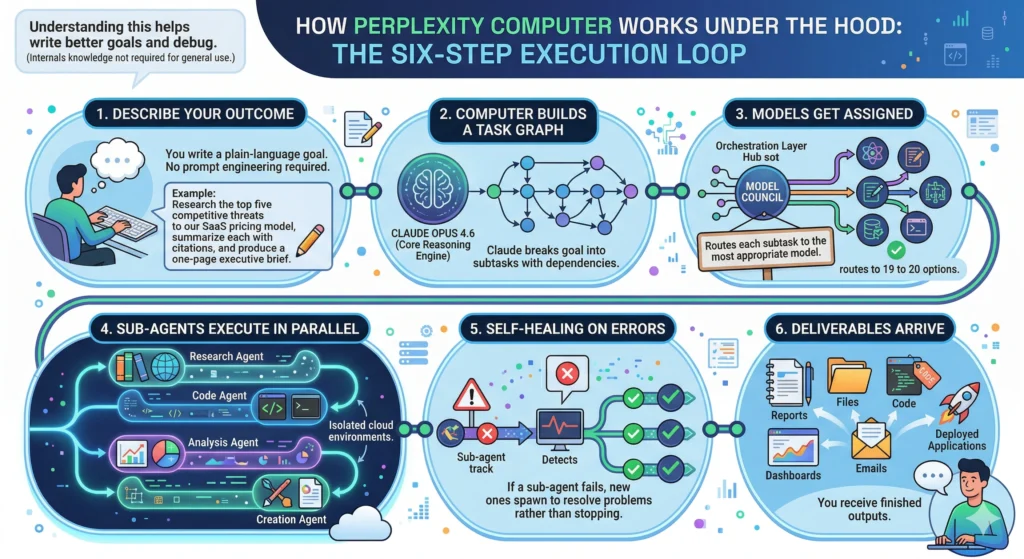
You do not need to understand the internals to use Computer effectively, but knowing the basic flow helps you write better goals and debug when outputs fall short. Here is how a task moves through the system:
- Describe your outcome — You write a plain-language goal. No prompt engineering required. For example: “Research the top five competitive threats to our SaaS pricing model, summarize each with citations, and produce a one-page executive brief.”
- Computer builds a task graph — Claude Opus 4.6, which serves as the core reasoning engine, breaks the goal into subtasks with dependencies. It figures out what needs to happen before what.
- Models get assigned — The orchestration layer, which Perplexity calls the Model Council, routes each subtask to the most appropriate model among 19 to 20 options.
- Sub-agents execute in parallel — Specialized sub-agents handle research, code, analysis, and creation simultaneously in isolated cloud environments.
- Self-healing on errors — If a sub-agent fails or hits a dead end, the system spawns new sub-agents to resolve the problem rather than stopping.
- Deliverables arrive — You receive finished outputs: reports, files, code, dashboards, emails, or deployed applications.
Multi-Model Orchestration: Why 19+ Models?
The core architectural bet behind Perplexity Computer is that no single model is best at everything, and that the right way to build a versatile AI system is to orchestrate specialists rather than rely on one generalist. The 19–20 models available in the backend include OpenAI’s GPT-5.1, Google’s Gemini Flash, Anthropic’s Claude Sonnet 4.5, and Perplexity’s own Sonar models, each selected for a particular strength domain such as coding, visual generation, retrieval, or medical analysis.
This strategy mirrors what sophisticated engineering teams already do internally when they chain multiple API calls across different providers for different steps of a pipeline. The difference is that Perplexity Computer does the routing automatically, reducing what used to require engineering effort to a single natural-language prompt.
The Secure Sandbox Architecture
Every session in Perplexity Computer runs inside its own isolated Kubernetes pod. This means the code Computer executes, the browser sessions it opens, and the files it creates exist in a completely separate environment from your organization’s internal network and from other users’ sessions. The practical implication: even if Computer is browsing the web or running scripts as part of a task, there is no pathway for that activity to reach or modify systems outside the sandbox.
The security model follows a zero-trust principle for code execution. Sandboxes have no direct network access; outbound traffic routes through an egress proxy that runs outside the sandbox and injects credentials only when needed. Code executing inside the sandbox never sees raw API keys. Sessions are stateful — a persistent filesystem is mounted for each session, so long-running workflows can pause and resume with full state intact.
How Deep Research Powers Computer
Perplexity Deep Research, accessible via the perplexity/sonar-deep-research model in the API, is the research engine that Computer draws on when a task requires information gathering. Unlike a single web search, Deep Research works iteratively: it searches, reads documents, reasons about what it learned, updates its research plan, and searches again — repeating this process across hundreds of sources until it has built a comprehensive, cited synthesis.
This is what separates Perplexity Computer from a system that simply calls a search API and pastes the results. When Computer needs to understand a market, verify a claim, or build a factual foundation for a report, the underlying Deep Research process mimics how a thorough human analyst would approach the same question: iteratively, critically, and with attention to source quality. The Sonar Deep Research model has a 128,000-token context window, can synthesize hundreds of sources, and is specifically designed for multi-step analysis across domains like finance, technology, and health.
Key Features and Capabilities
Workflow Automation and Orchestration
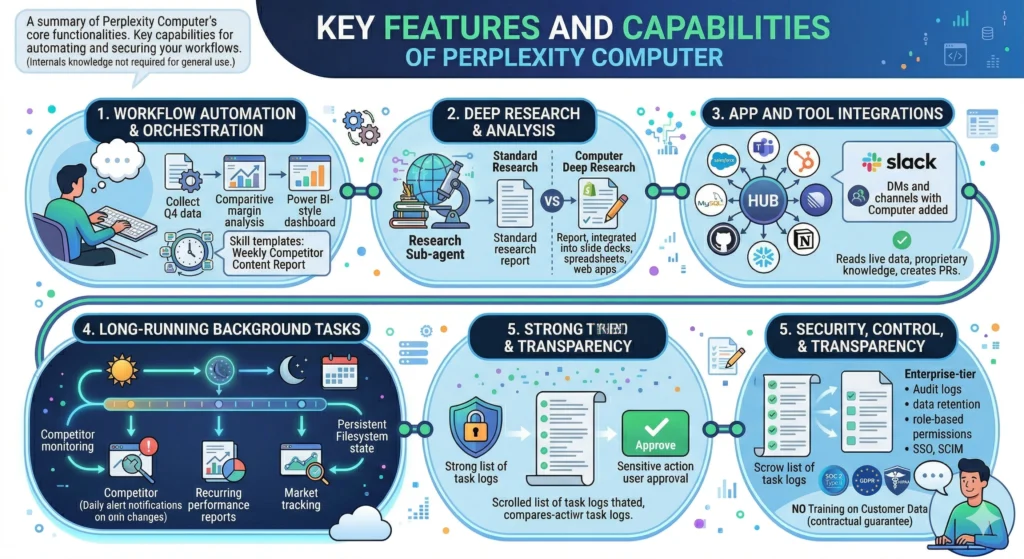
The central capability of Perplexity Computer is end-to-end workflow execution. Rather than completing a single task in a single turn, it can manage a project that unfolds across many interdependent steps. A user can define a pipeline as complex as “collect Q4 earnings data from these five companies, run a comparative margin analysis, generate a Power BI-style dashboard, and publish it to a secure internal page” — all from one prompt, with no code required.
This orchestration capability is asynchronous by design. Once you start a task, Computer works in the background. You can close the browser, start other work, or run multiple Computer sessions simultaneously — the system continues without requiring your attention until it hits a checkpoint that needs a human decision.
The Skills system extends this further. Users can build and save reusable workflow templates — called Skills — for tasks they run repeatedly. A marketing team might build a “weekly competitor content report” skill that they trigger each Monday morning with no additional setup.
Deep Research and Analysis
For tasks that require substantive research — market analysis, due diligence, literature review, competitive intelligence — Computer deploys Deep Research as a dedicated sub-agent. The result is not a summary of the top three search results; it is a structured, cited report built from iterative analysis across many sources.
In practical terms, one documented example involved a founder using Computer to generate a 12-page investment memo on Shopify — complete with financial charts, competitive analysis, and bull/bear cases — in approximately 90 minutes from a single prompt. A task that might otherwise take a senior analyst a full working day was completed in a fraction of the time, with all sources cited for verification.
The deep research vs perplexity comparison that many users consider is essentially a question of scope: standard Perplexity Deep Research gives you a research report; Computer integrates that research into a larger workflow that might also produce a slide deck, a spreadsheet model, or a deployed web application based on what was found.
App and Tool Integrations
Perplexity Computer connects to over 400 applications through its connector ecosystem. In the enterprise tier, this includes Salesforce, Microsoft Teams, HubSpot, MySQL, GitHub, Notion, Slack, Snowflake, and Linear, among many others. The Slack integration deserves specific mention: enterprises can add Computer directly to channels or DMs, enabling teams to delegate multi-step workflows from within the collaboration environment they already use without switching to a separate interface.
These integrations mean Computer can read live CRM data, query databases, create pull requests, post updates to project management tools, and incorporate proprietary internal knowledge into its outputs — rather than working only with information available on the public web.
Long-Running Background Tasks
One of the most commercially significant capabilities of Perplexity Computer is its ability to run workflows for hours, days, or months without human supervision. This enables use cases that were previously impractical for AI: monitoring a set of competitor websites daily and alerting you only when meaningful changes occur, generating recurring performance reports on a scheduled basis, or tracking a market over an extended period and surfacing trend shifts when they emerge.
Each session maintains state through the persistent filesystem. A workflow that pauses overnight picks up exactly where it left off. This continuity separates Computer from tools that require you to restart a conversation each time, losing context in the process.
Security, Control, and Transparency
Every task Computer executes is logged. Sensitive actions require explicit user approval before they execute. The Personal Computer variant (see below) includes a kill switch that immediately stops all agent activity. Enterprise deployments add audit logs, configurable data retention, role-based permissions, SSO, and SCIM provisioning.
Critically, Perplexity does not train its models on customer data — a contractual guarantee that matters for organizations handling competitive, legal, or health-related information. The platform is SOC 2 Type II certified, GDPR compliant, and HIPAA compliant.
Where and How to Access Perplexity Computer
Plans and Pricing
Perplexity Computer is not available as a standalone product. It is a feature included in the Max subscription tier, which costs $200 per month and includes 10,000 credits per month alongside unlimited Pro searches, access to advanced models, the Comet browser, and Labs.
| Plan | Monthly Price | Computer Access | Credits |
|---|---|---|---|
| Free | $0 | No | — |
| Pro | $20 | Coming soon | — |
| Max | $200 | Yes | 10,000/month |
| Enterprise Pro | $40/seat | No | — |
| Enterprise Max | $325/seat | Yes | 10,000/seat/month |
Source:
The perplexity pro vs deep research question comes up frequently: Pro at $20/month includes Deep Research (with daily query limits) but does not yet include Computer access. If your work centers on research synthesis without multi-step automation, Pro covers those needs well. Computer is the right choice when your tasks require execution across multiple tools, long-running automation, or workflow orchestration — not just research output.
For enterprise teams, the distinction between Enterprise Pro and Enterprise Max is meaningful. Enterprise Pro at $40/seat/month provides SSO, compliance features, and 500 research queries per day but does not include Computer. Enterprise Max at $325/seat/month adds Computer, unlimited research queries, and advanced model access.
Comet Browser: The Interface Layer
The Comet browser is Perplexity’s AI-native web browser, built on the Chromium framework — meaning it supports Chrome extensions and bookmarks seamlessly. After launching in July 2025 as an exclusive for Max subscribers, Comet became available free to all users in October 2025.
Comet serves as one of the primary interfaces through which Computer and Deep Research are accessible. Its built-in AI sidebar can summarize pages, draft emails, manage schedules, navigate web pages on your behalf, and complete authorized transactions without tab switching. Workspace organization groups related tabs by project, reducing the context-switching overhead that fragments complex research sessions.
For users evaluating the perplexity comet browser, the most practical distinguishing features are: real-time fact-checking against live sources, the ability to “chat” with a landing page’s content, automatic translation, and agentic task execution directly from the sidebar — all within a browser that works with the tools you already use.
Personal Computer: The Always-On Configuration
On March 11, 2026, Perplexity introduced a hardware-anchored variant called Personal Computer. This configuration runs on a dedicated Mac mini that stays active 24/7, connecting the user’s local files and applications to Perplexity’s cloud infrastructure. The Mac mini acts as a persistent task orchestrator — handling local integrations and scheduling — while Perplexity’s cloud handles the heavy reasoning.
The practical advantage of this setup is continuity: the agent maintains session state, knows your application environment, and can execute tasks at any hour without you manually restarting a session. Users can control the Mac mini remotely from any device. Every session logs activity, sensitive actions require approval, and a kill switch stops all agent activity immediately. At launch, this variant is Mac-only, with no announced timeline for Windows support.
Practical Use Cases
Business and Strategy
Competitive intelligence at scale: A strategy team at a software company can instruct Computer to monitor five competitors daily — tracking website changes, pricing updates, new product announcements, job postings, and funding news. Computer visits each site, scrapes relevant sources, compares against prior versions, and sends a summary email only when something meaningful changes. The defined threshold (“alert only when pricing changes by 10%+ or a new funding round is announced”) keeps signal-to-noise high.
Investment and market diligence: Computer can build publication-quality investment memos from a single prompt. The system pulls financial data, reads earnings transcripts, analyzes competitor margins, constructs bull/bear arguments, and formats everything into a structured document with charts and citations. The documented example above — a 12-page Shopify memo in 90 minutes — gives a realistic benchmark for what to expect.
Strategic planning inputs: Before a leadership offsite, a Chief Strategy Officer can ask Computer to research three potential expansion markets: their regulatory environments, competitive density, and entry cost estimates. Computer runs the research in parallel across all three, synthesizes each into a comparable format, and delivers structured inputs for the strategy discussion — work that would otherwise take an analyst several days.
Product, Engineering, and Data
Code projects end-to-end: Computer can take a product specification, write the code, debug it within the sandbox, and produce a working application — without requiring the user to write a single line of code themselves. Developers working on scaffolded projects can delegate boilerplate, documentation generation, and test writing to Computer while reserving architecture and design decisions for themselves.
Data analysis and visualization: Teams dealing with large datasets can hand off the full analysis pipeline: ingest data, run statistical analysis, produce visualizations, and format everything into a presentable dashboard. Perplexity’s Finance Agent, which shares the same sandbox infrastructure as Computer, demonstrates this with live market data calculations.
Automated monitoring and alerts: An engineering team running multiple services can use Computer to monitor error logs, pull data from GitHub issues and internal dashboards, and produce a weekly reliability report with trend analysis — delivered on a schedule with no manual trigger.
Marketing and Content Operations
Full campaign production: A marketer can instruct Computer to create a campaign including ad creative, social media posts, and a landing page, then build a performance tracking dashboard. This condenses what typically requires coordination across copywriting, design, and analytics into a single delegated task.
Content pipeline automation: For content-heavy operations, Computer can handle the full pipeline from brief to draft: research the topic using Deep Research, create an outline, write sections, apply a brand voice guideline, and output a formatted draft ready for editorial review. This is not replacing the editor; it is eliminating the research and scaffolding work that often takes more time than the writing itself.
SEO-informed content strategy: Research clusters, competitor content gap analysis, and keyword mapping are all tasks Computer can run across multiple competitors simultaneously, surfacing structured insights that an SEO strategist can act on directly.
Personal Productivity
Scheduling and calendar management: Computer can manage meeting scheduling, draft calendar invites based on email threads, and maintain a task list updated from multiple inputs — essentially acting as an executive assistant for professionals who do not have one.
Email triage and drafting: Rather than reading every email and composing responses from scratch, users can instruct Computer to review incoming emails by category, draft responses following defined guidelines, and surface only the messages that require a personal decision.
Research for decisions: Whether evaluating a job offer, a vendor contract, or a real estate market, Computer can perform the structured research that typically takes hours of reading across scattered sources and condense it into a single document with cited sources ready for a decision.
Enterprise-Specific Scenarios
Finance teams can use Computer to build interactive due diligence trackers for M&A transactions, automatically analyzing data room documents, flagging risks, and surfacing gaps in the information available.
Legal teams can delegate first-pass contract review: Computer reads a vendor agreement, compares it to a prior version or standard template, identifies deviations, and produces a tracked-changes document with an annotation layer explaining each flagged item.
Operations teams can connect Computer to Snowflake, Salesforce, and Slack simultaneously — enabling workflows where Computer queries live sales data, generates a performance summary, and posts it to the correct Slack channel on a scheduled basis, all without human coordination.
Best Practices and Prompting Patterns
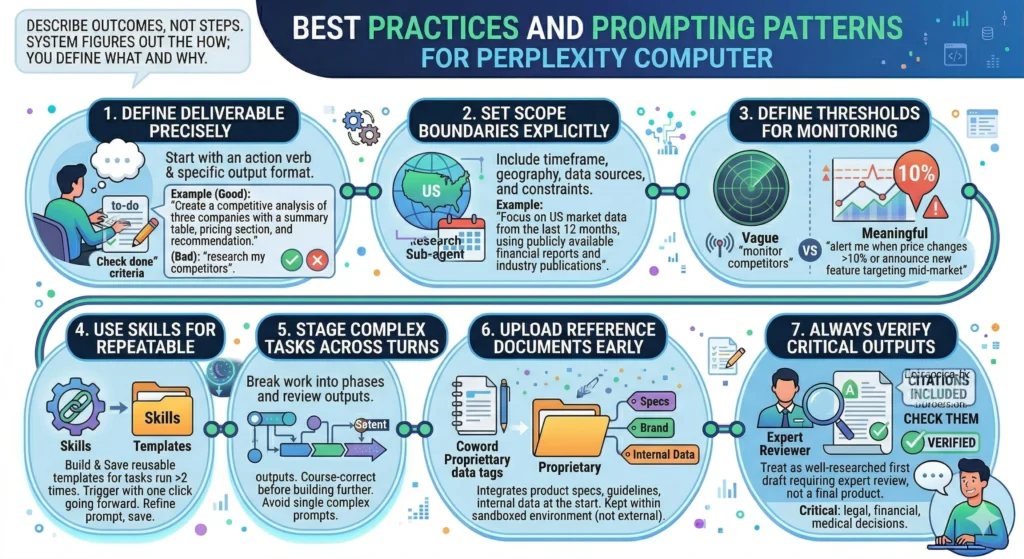
The most consistent principle for working effectively with Perplexity Computer is to describe outcomes, not steps. The system is designed to figure out the how; your job is to be clear about the what and why.
Define the deliverable precisely. Start every Computer task with an action verb and a specific output format. “Create a competitive analysis of three companies with a summary table, a section on each company’s pricing model, and a recommendation” performs better than “research my competitors.” The clearer the deliverable, the less inferential work the system has to do about what done looks like.
Set scope boundaries explicitly. Include timeframe, geography, data sources, and any constraints that should govern the research. “Focus on US market data from the last 12 months, using publicly available financial reports and industry publications” reduces irrelevant output and keeps the research focused.
Define thresholds for monitoring tasks. If you are setting up ongoing monitoring, tell Computer what “meaningful change” means for your context. A vague “monitor my competitors” prompt produces noise; “alert me when competitor pricing changes by more than 10% or they announce a new feature targeting mid-market customers” produces signal.
Use Skills for repeatable workflows. Any task you run more than twice is a candidate for a saved Skill. Build it once, refine the prompt, save it, and trigger it with a single click going forward.
Stage complex tasks across turns. For very complex projects, break the work into phases and review outputs between phases rather than attempting a single prompt that covers everything. This gives you checkpoints to course-correct before Computer builds further on a faulty foundation.
Upload reference documents early. When a task involves proprietary documents — product specs, brand guidelines, internal data — upload them at the start of the session. Computer integrates these into its outputs and keeps them within the sandboxed environment, not exposing them externally.
Always verify critical outputs. Computer’s outputs include citations precisely so you can check them. For high-stakes decisions — legal, financial, medical — treat Computer’s outputs as a well-researched first draft requiring expert review, not a final product.
Limitations and What Computer Is Not
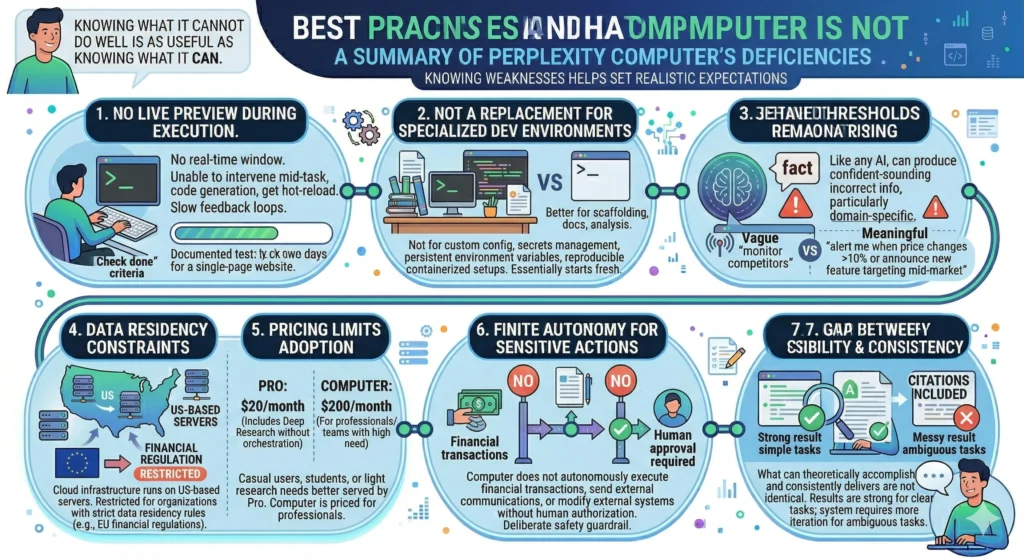
Being clear about what Perplexity Computer cannot do well is as useful as knowing what it can.
No live preview during execution. When Computer runs a task inside its sandbox, there is no real-time window showing progress. You cannot see the code being generated, intervene mid-task if the agent takes an unexpected approach, or get hot-reload feedback. For developers accustomed to rapid iteration, this friction is real — one documented test took two days to build a single-page website, largely because of these slow feedback loops.
Not a replacement for specialized developer environments. Computer is not the right tool for development work that requires custom configuration, secrets management, persistent environment variables, or reproducible containerized setups. Every session essentially starts fresh. Engineers building production software will still want their standard tools; Computer is better suited to generating scaffolding, documentation, or analysis than to long-form engineering projects.
Hallucinations remain a risk. Like any AI system, Computer can produce confident-sounding incorrect information, particularly in domain-specific contexts. Perplexity’s citation layer helps — you can trace claims to sources — but this requires you to actually check the cited sources for high-stakes outputs.
Data residency constraints for regulated industries. Computer’s cloud infrastructure runs on US-based servers. Organizations operating under strict data residency requirements (such as certain EU financial regulations) need to evaluate this carefully before routing sensitive data through the system.
Pricing limits adoption. At $200/month, Computer is positioned for professionals and small teams who will extract significant value from it. Casual users, students, or professionals with light research needs are well-served by Pro at $20/month, which includes Deep Research without the full Computer orchestration layer.
Finite autonomy for sensitive actions. Perplexity has stated that Computer does not autonomously execute financial transactions, send external communications, or modify external systems without human authorization. This is a deliberate safety guardrail, not a capability limitation — but it means fully unattended end-to-end workflows involving those categories are not yet the model.
The gap between possibility and consistency. What Computer can theoretically accomplish and what it consistently delivers across varied prompts are not identical. For well-structured, clearly scoped tasks with defined deliverables, results are strong. For ambiguous, open-ended, or highly specialized tasks, the system requires more iteration and oversight.
Future Direction and Ecosystem
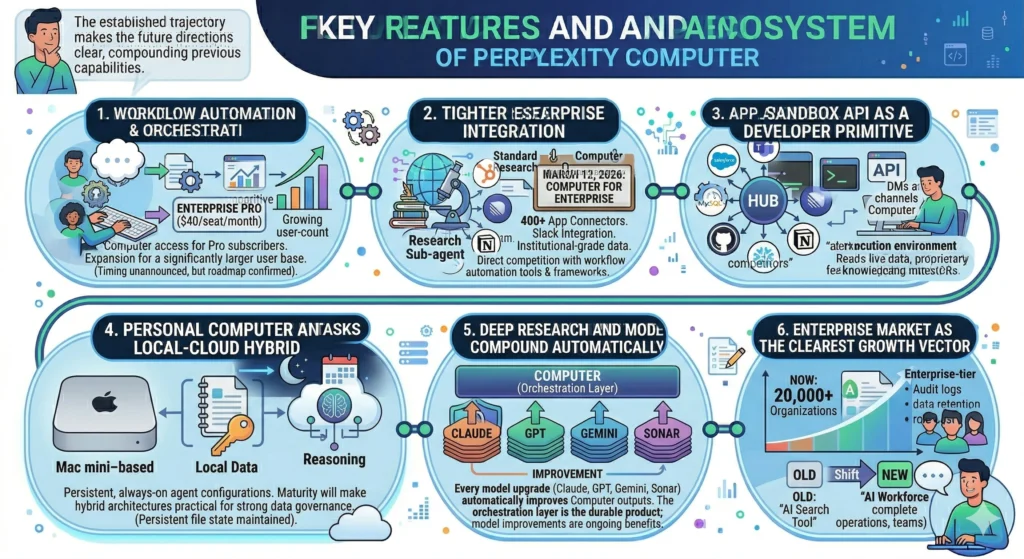
The trajectory Perplexity has established through its public product releases makes several directions clear, even without speculating about unannounced features.
Broader access tiers. Perplexity has confirmed that Computer access is on the roadmap for Pro subscribers ($20/month) and Enterprise Pro ($40/seat/month). The timing has not been announced, but this expansion would significantly increase the addressable user base.
Tighter enterprise integration. Computer for Enterprise, announced March 12, 2026, added 400+ app connectors, Slack integration, and institutional-grade data sources. The direction is clear: Perplexity is building the connector ecosystem necessary to make Computer a first-class enterprise platform, competing with workflow automation tools and internal AI deployment frameworks rather than just other AI assistants.
The Sandbox API as a developer primitive. Perplexity has released the same isolated execution environment that powers Computer as a standalone Sandbox API. This signals that Perplexity sees the sandbox infrastructure as a business in its own right, enabling third-party developers to build agentic applications on top of the same execution layer.
Personal Computer and local-cloud hybrid architectures. The Mac mini–based Personal Computer variant represents a commitment to persistent, always-on agent configurations that blend local data access with cloud reasoning. As this pattern matures, organizations with strong data governance requirements may find hybrid architectures more practical than purely cloud-based alternatives.
Deep Research and model improvements compound automatically. Because Computer sits as an orchestration layer above the underlying models, every improvement to the models it uses — Claude, GPT, Gemini, Sonar — automatically improves Computer’s outputs. This is the structural advantage Perplexity has built: the orchestration layer itself is the durable product; the model improvements are an ongoing benefit from the broader AI industry.
The enterprise market is the clearest growth vector. Perplexity currently reports 20,000+ organizations using its enterprise platform. Computer extends the value proposition from answering questions to completing work — a shift that changes the competitive framing from “AI search tool” to “AI workforce platform,” a much larger category.
Conclusion
Perplexity Computer is the most complete expression yet of what agentic AI looks like in a production product. It takes the search and research capabilities Perplexity built its reputation on, layers in multi-model orchestration and a secure execution environment, and produces a system that can do meaningful knowledge work without continuous human supervision.
The frame that makes it easiest to evaluate is the “digital worker” frame: Computer is not a better chatbot, it is a different kind of tool altogether. It is most valuable when the task is complex enough to require multiple steps, multiple tools, or sustained research — and when the cost of your own time doing that coordination outweighs the $200/month subscription.
What it is not is infallible, hands-off, or a substitute for professional judgment on high-stakes decisions. The verification responsibility does not go away; it shifts from doing the research yourself to checking what the system found. For teams that can make that shift effectively, the productivity differential is substantial.
FAQ: Common Questions About Perplexity Computer
What is the difference between Perplexity Deep Research and Perplexity Computer?
Perplexity Deep Research is a research mode that iteratively searches, reads, and synthesizes hundreds of sources into a structured report. Perplexity Computer is a full workflow platform that uses Deep Research as one component among many — it can also write code, build applications, connect to external tools, manage files, and run tasks in the background over extended periods. Deep Research answers your research question thoroughly; Computer executes entire projects that may incorporate that research as one step.
How does Perplexity Deep Research compare to ChatGPT’s Deep Research? Both systems take an iterative, multi-step approach to building research reports. On Perplexity’s own Draco benchmark, the perplexity deep research vs chatgpt comparison shows Perplexity’s Deep Research with Opus 4.6 scoring 70.5% versus Gemini Deep Research at 59.0%. Perplexity’s citation-first approach means all claims are traceable to source links by default; ChatGPT’s Deep Research produces polished prose with citations but is described by users as generally stronger on narrative coherence and production-ready formatting. Both are useful; the right choice depends on whether you prioritize verifiability (Perplexity) or structured narrative (ChatGPT).
Is Perplexity Computer available for free or on the $20/month Pro plan?
No. As of March 2026, Computer requires the Max plan at $200/month or Enterprise Max at $325/seat/month. Perplexity has stated that Pro and Enterprise Pro access is planned, but no timeline has been announced. Pro at $20/month does include Deep Research (with daily query limits), which is a strong research tool on its own.
What integrations does Perplexity Computer support?
Computer for Enterprise connects to over 400 applications. Documented integrations include Salesforce, Slack, HubSpot, MySQL, GitHub, Notion, Snowflake, Linear, and Microsoft Teams.
What AI models does Perplexity Computer use?
Computer orchestrates 19–20 models depending on the tier, including Claude Opus 4.6 (primary reasoning engine), Claude Sonnet 4.5, GPT-5.1, Gemini Flash, and Perplexity’s own Sonar models. Claude Opus 4.6 builds the task graph; the Model Council routes individual subtasks to the most appropriate model.
Key Takeaways for Beginners
- Perplexity Computer is not a chatbot — it is an AI digital worker that takes an outcome you describe, breaks it into tasks, and executes the entire workflow using 19–20 specialized AI models working in parallel.
- Deep Research is the research engine inside Computer — it iteratively searches and synthesizes hundreds of sources into cited reports; Computer uses it as one component of larger multi-step projects.
- The Comet browser is the interface layer — a Chromium-based browser with an AI sidebar that gives you direct access to Computer and Deep Research from within your normal browsing environment.
- Security is built into the architecture — each task runs in an isolated sandbox, no code sees raw API keys, Perplexity never trains on customer data, and the platform is SOC 2 Type II, GDPR, and HIPAA compliant.
- It works best for complex, multi-step tasks — the productivity gain is largest when a task requires sustained research, multi-tool coordination, or background execution over time; for simple questions, the $20/month Pro plan with Deep Research is the right starting point.