
The Best AI Planners for 2026: Organize Your Life Smarter
Keeping up with tasks, meetings, habits, and deadlines has become harder than ever, which is exactly why the AI planner category has exploded in popularity heading into 2026. Instead of manually dragging tasks around a calendar, today’s AI planner apps analyze your schedule, energy levels, and priorities to build a workable daily plan for you automatically. This guide breaks down the best AI planners for 2026, how they differ, and which one fits your specific workflow.
What Is an AI Planner?
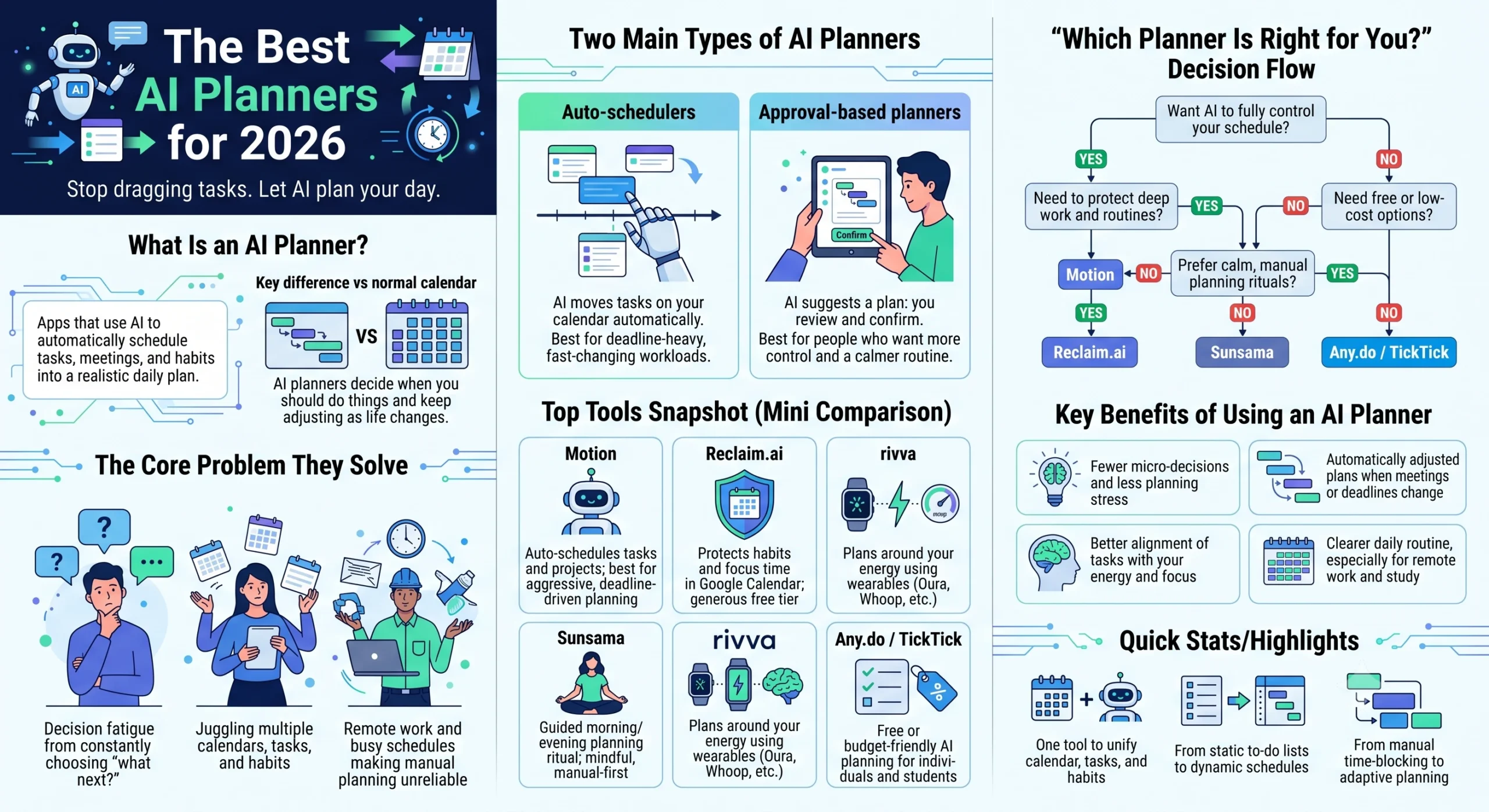
An AI planner is a scheduling app that uses artificial intelligence to automatically organize your tasks, meetings, habits, and goals into a realistic daily or weekly plan. Unlike a traditional calendar or to-do list, an AI planner actively decides when something should happen based on your existing commitments, deadlines, and even your energy patterns, then adjusts that plan in real time as things change.
Most AI planners fall into one of two categories. The first is fully autonomous auto-schedulers, which move your tasks around the calendar for you without asking permission first. The second is approval-based planners, which suggest a plan each morning that you review and confirm before it’s locked in. Understanding this distinction is the single most important factor in choosing the right AI planner, since some people want to hand over full control while others want AI assistance with a human final say.
Why AI Planners Matter in 2026
The rise of remote work, multiple overlapping calendars, and constant digital task capture has made manual planning exhausting. AI planners solve this by reducing decision fatigue: rather than deciding what to work on next every hour of the day, the software decides for you based on deadlines, meeting conflicts, and workload. This shift has made AI planners especially popular with freelancers, students, and small teams who juggle several tools and calendars at once.
Comparing the Best AI Planner Apps for 2026
| AI Planner | Best For | Standout Feature | Starting Price | Free Plan |
|---|---|---|---|---|
| Motion | Automated project scheduling | Fully autonomous AI scheduling across tasks, meetings, and projects | $19–29/seat/mo (annual) | No (7-day trial only) |
| Reclaim.ai | Protecting habits and focus time | 130+ habit templates with auto-defended time blocks | Free (Lite); $10–22/seat/mo paid tiers | Yes |
| Sunsama | Mindful, ritual-based daily planning | Guided morning and evening planning review | $20/mo (~$16–17/mo annual) | Trial only, no permanent free tier |
| Morgen | All-in-one calendar and task consolidation | AI Planner with an approval step before scheduling | $15/mo | Limited free tier |
| Akiflow | Power users with many task sources | Command-bar interface with a universal task inbox | ~$15.42–34/mo | No |
| rivva | Energy and biology-aware scheduling | Syncs with wearables like Oura and Whoop to plan around recovery data | Not fully disclosed | Not specified |
| Any.do | Free daily planning for individuals | Smart daily review prompt each morning | Free | Yes |
| TickTick | Budget task and habit tracking | Built-in Pomodoro timer plus habit tracker | ~$3/mo | Yes |
| SkedPal | Category-based time budgeting | “Time Maps” that allocate hours by category | $9.95/mo | No |
Motion: Best AI Planner for Automated Project Scheduling
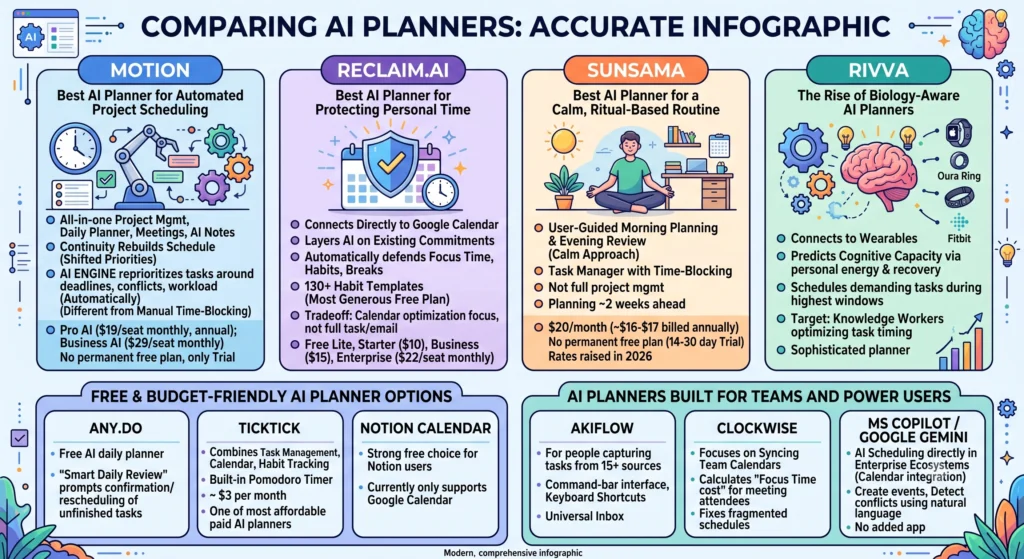
Motion combines project management, an AI daily planner, meeting scheduling, and AI note-taking into a single tool that continuously rebuilds your schedule whenever priorities shift. Its AI engine automatically reprioritizes and reschedules tasks around deadlines, conflicts, and workload, which sets it apart from tools that require manual time-blocking. Pricing ranges from $19 per seat monthly for the Pro AI plan (billed annually) up to $29 per seat monthly for Business AI, and there’s no permanent free plan, only a short trial. For people already paying for separate calendar, task, and meeting-scheduling apps, Motion’s all-in-one pricing can work out cheaper than running several tools side by side.
Reclaim.ai: Best AI Planner for Protecting Personal Time
Reclaim.ai connects directly to Google Calendar and layers AI scheduling on top of your existing commitments, automatically defending focus time, habits, and breaks. It ships with more than 130 habit templates and is widely considered the most generous free AI planner on the market. Reclaim’s four pricing tiers run from a free Lite plan up to a $22 per seat monthly Enterprise plan, with Starter and Business tiers priced at $10 and $15 per seat respectively. The main tradeoff is scope, since Reclaim focuses almost entirely on calendar optimization rather than full task or email management.
Sunsama: Best AI Planner for a Calm, Ritual-Based Routine
Sunsama takes a more deliberate approach than fully automated tools, guiding users through a structured morning planning session and an evening review rather than making scheduling decisions on its own. It only allows planning about two weeks ahead and functions more as a task manager with time-blocking than a full project-management platform. After holding its price steady for roughly five years, Sunsama raised rates in 2026 to $20 per month, or around $16 to $17 monthly when billed annually, with additional team seats billed separately. There’s no permanent free plan, just a trial ranging from 14 to 30 days depending on the source.
rivva and the Rise of Biology-Aware AI Planners
A newer wave of AI planners now factors in personal energy and recovery data rather than just open calendar slots. rivva connects with wearables such as Apple Watch, Oura, Whoop, and Fitbit to predict when your cognitive capacity will be highest and schedules demanding tasks during those windows. This approach is aimed at knowledge workers who’ve noticed the same task can take dramatically longer depending on the time of day it’s tackled. Reviewers consider rivva and Motion the two most sophisticated AI planners tested in 2026, with rivva better suited to people whose real challenge is timing tasks correctly rather than simply finding empty time slots.
Free and Budget-Friendly AI Planner Options
Not every AI planner requires a subscription. Any.do offers a free AI-powered daily planner built around a “smart daily review” that prompts users each morning to confirm tasks and reschedule anything left unfinished. TickTick combines task management, calendar view, and habit tracking with a built-in Pomodoro timer for roughly $3 per month, making it one of the most affordable paid AI planners tested. Notion Calendar is also a strong free choice for people already living inside Notion, though it currently only supports Google Calendar integration.
AI Planners Built for Teams and Power Users
Akiflow is designed for people who capture tasks from 15 or more different sources and prefer a command-bar interface with keyboard shortcuts over point-and-click navigation, funneling everything into one universal inbox. Clockwise focuses specifically on syncing team calendars and calculating a “Focus Time cost” for every meeting attendee, making it a favorite for fixing fragmented team schedules. Microsoft Copilot and Google Calendar’s Gemini integration bring AI scheduling directly into existing enterprise ecosystems, letting users create events and detect conflicts using natural language without adding another app to the stack.
How to Choose the Right AI Planner for You
The right AI planner depends largely on how much control you want to hand to the algorithm versus wanting an approval step before any changes hit your schedule. If your main struggle is protecting personal habits and focus time, Reclaim.ai is the strongest fit, while people managing deadline-heavy projects with shifting priorities are usually better served by Motion’s fully autonomous scheduling. Anyone who prefers a calmer, ritual-based approach with explicit morning and evening check-ins should look at Sunsama, while budget-conscious users or students may find Any.do or TickTick perfectly sufficient without paying for a subscription.
| Use Case | Recommended AI Planner |
|---|---|
| Fully automated project and task scheduling | Motion |
| Protecting habits and personal focus time | Reclaim.ai |
| Calm, manual-first daily planning ritual | Sunsama |
| Free, lightweight daily planning | Any.do |
| Energy and biology-aware scheduling | rivva |
| Power users with many task sources | Akiflow |
| Fixing team meeting culture | Clockwise |
Frequently Asked Questions About AI Planners
Is there a free AI planner?
Yes. Reclaim.ai offers a permanent free Lite tier, and Any.do and TickTick both provide free versions with core AI planning features.
What’s the difference between an AI planner and a regular calendar app?
A regular calendar only displays what you schedule manually, while an AI planner actively decides when tasks should happen and adjusts your plan automatically as priorities and conflicts change.
Which AI planner is best for teams?
Clockwise is built specifically for team calendar coordination and reducing meeting overload, while Motion also supports shared projects and team workload views on its Business plan.
Final Thoughts
The best AI planner for 2026 isn’t a one-size-fits-all answer; it depends on whether you want an app that fully automates your schedule, one that simply suggests a plan for your approval, or a free tool that covers the basics. What’s clear across the category is a broader shift away from static to-do lists toward continuous, context-aware scheduling that adapts to real disruptions, personal energy levels, and long-term habits. Starting with a free tier from Reclaim.ai, Any.do, or TickTick is a low-risk way to experience AI planning before committing to a paid tool like Motion or Sunsama.