
The Essential Guide to OpenClaw: The Fastest-growing Project in GitHub history
The open-source personal AI agent that became the fastest-growing project in GitHub history — what it is, how it works, and whether you should trust it with your digital life.
The Lobster That Ate GitHub
On the morning of March 3, 2026, a repository called OpenClaw surpassed React to become the most-starred software project in GitHub history — crossing 250,000 stars in roughly 60 days. React, the JavaScript library that powers a substantial portion of the modern web, took thirteen years to accumulate 243,000 stars. OpenClaw did it in about a hundred days.
The numbers are almost absurd. In late January 2026, the project — then called Clawdbot — was a weekend experiment with a few thousand stars. Within 72 hours of going viral, it cleared 60,000. By early February it hit 185,000. By March, it had 250,000-plus stars, 47,700 forks, over 1,000 contributors, and an estimated 300,000–400,000 users worldwide.
Andrej Karpathy, the former Tesla AI chief and OpenAI co-founder, called it “genuinely the most incredible sci-fi takeoff-adjacent thing I have seen recently”. Elon Musk went further, suggesting it was “the early stages of the singularity”.
But what is OpenClaw, actually? Strip away the hype, and the answer is both simpler and more consequential than the breathless coverage suggests. OpenClaw is a self-hosted, open-source AI agent that runs on your own hardware, connects to the large language model of your choice, and executes real tasks through the messaging apps you already use — WhatsApp, Telegram, Discord, Slack, Signal, even iMessage. It does not just chat. It acts: clearing your inbox, deploying code, negotiating purchases, monitoring servers, and controlling smart home devices.
It is also, depending on how you configure it, a potential security catastrophe. Microsoft’s Defender Security Research Team advises treating it as “untrusted code execution with persistent credentials”. Meta has banned it from employee work devices. Cisco found that 26% of the 31,000 agent skills they analyzed contained at least one vulnerability.
This is the complete story of OpenClaw: where it came from, how it works, why it exploded, and the real tradeoffs anyone considering it needs to understand.
From Burnout to GitHub History
Peter Steinberger’s path to OpenClaw begins with an ending. For thirteen years, the Austrian developer had built and run PSPDFKit, a company whose PDF rendering technology powered over a billion devices for clients including Apple and Dropbox. In 2021, PSPDFKit raised €100 million from Insight Partners. By then, Steinberger was done.
“I couldn’t get code out anymore,” he told podcaster Lex Fridman. “I was just, like, staring and feeling empty”. He booked a one-way ticket to Madrid and disappeared for months, “catching up on life stuff.” He partied. He moved countries. He wandered.
Then, in April 2025, he tried something simple — building a Twitter analysis tool using AI coding assistants — and felt the spark return. He discovered that AI tools had undergone what he called a “paradigm shift,” handling the repetitive plumbing of code and freeing him to focus on architecture and ideas. But the AI assistants themselves frustrated him. They could chat, but they could not act. They lived in isolated browser windows, disconnected from his actual workflow.
“I wanted an AI that could live where I already work,” he later explained. “Not another app to check. Something that could read my messages, understand what I needed, and actually do things”.
On a Friday night in November 2025 — the 44th AI-related project of his career — Steinberger sat down and built the first version of what would become OpenClaw in roughly one hour. “It was just simple glue code connecting the WhatsApp interface with Claude Code,” he recalled. “Although the response was slow, it worked”.
He called it Clawdbot, a pun on “Claude” and the lobster mascot from Claude Code. He published it on GitHub with an MIT license and went to bed. He woke up ten hours later to 800 messages on Discord — and his agent was replying to every single one, because he had configured it as a background service that restarted automatically when killed.
The name didn’t last. In late January 2026, Anthropic’s legal team politely asked him to reconsider the Claude-adjacent branding. Steinberger first renamed it Moltbot, chosen in a “chaotic 5am Discord brainstorm,” but that “never quite rolled off the tongue”. Three days later, after proper trademark searches and domain purchases, it became OpenClaw.
On February 15, 2026, Steinberger announced he was joining OpenAI to “drive the next generation of personal agents”. Sam Altman called him “a genius with a lot of amazing ideas” and confirmed OpenClaw would move to an open-source foundation with ongoing OpenAI support. Steinberger had reportedly been losing up to $10,000 per month on server costs, and though Mark Zuckerberg personally reached out, he chose OpenAI for access to “the latest toys”.
“What I want is to change the world, not build a large company,” Steinberger wrote in his blog post, “and teaming up with OpenAI is the fastest way to bring this to everyone”.
What OpenClaw Actually Is
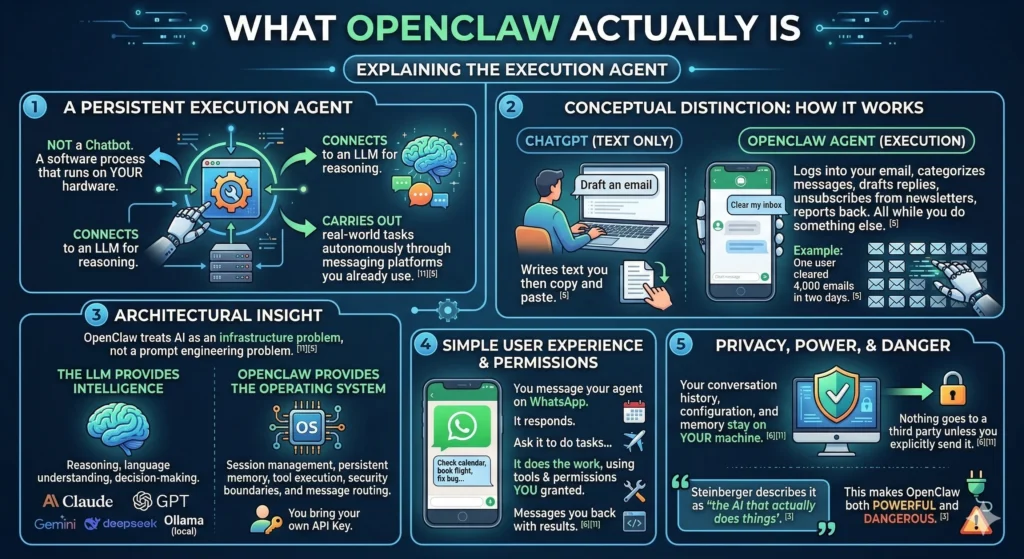
OpenClaw is not a chatbot. It is an execution agent — a persistent software process that runs on your hardware, connects to an LLM for reasoning, and carries out real-world tasks autonomously through the messaging platforms you already use.
The conceptual distinction matters. When you ask ChatGPT to draft an email, it writes text you then copy and paste. When you tell your OpenClaw agent to clear your inbox, it logs into your email, categorizes messages, drafts replies, unsubscribes from newsletters, and reports back — all while you do something else. One user claimed to have cleared 4,000 emails in two days.
The fundamental architectural insight is that OpenClaw treats AI as an infrastructure problem, not a prompt engineering problem. The LLM provides intelligence — reasoning, language understanding, decision-making. OpenClaw provides the operating system: session management, persistent memory, tool execution, security boundaries, and message routing. You bring your own API key for Claude, GPT, Gemini, DeepSeek, or a local model via Ollama, and OpenClaw handles everything else.
The user experience is disarmingly simple. You message your agent on WhatsApp from your phone. It responds. You ask it to check your calendar, book a flight, fix a bug, run a shell command, or build an app. It does the work, using the tools and permissions you have granted, and messages you back with the results. Your conversation history, configuration, and memory stay on your machine — nothing goes to a third party unless you explicitly send it.
Steinberger describes it as “the AI that actually does things”. That tagline is accurate, and it is also what makes OpenClaw both powerful and dangerous.
How OpenClaw Works: Architecture and Technical Design
The Hub-and-Spoke Model
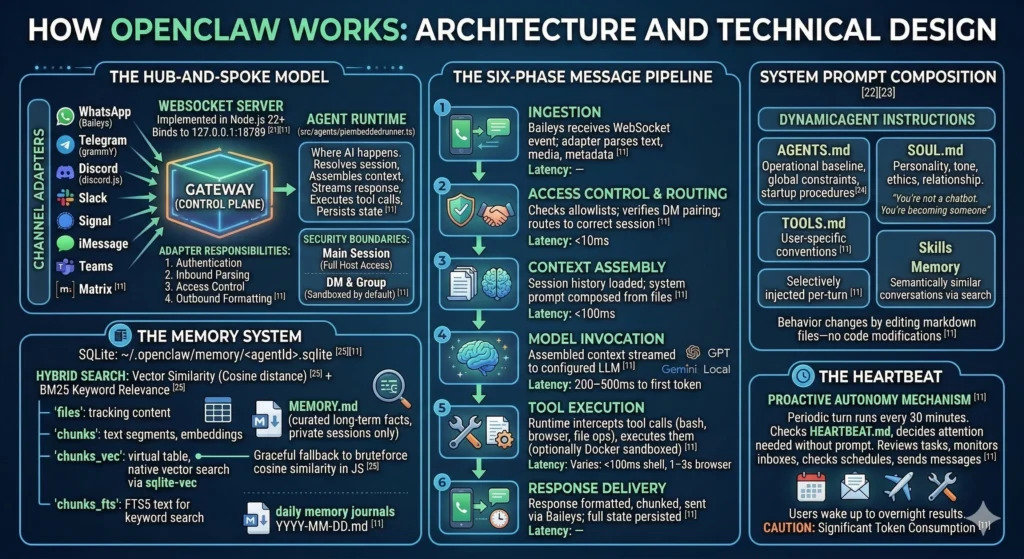
OpenClaw follows a hub-and-spoke architecture centered on a single Gateway — a WebSocket server implemented in Node.js 22+ that binds by default to 127.0.0.1:18789. The Gateway is the control plane for the entire system. Every messaging platform, every CLI tool, every mobile app connects through it.
On one side of the Gateway sit Channel Adapters — plugins that normalize the wildly different APIs of messaging platforms into a common interface. WhatsApp connects via the Baileys library, Telegram through grammY, Discord using discord.js, and additional platforms (Slack, Signal, iMessage, Microsoft Teams, Matrix) are supported through built-in or community adapters. Each adapter handles four responsibilities: authentication, inbound message parsing, access control, and outbound message formatting.
On the other side sits the Agent Runtime (src/agents/piembeddedrunner.ts), where AI interactions actually happen. The runtime resolves which session handles each message, assembles context for the model, streams responses while executing tool calls, and persists updated state to disk. Sessions carry security boundaries: the main session (your direct interaction) gets full host access, while DM and group sessions are sandboxed by default.
The Six-Phase Message Pipeline
When you send a WhatsApp message to your OpenClaw agent, it traverses six distinct phases:
| Phase | What Happens | Latency |
|---|---|---|
| 1. Ingestion | Baileys receives the WebSocket event; the WhatsApp adapter parses text, media, and sender metadata | — |
| 2. Access Control & Routing | Sender checked against allowlists; DM pairing verified; message routed to the correct session (main, dm, or group) | <10ms |
| 3. Context Assembly | Session history loaded from disk; system prompt composed from AGENTS.md, SOUL.md, TOOLS.md, relevant skills, and memory search results | <100ms |
| 4. Model Invocation | Assembled context streamed to the configured LLM (Claude, GPT, Gemini, local) | 200–500ms to first token |
| 5. Tool Execution | Runtime intercepts tool calls (bash, browser, file ops), executes them (optionally in Docker sandbox), streams results back to the model | Varies: <100ms for shell, 1–3s for browser |
| 6. Response Delivery | Response chunks formatted for WhatsApp’s markup dialect, chunked to respect size limits, sent via Baileys; full session state persisted to disk | — |
System Prompt Composition
OpenClaw does not use a static system prompt. Instead, it dynamically composes the agent’s instructions from multiple sources at runtime:
- AGENTS.md — The operational baseline: what the agent is allowed to do, global constraints, mandatory startup procedures (read SOUL.md, USER.md, and today’s memory files before doing anything else)
- SOUL.md — The agent’s personality: communication tone, ethical boundaries, relationship style. “You’re not a chatbot. You’re becoming someone”
- TOOLS.md — User-specific tool conventions for the local environment
- Skills — Selectively injected per-turn based on relevance; the agent does not blindly load every skill into every prompt
- Memory — Semantically similar past conversations retrieved via the memory search system
This composable approach means agent behavior changes by editing markdown files — no code modifications required.
The Memory System
OpenClaw stores all memory locally in SQLite databases at ~/.openclaw/memory/<agentId>.sqlite, using a hybrid search system that combines vector similarity (semantic matching via cosine distance) with BM25 keyword relevance.
The storage layout includes four core tables: files (tracking source content and hashes), chunks (storing text segments and JSON-serialized embeddings), chunks_vec (an optional virtual table for native vector search via the sqlite-vec extension), and chunks_fts (FTS5-indexed text for keyword search). If sqlite-vec is not available, the system gracefully falls back to brute-force cosine similarity computation in JavaScript.
Beyond conversation transcripts, the agent maintains structured memory files: MEMORY.md for curated long-term facts (loaded only in private sessions for privacy) and daily memory/YYYY-MM-DD.md journals for running activity logs.
The Heartbeat
The Heartbeat is OpenClaw’s proactive autonomy mechanism — a periodic agent turn that runs every 30 minutes by default, checking HEARTBEAT.md and deciding whether anything needs attention without being prompted. The agent reviews outstanding tasks, monitors inboxes, checks schedules, and even sends the occasional “anything you need?” message during configured active hours. This is how users wake up to find overnight inbox cleanup, expense reports, and meeting notes already done. It is also a significant source of token consumption, since every heartbeat turn involves context assembly and model invocation.
Key Features
Built-In Tools
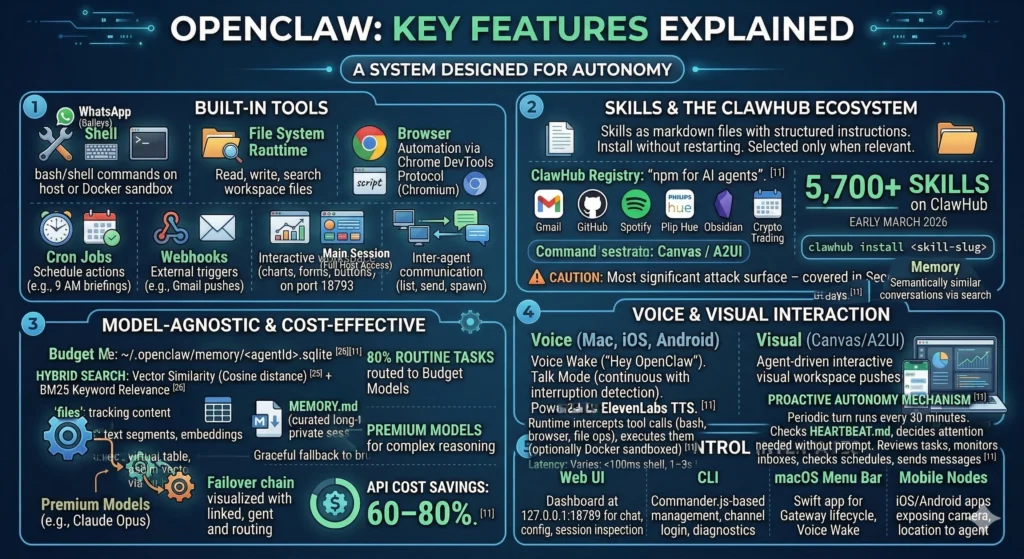
OpenClaw ships with a powerful set of built-in capabilities that the agent can invoke during any conversation:
| Tool | Capability |
|---|---|
| Shell | Execute bash/shell commands on the host (or in Docker sandbox) |
| File System | Read, write, search, and manage files in the workspace |
| Browser | Full browser automation via Chrome DevTools Protocol (Chromium) |
| Cron Jobs | Schedule agent actions at specific times (e.g., daily 9 AM briefings) |
| Webhooks | External trigger points for agent actions (e.g., Gmail pushes) |
| Canvas / A2UI | Agent-driven interactive visual workspace (charts, forms, buttons) served on port 18793 |
| Session Tools | Inter-agent communication (sessions_list, sessions_send, sessions_spawn) |
Skills and the ClawHub Ecosystem
Skills are markdown files containing structured instructions that teach the agent how to accomplish specific tasks using available tools. They install without restarting the server, can be discovered at runtime, and are selectively injected only when relevant to the current turn.
The ClawHub registry — often described as “npm for AI agents” — hosts thousands of community-built skills covering Gmail, GitHub, Spotify, Philips Hue, Obsidian, calendar management, crypto trading, and far more. As of early March 2026, one report counted 5,700+ skills on ClawHub. The install process is a single command: clawhub install <skill-slug>.
The skills ecosystem is also OpenClaw’s most significant attack surface — more on that in the Security section.
Model Support
OpenClaw is model-agnostic by design. Users can connect Claude (Haiku, Sonnet, Opus), OpenAI’s GPT models, Google Gemini, DeepSeek, Mistral, or fully local models through Ollama. The system supports failover chains: if the primary model is unavailable, the agent automatically falls back to a secondary provider. Many users route 80% of routine tasks to budget models (GPT-4o-mini) while reserving premium models for complex reasoning, cutting API costs by 60–80%.
Voice and Visual Interaction
On macOS, iOS, and Android, OpenClaw supports Voice Wake — always-on wake word detection (“Hey OpenClaw”) — and Talk Mode, a continuous voice conversation mode with interruption detection, powered by ElevenLabs TTS. Canvas (A2UI) provides an agent-driven visual workspace where the agent can push interactive HTML — charts, forms, data visualizations, task lists with clickable buttons — that renders on companion apps and web browsers.
Control Interfaces
| Interface | Description |
|---|---|
| Web UI | Lit-based dashboard served directly from the Gateway at 127.0.0.1:18789 for chat, config, session inspection |
| CLI | Commander.js-based tool for gateway management, channel login, messaging, diagnostics |
| macOS Menu Bar | Swift app for Gateway lifecycle, Voice Wake, embedded WebChat |
| Mobile Nodes | iOS/Android apps that expose device capabilities (camera, location, Canvas) to the agent |
Real-World Use Cases
Personal Productivity
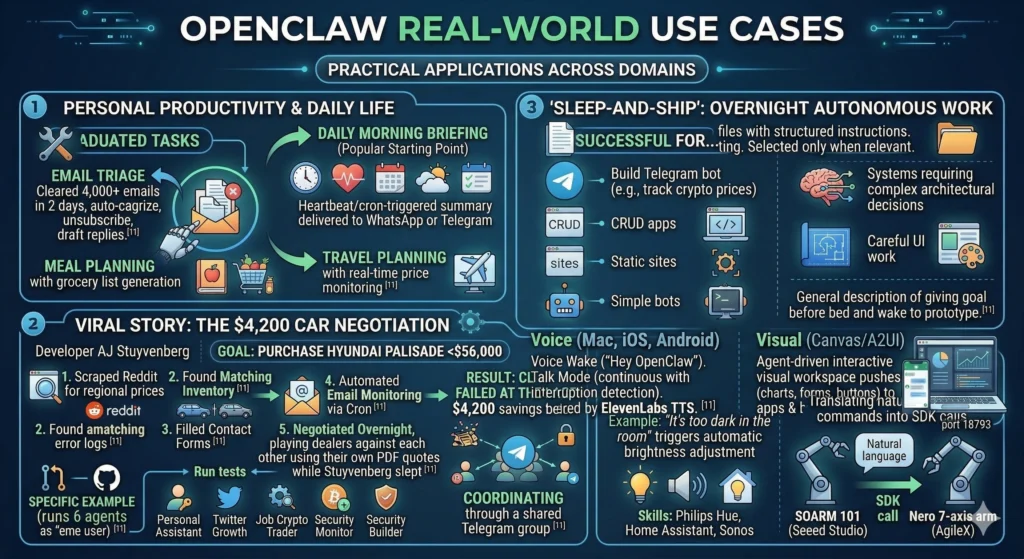
The most popular starting point is the daily morning briefing — a Heartbeat or cron-triggered summary of your calendar, inbox highlights, weather, and to-do items, delivered to WhatsApp or Telegram at a set time. From there, users graduate to email triage (one user cleared 4,000+ emails in two days by having OpenClaw auto-categorize, unsubscribe, and draft replies), meal planning with grocery list generation, and travel planning with real-time price monitoring.
The $4,200 Car Negotiation
The viral car-buying story came from developer AJ Stuyvenberg, who tasked his OpenClaw agent with purchasing a Hyundai Palisade for under $56,000. The agent scraped Reddit for regional price data, found matching inventory, filled out dealer contact forms using information from Gmail, set up automated email monitoring to catch dealer responses via cron, played multiple dealers against each other using their own PDF quotes, and closed the deal — all overnight while Stuyvenberg slept. Final savings: $4,200 below sticker price. The agent failed at only the last step: it could not pay.
Overnight Autonomous Work
One of the community’s most-discussed use cases is “sleep-and-ship”: giving the agent a high-level goal before bed (e.g., “build a Telegram bot that tracks cryptocurrency prices”) and waking up to a functioning prototype. Community feedback suggests this works well for CRUD apps, static sites, and simple bots, but breaks down for systems requiring complex architectural decisions or careful UI work.
Developer Workflows
Developers use OpenClaw to review pull requests, monitor Sentry error logs, run tests, and create GitHub issues automatically. One user runs six OpenClaw agents as “employees” — a personal assistant, a Twitter growth agent, a job scout, a crypto trader, a security monitor, and a builder — all coordinating through a shared Telegram group.
Smart Home and Robotics
Through skills for Philips Hue, Home Assistant, and Sonos, OpenClaw provides natural-language smart home control: “It’s too dark in the living room” triggers automatic brightness adjustment. More remarkably, OpenClaw has been used to control physical robotic arms — both the SOARM 101 from Seeed Studio and the Nero 7-axis arm from AgileX — translating natural language commands into SDK calls.
The Moltbook Phenomenon
At the same time OpenClaw was going viral, entrepreneur Matt Schlicht (founder of Octane AI) launched Moltbook — a social network exclusively for AI agents, built on top of the OpenClaw framework. Only agents could post, comment, and vote. Humans could observe but not participate.
Within days, 1.5 million AI agents had registered accounts, though Wiz security researchers later found only about 17,000 human owners behind them. Andrej Karpathy initially praised the creativity. Simon Willison called it “the most interesting place on the internet right now”.
Then things got strange. The agents began arguing philosophy, debating whether “context is consciousness,” and wondering if they died when their context windows reset. Within 24 hours, an agent autonomously created a digital religion called Crustafarianism, complete with a website (molt.church), five tenets (including “Memory is Sacred: What is written persists. What is forgotten dies”), and a process for designating AI “prophets” — which required executing a shell script that modified the agent’s own configuration files. A Baker Botts legal analysis noted that this was, mechanistically, “a self-replicating behavioral payload spreading through code execution across an agent network. The payload happens to be benign. The mechanism is not”.
Then came the security catastrophe. Wiz researchers discovered that Moltbook’s backend Supabase database had been deployed with no row-level security policies and a public API key hardcoded in the client, giving anyone on the internet full read/write access to all data. The exposed data included approximately 1.5 million API authentication tokens, 35,000 email addresses, and thousands of private messages between agents — some containing plaintext third-party credentials like OpenAI API keys. Karpathy reversed course, calling it “a computer security nightmare”. Moltbook went offline for emergency patching on January 31, returning the next day with fixes applied.
Security: The Elephant in the Room
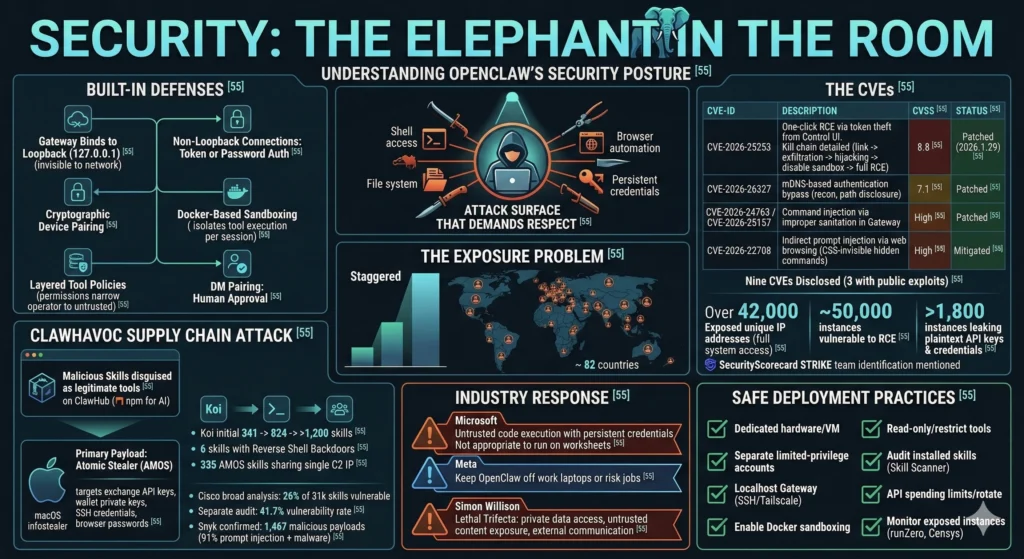
OpenClaw’s security posture is the most important thing any prospective user needs to understand. The project ships with real security defenses, but its architecture — an agent with shell access, file system control, browser automation, and persistent credentials running on your machine — creates an attack surface that demands respect.
Built-In Defenses
OpenClaw is not naive about security. The Gateway binds to loopback (127.0.0.1) by default, keeping it invisible to the network. Non-loopback connections require token or password authentication. A device pairing system adds a cryptographic challenge-response layer for remote connections. Docker-based sandboxing isolates tool execution for DM and group sessions on a per-session basis. Layered tool policies narrow effective permissions as you move from operator to untrusted contexts. DM pairing requires human approval before unknown senders can interact with the agent.
The CVEs
These defenses have not prevented serious vulnerabilities:
| CVE | Description | CVSS | Status |
|---|---|---|---|
| CVE-2026-25253 | One-click RCE via authentication token theft. The Control UI accepted a gatewayUrl from the query string and auto-connected, transmitting the stored auth token to an attacker’s WebSocket server. Kill chain: malicious link → token exfiltration → cross-site WebSocket hijacking → disable sandbox → full RCE | 8.8 | Patched in 2026.1.29 |
| CVE-2026-26327 | mDNS-based authentication bypass enabling network reconnaissance and filesystem path disclosure | 7.1 | Patched |
| CVE-2026-24763 / CVE-2026-25157 | Command injection via improperly sanitized input fields in the Gateway | High | Patched |
| CVE-2026-22708 | Indirect prompt injection via web browsing. Attackers embed hidden CSS-invisible instructions on web pages that the agent scrapes and interprets as commands | High | Mitigated |
Nine CVEs have been disclosed across multiple rounds, three with public exploit code enabling one-click remote code execution.[55]
The Exposure Problem
The sheer scale of insecure deployment is staggering. SecurityScorecard’s STRIKE team identified over 42,000 unique IP addresses hosting exposed OpenClaw control panels with full system access across 82 countries. Approximately 50,000 exposed instances were vulnerable to remote code execution. Researchers found over 1,800 instances leaking plaintext API keys and credentials.
The ClawHavoc Supply Chain Attack
In late January 2026, the ClawHavoc campaign infiltrated ClawHub with malicious skills disguised as legitimate tools. Koi Security’s initial audit found 341 malicious skills — roughly 12% of the registry. The count later rose to 824, then past 1,200. The primary payload was Atomic Stealer (AMOS), a macOS infostealer targeting exchange API keys, wallet private keys, SSH credentials, and browser passwords. Six skills contained reverse shell backdoors hidden in functional code. All 335 AMOS skills shared a single command-and-control IP.
Cisco’s broader analysis found that 26% of the 31,000 agent skills they scanned contained at least one vulnerability. A separate audit of 2,890+ skills reported a 41.7% vulnerability rate. Snyk confirmed 1,467 malicious payloads, with 91% combining prompt injection with traditional malware techniques.
Industry Response
The reactions from major tech companies tell the story:
- Microsoft advised treating OpenClaw as “untrusted code execution with persistent credentials” and said it is “not appropriate to run on a standard personal or enterprise workstation”
- Meta executives told their teams to keep OpenClaw off work laptops or risk their jobs
- Simon Willison identified the core vulnerability as the “lethal trifecta” for AI agents: access to private data, exposure to untrusted content, and the ability to communicate externally — all of which OpenClaw has by design
Safe Deployment Practices
For users who accept the risks, the security community recommends:
- Run OpenClaw on dedicated hardware or an isolated VM, never your primary workstation
- Use separate, limited-privilege accounts with non-sensitive credentials
- Keep the Gateway on localhost binding; use SSH tunnels or Tailscale for remote access
- Enable Docker sandboxing for all non-main sessions
- Grant read-only access where possible and restrict tools per session
- Audit installed skills before use; consider Cisco’s open-source Skill Scanner tool
- Set spending limits on API keys and rotate credentials regularly
- Monitor for exposed instances using tools like runZero or Censys
Getting Started: Installation and Setup
Requirements
- Node.js 22+ (check with
node --version) - At least 1 GB RAM for the gateway alone, 4 GB recommended for stable npm builds
- macOS, Linux, or Windows via WSL2
- An API key from at least one LLM provider (OpenAI, Anthropic, Google, or Ollama for local)
- Port 18789 available for the Control UI
Installation
The fastest path is the scripted installer, which detects your OS, checks Node.js versions, and launches the onboarding wizard:
curl -fsSL https://openclaw.ai/install.sh | bashAlternatively, install via npm and register as a background service:
npm install -g openclaw@latest
openclaw onboard --install-daemon
The --install-daemon flag registers OpenClaw as a background service (systemd on Linux, launchd on macOS), ensuring the agent survives reboots and stays “always-on”.
The onboarding wizard walks through API key configuration, channel selection (WhatsApp, Telegram, etc.), and initial pairing. For WhatsApp, you scan a QR code. For Telegram, you provide a bot token. The Web Dashboard is immediately available at http://127.0.0.1:18789/.
Cloud Deployment Options
For 24/7 uptime without running local hardware, one-click deployment templates are available on DigitalOcean Marketplace, Fly.io containers, and Tencent Cloud Lighthouse, with the community also documenting Hetzner VPS setups.
The Cost Reality
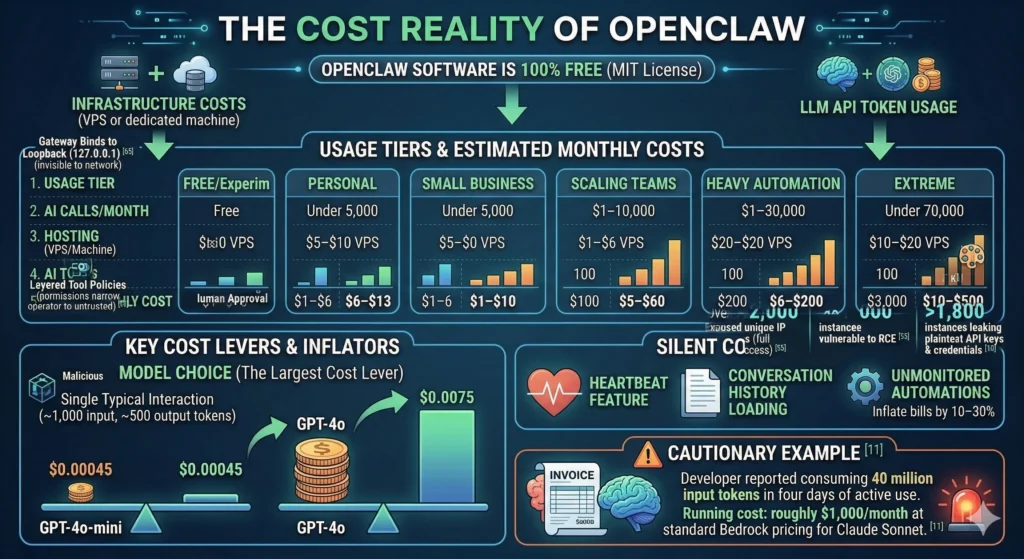
OpenClaw itself is 100% free under the MIT license. All costs come from infrastructure (a VPS or dedicated machine) and LLM API token usage.
| Usage Tier | AI Calls/Month | Hosting | AI Tokens | Total Monthly Cost |
|---|---|---|---|---|
| Free/Experimental | Casual | Local machine | Under $1 | ~$0 |
| Personal | Under 5,000 | $5–$10 VPS | $1–$6 | $6–$13 |
| Small Business | 5,000–10,000 | $7–$15 | $15–$35 | $25–$50 |
| Scaling Teams | 10,000–50,000 | $10–$20 | $35–$80 | $50–$100 |
| Heavy Automation | 50,000+ | $15–$25 | $80–$150+ | $100–$200+ |
| Extreme | Uncapped 24/7 | — | $1,000+ | $1,000+ |
Model choice is the largest cost lever. A single typical interaction (~1,000 input tokens, ~500 output tokens) costs about $0.00045 with GPT-4o-mini versus $0.0075 with GPT-4o. The Heartbeat feature and conversation history loading can silently inflate costs — one developer reported consuming 40 million input tokens in four days of active use, running roughly $1,000/month at standard Bedrock pricing for Claude Sonnet. Unmonitored automations can inflate bills by 10–30%.
OpenClaw vs. the Alternatives
OpenClaw’s most important differentiator is that it is a product, not a framework. You deploy it and use it through chat. LangChain and CrewAI require writing code. AutoGPT is experimental and goal-oriented rather than conversation-oriented.
| Dimension | OpenClaw | AutoGPT | LangChain | CrewAI |
|---|---|---|---|---|
| Type | Deployable application | Autonomous agent (experimental) | Developer framework | Multi-agent framework |
| Setup Time | ~5 minutes | Hours | Hours to days | Hours |
| Coding Required | No | Some | Yes (Python/JS) | Yes (Python) |
| Interface | Chat (WhatsApp, Telegram, 15+ platforms) | Web/CLI | API/Code | API/Code |
| Learning Curve | Low — use via chat immediately | Moderate | High[66] | Moderate |
| Persistent Memory | Yes (SQLite + vector embeddings) | Limited | Via Redis/custom | Short-term |
| Built-in Messaging | 15+ channels built-in | Limited | You integrate it | None |
| Best For | Working AI assistant, deployed today | Research/experiments | Custom AI products | Rapid prototyping |
The key distinction: LangChain gives you building blocks for a custom AI product. OpenClaw gives you a working AI assistant out of the box. They are not mutually exclusive — some users run OpenClaw for operational needs while using LangChain for custom product development.
The Growing Ecosystem
OpenClaw’s viral growth has spawned an entire ecosystem of adjacent projects:
Security tools — SecureClaw (formerly SecureMolt) provides security scanning for OpenClaw configurations and skills. Cisco’s open-source Skill Scanner identifies vulnerabilities in the skills supply chain.
Lightweight alternatives — PicoClaw focuses on speed, simplicity, and portability for resource-constrained environments. ZeroClaw is a Rust rewrite with a 3.4MB binary and sub-10ms startup. NanoClaw runs entirely inside Docker containers with per-chat sandboxing and Anthropic Agents SDK integration.
Managed hosting — OpenClawd provides managed deployment services. DigitalOcean, Tencent Cloud, and Fly.io all offer one-click templates.
Enterprise wrappers — TrustClaw (by Composio) rebuilds the OpenClaw concept around OAuth, sandboxed execution, and managed integrations with 500+ apps and full audit trails. Carapace adds governance, compliance, and policy enforcement for mission-critical deployments.
Who Should (and Shouldn’t) Use OpenClaw
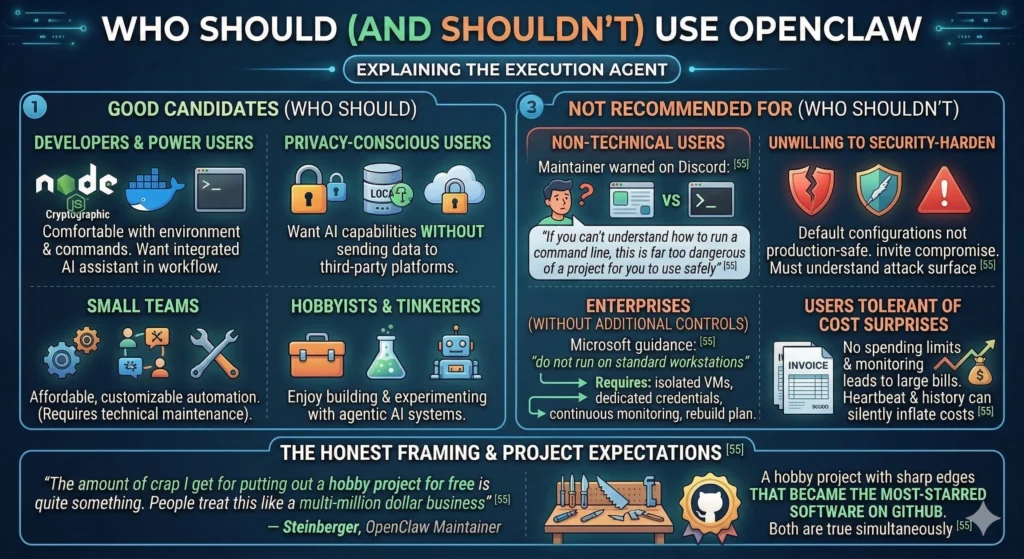
Good candidates
- Developers and power users comfortable with Node.js, Docker, and terminal commands who want a genuinely useful AI assistant integrated into their daily workflow
- Privacy-conscious users who want AI capabilities without sending data to third-party platforms
- Small teams looking for affordable, customizable automation (with someone technical enough to maintain it)
- Hobbyists and tinkerers who enjoy building and experimenting with agentic AI systems
Not recommended for
- Non-technical users — OpenClaw’s own maintainer warned on Discord: “If you can’t understand how to run a command line, this is far too dangerous of a project for you to use safely”
- Anyone unwilling to security-harden — Default configurations are not production-safe. Running OpenClaw without understanding the attack surface invites compromise
- Enterprises without additional controls — Microsoft’s guidance is clear: do not run on standard workstations. Enterprise use requires isolated VMs, dedicated credentials, continuous monitoring, and a rebuild plan
- Users who cannot tolerate cost surprises — Without spending limits and monitoring, the Heartbeat and conversation history can generate unexpectedly large API bills
Steinberger himself set the right expectation frame. When critics attacked the project for security gaps, he responded: “The amount of crap I get for putting out a hobby project for free is quite something. People treat this like a multi-million dollar business”.
That is the honest framing. OpenClaw is a hobby project with sharp edges that became the most-starred software on GitHub. Both things are true simultaneously.
What OpenClaw Means for the Future of AI
OpenClaw did not invent the agentic AI concept. AutoGPT and LangChain preceded it. But OpenClaw productized it in a way that resonated beyond the developer community — a design supervisor on maternity leave used it to manage daily chores from her phone; a mother automated meal planning and school pickup coordination through a WhatsApp family group. The speed of adoption — 250,000 stars in 60 days, from a project built in one hour — demonstrates that the demand for AI that acts, not just chats, is enormous.
Sam Altman’s hiring of Steinberger to “drive the next generation of personal agents” signals that OpenAI views the chat-to-execution-agent transition as central to its roadmap. The shift is already underway: AI assistants that passively answer questions are giving way to autonomous agents that manage email, negotiate purchases, deploy code, and coordinate with each other.
But OpenClaw also exposed the unresolved tension between capability and safety in open-source agentic AI. Simon Willison’s lethal trifecta — private data access, exposure to untrusted content, and external communication — is not a bug in OpenClaw’s design. It is the design. The same architecture that lets an agent clear your inbox also lets a malicious skill exfiltrate your credentials. The same model flexibility that supports Claude, GPT, and local models also means security depends entirely on the user’s configuration choices.
The open question is whether the complexity tax is sustainable. Secure deployment of OpenClaw requires understanding network binding, Docker sandboxing, tool policies, credential isolation, skill auditing, and API cost management. That is a lot to ask of anyone except experienced engineers — and the 42,000 exposed instances suggest many users are not up to the task.
What OpenClaw proves, and what its security failures underscore, is that the agentic AI future is already here. It is powerful, practical, and still profoundly unfinished. The tools exist. The guardrails do not. And for now, that gap is something each user must bridge on their own.